Constant attention to Performance
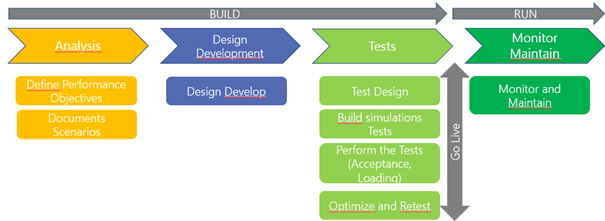
The activities and performance objectives, which will be realized during our performance tests as well as validations must start at the beginning of the implementation during the analysis phase.
This involves defining the objectives not only from the point of view of business processes, response time or integration success. It is not always about how fast the user interface responds but whether you can complete your integrations or batch processes with an acceptable duration or within the defined time window.
Once your performance objectives and scenarios are documented, you will be able to enter the design and development phase and during this phase, keep these performance goals and objectives in mind to design and develop solutions that will achieve the objectives.
Then we can move on to the testing phase: and in this phase we will spend time using the tools we have to help us create and then perform performance tests: this process can of course be iterative, the tests will identify needs for adjustments and then go through a re-testing exercise.
Once the go-live is completed, we continuously monitor and maintain the system’s performance: there are tools from an environmental monitoring perspective that can help in this regard.
Performing these performance tests across all the implementation steps ensures that we have the best performance for the solution.
Performance Objectives
It is particularly important to identify which critical scenarios are based on the type of organization, industry we need to make sure we have the system response that we expect so that business is not affected by the process.
In the definition of performance objectives and these critical scenarios, some of them are related to response time: how the system reacts when, for example a user creates an order, to parallel with processes that we just want to measure and track in terms of timing to make sure we can complete these processes within the time window allocated for them.
One important thing for all of us in this identification process is to document and communicate. What are the critical scenarios, what are the objectives that the company has linked to these scenarios and after the performance tests conducted to report results so that there is no surprise along the way.
Documents
When documenting scenarios we will define the load profile i.e. how many different processes we will have running in the system simultaneously and how many simultaneous users will be in the system (example month-end closing that runs at the same time as business processes: purchase/ sales/ orders, financial reports in progress…). Business needs and expected system usage.
As for the characteristics of the scenario, it is necessary to define which types of transactions will be used, through which type of menus they will pass, which modules will be used, the volume of transactions that will be part of the tests (for example, the number of lines in a sales order).
And finally communicate these scenarios before testing in the design phase so that everyone can understand and contribute to these critical scenarios: what are the expected results, what will the volume of data look like?
It is not only technical tasks in this phase, the business and functional consultants must be involved at the beginning of the implementation to define these critical performance scenarios and acceptable targets that we need to include in the tests (example for the sales part: sales orders, sales documents, shipments, MRP, calculation of prices requiring attention and special performance).
Once the scenarios are catalogued it is either time sensitive scenarios where we need to get the data with a good response time, or volume sensitive and we need to verify that we can manage them in the given time.
Scenarios should be divided into two categories: those that will be executed during the day during peak hour and those that will be executed at night (e.g., batch processes). For the first category you will have to plan, after developing each individual scenario, the phase where these scenarios are run simultaneously to simulate the load and understand how the system behaves with this load.
For the second category you must measure the time required to process the volume you expect according to the scenario and then calculate based on the windows you have if you have enough time for this or not or if you need to make some optimizations on the processing
Knowing the volume of data from this phase will have an impact on the developer’s way of coding in extension and considering the notions of volumetry in its developments.
An Excel file can be set up for follow-up, for example with the following:
- Scenario tab: Day-to-Day (yes/no), Name of the scenario, description (give details), additional info, delay (when the scenario runs), Data volume, Performance objectives, Task Recording: list of tasks saved to unroll the scenario (how scenarios will work), allows for better description of the scenarios
- Master Data tab: with subscription estimate data: Number of legal entities, customers, suppliers, stored and unstored products, users. Try to define the situation in the past and future.
Project Phase
Phase Analysis
During the analysis phase it is important to implement the following elements:
- Educate and sensitize teams to performance: how to detect pbs of perf during tests.
- Define the environment to use for performance testing.
- Ensure time has been allocated and plan for performance testing.
- Consider non-functional performance requirements.
- Identify critical scenarios that would be candidates for performance evaluation.
Design phase
During the design phase, essential elements to be implemented are:
- Design an architecture that focuses on business performance and best practices (such as putting non-critical work in the job at night), implement a thread approach in batch design using a large volume of data, to consider the concepts of volumes in data integration.
- Define workflows to investigate performance issues so that teams are somehow prepared for the worst.
Development phase
Now that the data is linked to functional critical scenarios and the characteristics of the data known before development: it is good to have all these elements documented and communicated to the developers.
During development, it is important to always keep in mind the goals set for each critical scenario, as this helps the developer have this element as a dev requirement instead of having it managed after the fact at the time of testing.
For example, using the task recorder to play this feature with the use of trace parser during the development phase to see if the trend of the tests is suitable in relation to the objectives set: If there is a problem the developer can go to the X++ or SQL side code and see what is possible to optimize. Tests with realistic configurations also allow to find more quickly where the perf pb comes from.
You need to have a complete view of the performance and not only focus on HMI performance but also on reports, integrations, or batch treatments.
Testing phase
The developments are complete, and the developers have taken performance objectives into account in their developments as a functional requirement.
It is a clever idea to think about how all the elements developed will come together to form a concrete scenario. Once you have this design ready, the next step is creating real scripts.
The next step is to deploy the scripts so that you can run a performance simulation test: this is to be done on a dedicated environment, depending on number of users who will test and the number of transactions per hour (volume) you will have to choose the specific environment.
When you run the tests start, with simple tests and gradually increase complexity: a scenario, a user to start then increase the number of scenarios/ users. If there is a performance problem, the more scenarios and the harder it is to trace the problem.
Depending on the problems encountered, this can generate a considerable number of rework and optimization that may subsequently cause a delay in the schedule of your project.
Finally note in a report the test results, the optimizations made so that if later a new performance problem takes place, you do not start from zero.
During the testing phase it is important to focus on:
- Identify several types of performance: form that block and crashes, interrupted interfaces and queued message, power bi report that does not load, batches that take days to run rather than hours.
- Collaborate with the right stakeholders to investigate and resolve performance issues.
- Receive and apply the corrections provided.
- To be concerned about the scalability of the solution in terms of load and number of users
Go Live and Post Go Live phase
It is important to focus on the following:
- Verify that in the event of a performance problem, tools, processes are in place to investigate and effectively resolve performance problems, that all stakeholders: partners, ISVs, Microsoft are mobilized.
- Ensure that the risks of dealing with performance problems have been detected and resolved prior to go live.
- Have positive communication about the solution.
 D365FOAdviceTips
Leave a comment