In version 10.0.34, the functionality “Delete journal performance using batch” is available. This feature allows you to schedule a deletion of financial journal lines via batch processing.
To use it, you must enable this feature in the Feature Management:
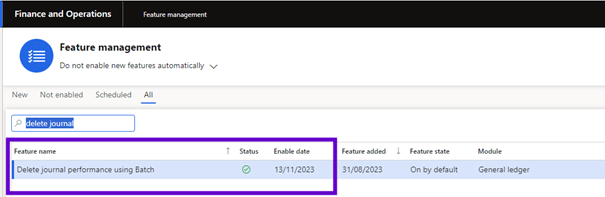
When this option is enabled, you can use the “Delete Journal Lines” option from the “Functions” options of the Log in the header.
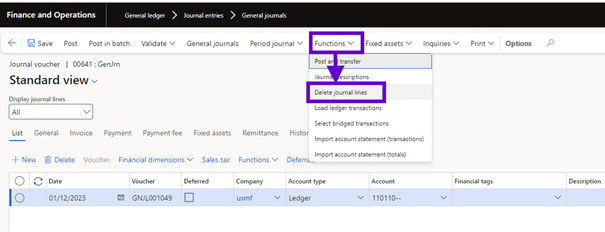
After clicking, you can configure batch journal to remove journal lines:
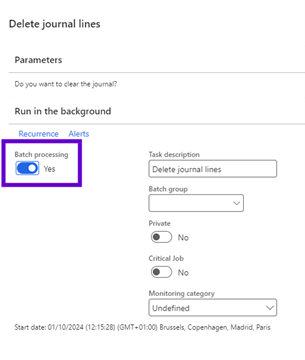
Once completed, the batch job is added to the batch queue:

When the batch work is finished, the journal still exists:

When opening the lines of this journal, the lines of the journal are deleted:
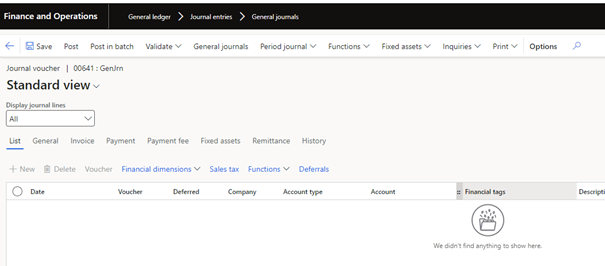
This option will be available in most financial journals.
The advantage is for large journals, deletion of all journal lines can take some time. As a user, you must wait for the lines to be deleted by the system if you are not using batch jobs. With this new batch task feature, you don’t need to wait for the deletion process and can continue with other tasks.
 D365FOAdviceTips
Leave a comment