
- Introduction
- Key dates to remember
- Be proactive in assigning licenses
- Resources to train and set up licenses
Introduction
Microsoft will introduce updates to centralize the management of user licenses, allowing more clarity for administrators. As of April 30, 2025, administrators will have access to license usage reports showing available and assigned licenses. Users who do not yet have a license will receive an integrated notification in Dynamics 365 Finance and Operations inviting them to contact their administrator to request the assignment of their license.
Starting August 30, users will need an assigned license to access the Dynamics 365 Finance and Operations applications.
Users who already have assigned licenses will not be interrupted or have their administrator intervene.
Key dates to remember
April 30, 2025: Microsoft will introduce enhanced license reports in the Power Platform admin center, providing a complete overview of licensing usage for all security roles. Users who do not meet the license conditions will receive proactive notifications directly in the D365 Finance application, asking them to request appropriate licenses from their administrator. This improvement will maintain accurate control and ensure your application is compliant.
August 30, 2025: all Dynamics 365 customers will be required to assign user licenses directly through the Microsoft 365 admin center for the following applications:
- Finance
- Finance Premium
- Supply Chain Management
- Supply Chain Management Premium
- Trade
- Project Operations (dans Dynamics 365 Finance and Operations)
- Human Resources
To ensure continuous access and avoid future disruptions, organizations are encouraged to verify and license proactively in advance. Unlicensed users will no longer have access to these applications and will receive prompts to request appropriate licenses from their administrator.
Be proactive in assigning licenses
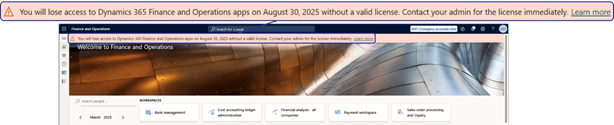
Notification in D365 Finance
Starting April 30, 2025, Dynamics 365 Finance and Operations users who do not have an assigned license will receive notifications inviting them to contact their administrator to obtain a license.
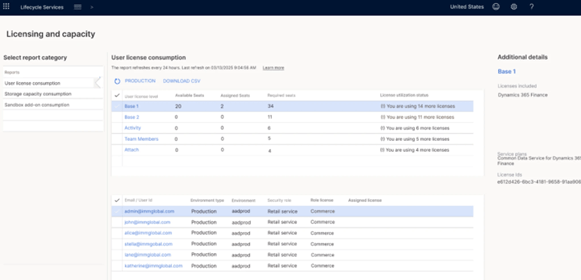
Visualization of license consumption
In the Power Platform admin center (PPAC), administrators have access to license reports. It also shows the number of licenses granted by the Microsoft 365 administration center and provides recommendations for the allocation: Presentation report for Finance and Operations.

Administrators will be able to verify the allocation of licenses.
In LCS, Microsoft will integrate the same reporting information from PPAC. This means that administrators in LCS will have access to the same information and actions as PPAC administrators.
You also have the option to view these elements through the License and capacity report, if you are an administrator:
Assign user licenses
To assign or remove licenses from specific users or groups of users, go to the Microsoft 365 Admin Center portal and the tab: Billing > Licensing. Select the target license and assign user groups or users to this license:
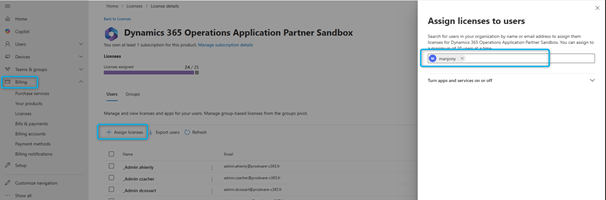
By following these steps, you will help ensure a smooth transition before August 30, 2025, in the successful implementation of licenses. and position your organization to succeed in licensing on Microsoft Cloud solutions.
Reports integrated with D365 Finance & Operations
Several reports in D365 Finance & Operations help ensure license compliance:
- The Number of User Licenses report provides the number of licenses required by license type (for example, Team members, Activity, Operations). It provides the totals for licenses, information about each user and license requirements for each assigned role. Users are listed under the highest license type.
- The “User License History” report displays the total number by</b> date, with no details.
- The user license estimate report shows the combined number of base licenses and associated licenses needed If users have an indicated application license, this license must be assigned to them.
In addition, the USG (User Security Governance) is now available in public preview with version 10.0.43, giving administrators greater visibility and control. General availability (GA) of these features is expected in July 2025 with version 10.0.44.
You can enable these features via feature management and evaluate them in sandbox environments.
 D365FOAdviceTips
Leave a comment