
The feature called User Security Governance is currently available in preview version 10.0.43. In this post, I will share a first overview.
Security is not an easy thing. It is important to understand complete architecture for several reasons. Without a good understanding, you may encounter several challenges, such as:
- Cannot implement required security.
- Security roles and over-authorized users
- Licensing requirements are too high compared to the actual needs of users.
The complexity of security is underestimated. Everyone can easily talk about security related roles, duties, privileges, and menu items. Security is not limited to granting access to menu items. It is not just about menu items. For example, you have to deal with data entities, form controls and table permissions. The role content also determines the license references required for the user.
In the area of security administration, there are no simple tools to create security roles, obtain information about the permissions a user has and verify license compliance. Several vendors offer ISVs with enhanced functionality for customers. Solutions are hosted outside of Dynamics 365 where you can manage security and get information about different applications.
Microsoft has now admitted that user security governance is a principal issue and has acquired a solution from Executive Automats.
User security governance helps organizations create a security architecture that is closely aligned with their business processes. It enables organizations to apply precise role management, advanced audit capabilities and comprehensive licensing optimization tools.
User security governance provides the following functionality:
- Detailed reports on the separation of duties and privileges
- Process-based security roles, duties and/or privileges.
- Create new roles/functions from existing objects via import processes.
- Temporary role capabilities
- Privileged user management, which allows dedicated accounts to obtain access limited in time.
User security governance features
User security governance provides the following functionality:
- Design process-based security roles, duties, and/or privileges.
- Design user roles based on position/responsibility.
- Create new roles/duties from existing objects via import processes and merge duties.
- Automate temporary role assignments.
- Grant time-limited elevated privileges to dedicated accounts through privileged user management.
- Continuously monitor the separation of duties and privileges. Set a threshold and control the creation of duties/privileges that have overlapping entry points.
- Write and possibly convert the defined roles into an application object tree project (AOT).
- Use the user aging report.
- Manage versions of roles, tasks, and privileges.
- Compare the versions.
- Restore previous versions.
- Use the subtraction function of duty.
- Export the security configuration in XML format.
- Use the security audit trail to track changes in user security governance.
- Use new reports that include license indicators by role, duty, privilege, and entry point.
Feature management
Recently, the preview of version 10.0.43 of Microsoft Dynamics 365 Finance became available and I installed the solution and started clicking. First, the new features are not visible. For this, you will need to enable the User Security Governance feature in Feature Management.
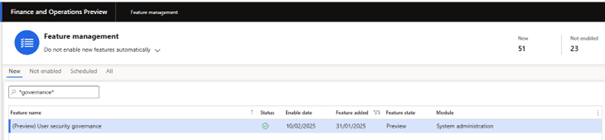
When you enable the feature, reload the browser to create a new session where the new menu items are visible.

Before we get to the details, an important note: the user security governance features are in preview.
Conclusion
User security governance features are a welcome addition to D365 Finance. They enrich the application for easy configuration of security roles, provide better inquiry options for compliance and provide an emergency-controlled access option.
Although Microsoft offers these new features, this does not replace the requirement to know the full D365 Finance security architecture and license details described in the D365 Finance Licensing Guide. As mentioned above, it is too easy to create a rule and lose insight into the user license overview. As mentioned above, my recommendation will be to reuse the standard features and privileges for your custom roles as much as possible. I agree that the examples of ready-to-use security roles are far from perfect, but the duties and privileges provide good granularity for required permissions. By using these standard objects, you can benefit from licensing insights that facilitates the configuration and validation of segregation of duties.
Under the current plan, these features will generally be available in July 2025.
 D365FOAdviceTips
Leave a comment