
Introduction
Microsoft is transforming Finance & Operations with the introduction of autonomous agents.
Reconciliation of accounts has long been a manual and time-consuming task in checking and tracking errors that were made using various reports or Excel sheets difficult to read and analyze. Microsoft is changing the game with a major innovation in Dynamics 365 Finance & Operations: the account reconciliation agent, powered by artificial intelligence (AI). The goal is to transform a traditionally slow, manual and error-prone task into a smooth, proactive and fully automated process.

Business Value
Financial reconciliation is essential, but no one enjoys it. Traditionally, finance teams relied on separate reports for each module (suppliers, customers, banks, taxes) to compare the large auxiliary books with the general ledger. This process was not only time-consuming, but also prone to human error: discrepancies had to be identified and resolved manually. In fact, data reconciliation was a time-consuming process that was often deferred to the end of the fiscal year. This could represent a heavy workload in addition to the accounting closure tasks.
Now, thanks to the reconciliation agent (available from version 10.0.44), this task is simplified and optimized. The officer continuously monitors discrepancies between the general ledger and sub-general ledgers, automatically reports on exceptions and makes concrete suggestions. With this agent, this tedious process becomes continuous, proactive and intelligent.
The reconciliation functionality between the sub-accounting and the general accounting now makes this process proactive, rather than reactive, when a difference is identified. Copilot informs the user of a difference between the auxiliary and general accounting, provides options to solve the problem and finally helps to solve the problem on behalf of at the end of the month but becomes a continuous and automated preparation. the user. Reconciliation must no longer be a bottleneck.
Some of the benefits of this agent are:
- Increased efficiency – customers can maintain a more consistent reconciliation state. Manual reconciliation therefore requires less time and effort.
- Proactive Management – The agent proactively identifies and proposes mitigations for exceptions. It helps to minimize the risk of errors and ensure financial accuracy.
- Improved transparency – each exception is recorded to keep a history of actions performed by users, automation or agents. This enhances transparency and accountability.
- Regular reconciliation – The ability to perform more regular reconciliations ensures that clients’ financial records are always up to date. As a result, decision-making and financial planning are improved.
Details of the feature
The first reconciliation automations relate to the reconciliation of general and auxiliary accounting balances. Reports become unnecessary and are replaced by a near real-time process that proactively informs the finance team of any reconciliation issues. When a problem is detected, for each transaction several possible solution options are proposed. This may include changing a master account setting (for example, not allowing manual entry) or recognizing when an accounting profile has changed, resulting in the use of a different balance sheet account for reconciliation. When identifying problems, the audit trail and solution will be retained.
The current functionality includes automation of reconciliation between sub-ledgers and general ledgers, as well as an agent feature that will recommend action to be taken to process transaction exceptions. Copilot will learn from previous audits and solutions implemented (historization) and move towards automatic resolution of any reconciliation issues.
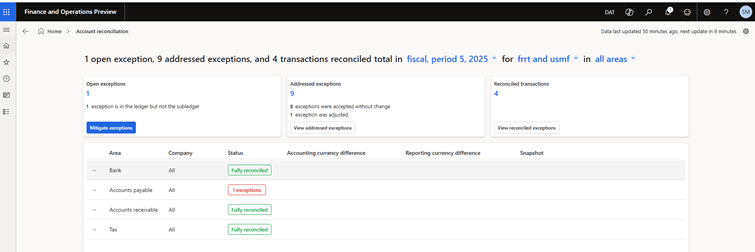
The agent can be activated directly from the Dynamics 365 Finance & Operation feature library. Once activated, it analyzes all legal entities and all accounts, with the possibility to filter and activate only relevant items (accounts payable, customers, taxes, bank).
The Account Reconciliation agent evaluates the exceptions and recommends action for each exception. Its display is optimized from the account reconciliation workspace
Main features
- Easy activation via the Features management interface.
- Custom configuration: enable or disable specific modules.
- Ongoing analysis of exceptions as they are identified.
- Dedicated account reconciliation workspace.
- Automated recommendations: create journal entries, link transactions, accept or cancel.
- Complete history of actions to provide transparency and audit capabilities.
A clear and interactive dashboard
From the new Dynamics 365 Finance & Operations homepage, users can access a dedicated reconciliation workspace. This space covers four main areas:
- Bank accounts
- Accounts payable
- Accounts Receivable
- Tax accounts

Each section displays the status of reconciliation: reconciliation or differences. If there is a problem, the agent identifies the cause (for example, manual entries in automated accounts or misconfigured accounting profiles) and recommends a solution.
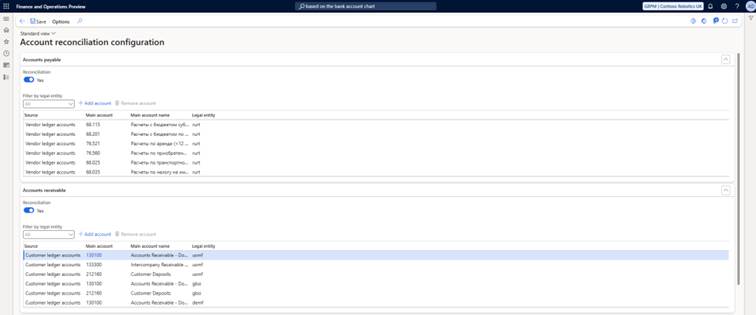
How the agent works
The agent uses existing validation profiles configured in your system:
- Bank accounts: Bank chart of accounts
- Vendors: Vendors validation profile
- Customers: Customers validation profile
- Taxes: Tax accounting setup
These accounts are automatically tracked. If users change a validation profile or add new accounts, the agent adapts accordingly and provides real-time tracking.
Management of exceptions and integrated actions
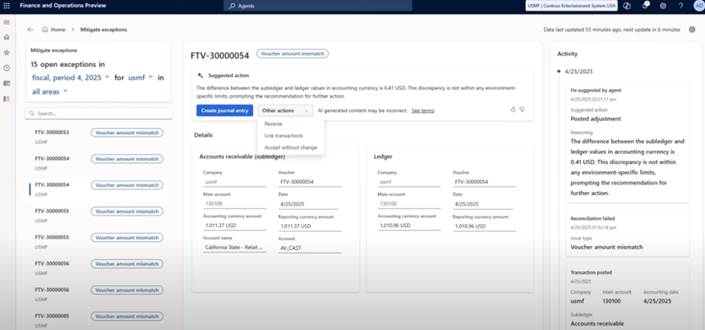
When an exception is detected (for example, a manual journal entry in a sub-ledger account), users are redirected to a detailed analysis screen showing the transaction date, legal entity, log type, the relevant sub-ledger.
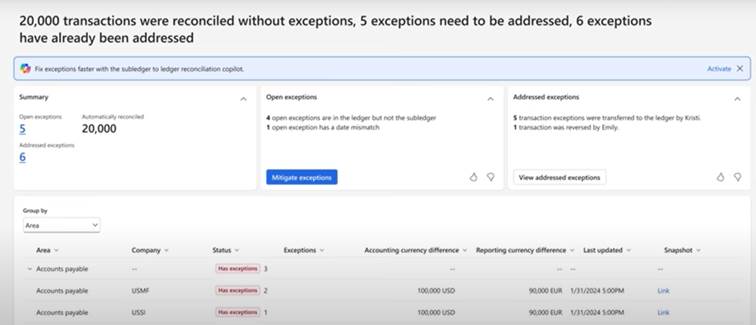
Four resolution options are available:
- Cancel the transaction
- Create a regularization entry
- Manually link transactions
- Accept as is
A constantly evolving feature
Microsoft plans to improve the agent through AI-based suggestions, which will further simplify monthly closing and improve financial accuracy. These improvements are expected in future releases.
Conclusion
The Dynamics 365 Finance & Operations Reconciliation Agent is more than just a reporting tool: it is a truly intelligent agent, capable of detecting anomalies, suggesting actions and supporting your financial team throughout the closing process. This is a significant step forward in terms of efficiency, accuracy and automation.
This agent will enable finance teams to work in a new way:
- Exceptions are resolved within hours, not days.
- Financial data is becoming more accurate and reliable.
- Finance teams can focus on strategic analysis rather than manual tasks.
- Managers receive timely and reliable information.
The account reconciliation agent in Dynamics 365 Finance & Operation opens a new era for finance: automated, proactive and intelligent. By adopting this innovation, you not only optimize a process but also gain a strategic advantage.
 D365FOAdviceTips
Leave a comment