
Introduction
Effective communication with suppliers is critical to the success of procurement operations. Yet, many purchasing teams are facing challenges such as manual processes, late responses and missed optimization opportunities. Microsoft Dynamics 365 Supplier Communication Agent is here to transform how procurement professionals interact with suppliers and optimize your workflows.
The procurement teams devote a large part of their time to managing communications with suppliers. This includes tasks such as:
- Sending purchase orders to suppliers.
- Tracking of overdue orders.
- Updating purchase orders based on supplier emails.
These tasks are often uncomplex, manual and repetitive not only consume valuable time, but also increase the risk of errors, order delays and lost revenue due to customer dissatisfaction. That’s why the purchasing staff wants to automate them. Automating these tasks can also help reduce the procurement costs of businesses.
Communication between procurement and suppliers is often unstructured and via e-mail, even for companies implementing electronic data interchange (EDI) and companies that work with recurring suppliers.
The Supplier Communication Agent is a feature of Copilot designed to automate and optimize common communications with suppliers. The supplier communication agent is available in public preview with version 10.0.44. Start today to rethink your communications with suppliers!
Business Value
The supplier communication agent helps buyers save time by automating manual and repetitive tasks based on user-defined rules. It helps you achieve a resilient and efficient supply chain, as well as increase procurement productivity.
The supplier communication agent processes incoming and outgoing communications with suppliers, thus allowing purchasing teams to focus on higher value-added tasks. Its main advantages are:
- Save time on messaging tasks
- Automatic detection of orders requiring supplier tracking
- Write or automatically send emails to suppliers
- Interpret responses using AI and extract meaningful updates
- Ensure the accuracy and consistency of PO-related communications
- Shorten supply cycles and reduce lead times
Feature details
Buyers put a lot of manual effort into checking incoming emails, assessing the status of each purchase order, responding to and tracking suppliers, and updating systems. The supplier communication agent helps buyers by providing them with the following features:
- Tracking of suppliers on supplier orders: The agent follows up with suppliers in case of delayed or missing confirmations, thus eliminating avoidable delays due to an oversight. The agent can automatically draft emails ready to be sent, for example, to ask a supplier about the status of an overdue order, or to remind them to confirm a purchase order.

D365 Finance provides two default PO filters:
- Orders not confirmed: no delivery date confirmed, due within the next 60 days
- Delayed orders: delivery date confirmed in the past, still partially or not delivered
They can be customized to meet the specific logic of your organization, by supplier group, PO age, delivery expectations, etc.
- Speed up supplier order updates based on incoming supplier emails: it reads incoming emails, understands the intent and extracts relevant data to summarize changes or update purchase orders. The agent automatically reads your inbox in order to analyze communications with your suppliers. It searches for messages related to purchase orders and analyzes them with organizational data to identify both purchase order confirmations and modification requests. It then runs automated tasks based on your own user-defined rules.

You can customize outgoing messages by:
- Selecting the tone of the email: formal, casual or urgent
- Adding signatures and disclaimers (e.g. “This email was written with the help of AI”)
- Insertion of dynamic PO data such as delivery dates, item quantities or delivery addresses
Tracking of delayed or unconfirmed orders
Define the follow-ups according to your criteria, for example for unconfirmed orders for the coming week or month, or for orders not received after two days. Set your own criteria and define the tone, information and even the email signature.
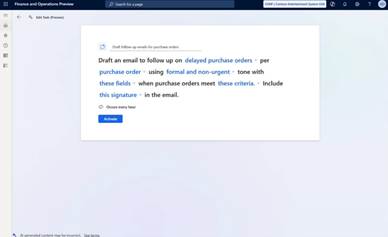
You customize the rules:
- Should emails be sent automatically or reviewed first?
- Should they be grouped by supplier or sent by purchase order?
- What tone should be used (formal, casual, urgent)?
- What fields should be included (delivery dates, quantities, item numbers, etc.)?
In a few clicks, the agent prepares emails ready to be sent according to your criteria. Each message is customized according to the supplier and includes all relevant information
And have the emails written:
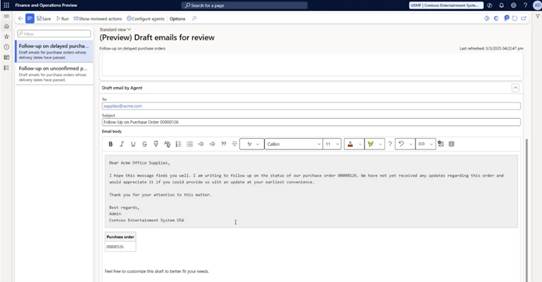
If you prefer, you can send them automatically. For organizations that prioritize full automation, administrators can enable automatic sending of emails without user verification. By default, messages are sent from the administrator’s mailbox.
In addition, emails are written in the language of the provider. You can even add your signature and an AI warning for more transparency.
Updates based on vendor emails
After a simple and unique configuration, the agent:
- Reads incoming emails,
- Identify the proposed changes (quantities, delivery dates, cancellations),
- Generates a clear and actionable summary,
- Allows you to apply these updates to your ERP with a single click.
He can:
- Classify supplier responses:
- Confirmation of the purchase order
- Change request (e.g. date or quantity)
- Rejection
- Other/ unknown
- Extract data from email text and PDF attachments
- Associate the values with PO fields and propose updates in the system
- Allow users to accept all changes or selective changes with a single click
Currently only PDF attachments are supported. Word and Excel files are not.
The agent can determine the subject of each email (for example, whether it is a PO confirmation or an amendment request) and the PO numbers involved
Buyers can view suggested updates with full context:
- Display the original content of the email
- Compare with existing PO data
- See the suggestions generated by the AI
- Apply updates individually or in bulk
This makes the update process both transparent and efficient.
You can train the supplier communication agent to improve its accuracy over time:
- Column Mappings: Map unknown headers in emails or PDFs to PO fields in Dynamics 365.
- Equivalences of value: Define how terms or units of measure should be interpreted, globally or by supplier.
Select the mailbox that the agent must monitor. It can be a generic mailbox managing supplies usually or each buyer’s mailbox that you use for your communications. Then select the addresses of the providers for which the agent should be activated. If you want to start with just a few addresses while waiting to automate all communications, it’s possible.
- Update to confirm orders: The agent scans emails from suppliers and suggests updating purchase orders when confirmation is received.
- Managing delivery changes: The agent identifies changes in delivery quantities and receipt dates, allowing purchasing agents to review and accept updates easily.
After setting up, the agent will automatically read the emails and show you the summary:
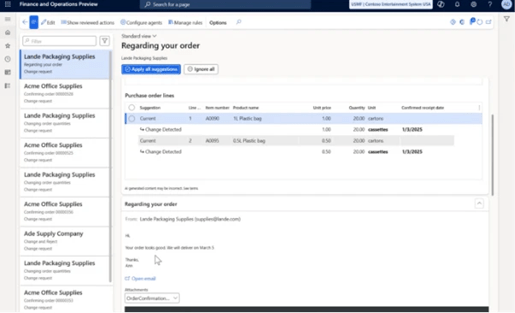
You can also train the agent so that it becomes more and more intelligent over time. For example, you can help him improve the mapping of his data from supplier emails or PDF documents to Dynamics 365.
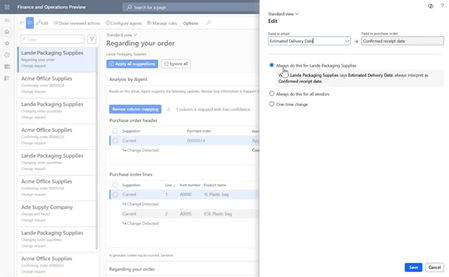
For example, if a supplier responds with an updated delivery date buried in a long email thread, the agent identifies the change (“Delivery now scheduled for June 15 instead of May 10”) and presents it as a suggestion to update your purchase order, without you having to search in the message.
The agent also adapts to the habits of suppliers. If a supplier still confirms availability in weeks (“Week 28”) rather than dates, you can teach the agent to automatically interpret and convert this data into dates, ensuring consistency of your ERP without manual translation.
Cost considerations
Use of the Vendor Communication Agent incurs a fee based on the use of Microsoft Copilot Studio messages. Costs depend on the volume of automated interactions.
Conclusion
In modern procurement, speed, clarity and automation are essential for maintaining a responsive and resilient supply chain. Dynamics 365’s supplier communication agent leverages AI and Microsoft Copilot to optimize supplier communication, speeding up follow-ups and improving the accuracy of PO management.
Supplier communication agents and procurement teams can:
- Significantly reduce the time spent on manual and repetitive tasks
- Avoid missed follow-ups or late responses,
- Refocus on high-impact tasks, such as negotiating better terms or finding new suppliers.
The agent transforms your purchasing operations by managing tedious tasks so that you can focus on strategy.
By adopting the Supplier Communication Agent, organizations can:
- Eliminate communication bottlenecks
- Ensure faster response cycles from suppliers
- Reduce the administrative burden on supply teams
- Improve data quality and order traceability
- Take one more step towards automating the AI-powered supply chain
 D365FOAdviceTips
Leave a comment