
Introduction
This is a detailed, step by step guide on how to set up and use the Purchase order updates from vendors agent.
The key features of this agent:
- Reads supplier emails: The agent scans incoming emails from suppliers to detect the intent, such as PO confirmations, change requests, or rejections.
- Classify messages:
- Confirmation: Supplier confirms the PO.
- Change Request: Supplier proposes changes (e.g., quantity, delivery date).
- Rejection: Supplier cannot fulfill the PO.
- Other: Unclassified or unclear intent.
- Matches email content to POs: It identifies which POs are referenced and extracts relevant data.
- Propose updates: The system shows:
- The original email.
- Current PO data.
- Suggested changes.
- User review and approval: You can review and apply changes directly from the interface, saving time and reducing manual entry.
| HIGH LEVEL PROCESS |

Dynamics D365 FO: Setup
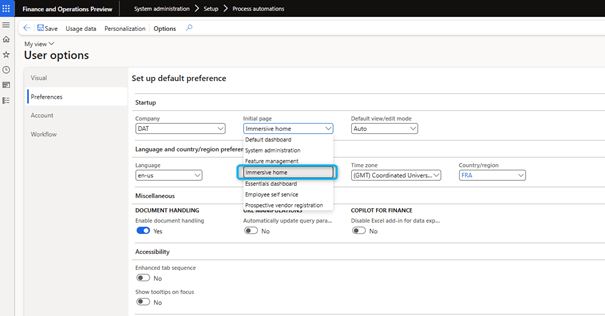
Immersive Home
- Go to the user options form.
- Select immersive home as the default home page.
- Save and refresh your current session.
 D365FOAdviceTips
Leave a comment