
Introduction
Microsoft is updating the calendar of in-app notifications and per-user license validation to give customers more time to prepare. For a smoother and more predictable experience, the validation of licenses will be deployed in stages, depending on the renewal date or the client’s contract anniversary. At the same time, Microsoft will introduce additional reporting tools and features to increase transparency and improve the overall experience for customers managing their license fleet.
Starting January 15, 2026, license validation for Dynamics 365 Finance and Operations applications will begin for customers whose contract renewals or anniversaries occur after that date.
This approach offers several important advantages:
- Proactive engagement: Aligning validation with contract milestones helps clients plan for review of user count and licensing needs.
- Reduced operational impact: this timeline allows organizations to plan and implement the necessary adjustments with less risk of operational disruption.
- Scalable and transparent: a staggered schedule provides greater transparency during license validation, helping customers plan ahead.
It will therefore be necessary to:
- Understanding licensing requirements: review the licensing model for clarity on how roles, duties and security privileges are mapped to license types.
- Review the mapping of user roles and licenses: use the Power Platform Admin Center or Dynamics Lifecycle Services reports to generate a high-level summary of active users and respective license requirements.
- Role and license optimization: use the License Usage Summary Report usage in Dynamics 365 Finance and Operations to identify opportunities for optimizing user role assignments by removing unnecessary rights or permissions.
- Align license assignments in the Microsoft 365 Admin Center: Provision and assign appropriate licenses to users in the Microsoft 365 Admin Center, ensuring they match the license types mapped in reports. If necessary, make reservations or place additional orders for additional licenses.
Microsoft therefore provides several tools to help us in these tasks:
- The PPAC (Power Platform Administration Center): Administrators can check license allocation in D365 by viewing the Finance & Operation license report in the new Power Platform Admin Center portal,
- The new report in USG (User Security Governance): License summary Report
Starting from January 15, 2026, the validation of the per-user license will follow a staggered deployment aligned with each client’s contract anniversary or renewal date. Users will receive an embedded notification 30 days prior to the validation month to give customers time to review and assign the correct licenses.
MS will follow a milestone-driven timeline:
- T-90 (90 days prior to anniversary or renewal date): Customers begin birthday preparation with the support of the seller/partner.
- T-30: In-app notifications will appear to alert users without assigned user licenses.
- T+15: License validation begins, giving customers a 15-day lead time to assign the correct user licenses.
So, 30 days before the anniversary date of renewal, a warning embedded in the application will be displayed if users do not have the appropriate license. The strict application will start 15 days after the anniversary date.
All Dynamics 365 customers will need to assign user licenses directly through the Microsoft 365 Admin Center for the following applications:
- Finance
- Finance Premium
- Supply Chain Management
- Supply Chain Management Premium
- Commerce
- Project Operations (in Dynamics 365 Finance and Operations)
- Human Resources
On January 15, 2026, the deployment of user notifications will start 30 days before the contract renewal date or customer’s anniversary date. Customers with renewal on January 15 will receive a notification on December 15, 2025. As a reminder, only users who do not have the necessary licenses assigned in the Microsoft 365 admin center will receive these notifications. During the customer’s renewal or anniversary month, all users must have an assigned license to access the Dynamics 365 Finance and Operations applications, as confirmed in the license reports.
It is therefore urgent if not already done to consult the license reports and start assigning licenses. To ensure continuous access and avoid future disruption, it is recommended that organizations proactively check and assign licenses in advance.
Once the license validation is launched, any user who does not have the required license can no longer connect to a Dynamics 365 Finance and Operations application. In this case, the following screen is displayed.
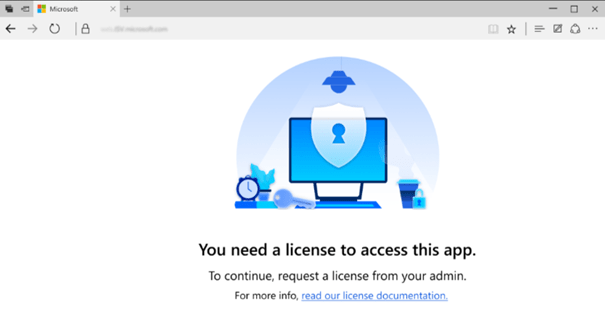
The screen indicates to the user that he needs a license to access the application and that he must request one from his administrator. He must contact his system administrator to obtain the required license before attempting to reconnect.
This move towards centralized licensing underscores Microsoft’s commitment to simplify administrative processes, providing better visibility and governance around licensing management.
Microsoft gives customers time to prepare with tools and training to support any action needed. For users who already have licenses assigned, there will be no disruption, and no action is required from their administrator.
The license validation is carried out at the tenant level. Each user must have a license covering the most demanding role assigned to them.
If your organization’s contract renewal or anniversary date occurs before January 15, 2026, it will not immediately move to the per-user license validation model. Instead, your organization will switch to the new validation process on its next contract renewal or anniversary date after January 15, 2026
A grace period is granted only if the renewal occurs between April 1st and September 2025. A period of 12 months is granted: users can continue to access the applications even without an assigned license.
Purchase and licensing obligations remain in effect. The grace period does not remove an organization’s obligation to comply with licensing requirements for D365 Finance & Operation. The grace period only delays the application in order to give organizations time to assign their users the appropriate licenses and avoid service interruptions.
The grace period is intended to support a smooth transition, reduce administrative burden and maintain service continuity for customers while encouraging proactive licensing management. If the grace period expires without the organization purchasing and allocating the appropriate licenses, its unlicensed and sub-licensed users will have disabled access to D365 Finance & Operation applications.
No extensions are currently planned. Organizations are encouraged to use the full grace period to achieve license compliance.
Preparing for a smooth transition
As this important step approaches, it is important to:
- See the “Finance and Operations User license level overview report” in the Power Platform Admin Center.
- Start today to assign your Dynamics 365 licenses in the Microsoft 365 admin center.
Take control of your licensing reports
Administrators can now better understand and manage licenses with reporting capabilities available in the Power Platform admin center and Dynamics Lifecycle Services (LCS). Reports were also introduced in D365 Finance.
Power Platform Administration Center (PPAC)
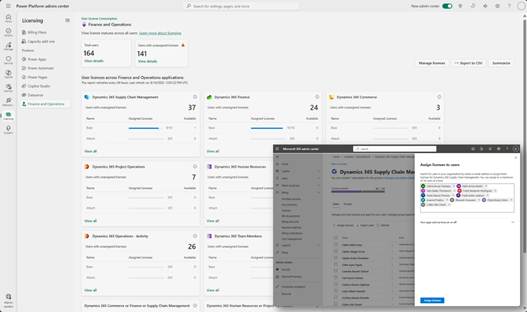
In the Power Platform Administration Center (PPAC), administrators will have access to comprehensive reports on licenses for required seats. This report also shows the number of seats assigned by the Microsoft 365 admin center and makes recommendations to address assignment gaps.
Dynamics Lifecycle Services (LCS)
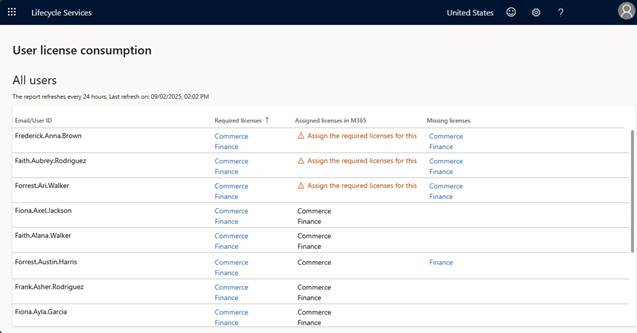
Similarly, in LCS, the same reporting information from PPAC is present. Thus, the administrators of the client and its system implementation partner will have access to the same reporting information and actions as the PPAC administrators.
Reports integrated in D365 Finance
User Security Governance is now available with Dynamics 365 version 10.0.44, giving administrators increased visibility and control.
 D365FOAdviceTips

Leave a comment