
- A New Reporting Experience in the Power Platform Admin Center
- Preview Display Discrepancies: What You Need to Know?
- Environment-Level Breakdown for Finance & SCM
- Understanding Storage Entitlements Per License
- Final Thoughts
Since December 1st, 2025, Microsoft has introduced new storage capacity rules for Dynamics 365 applications. These changes include higher entitlements per license and, more importantly, a unified storage model for Dataverse and Dynamics 365 Finance & Supply Chain Management.
This consolidation marks a significant step toward providing organizations with a single, consistent capacity model across the Power Platform and Dynamics 365 ecosystem.
A New Reporting Experience in the Power Platform Admin Center
Microsoft is now integrating the storage consumption of D365 Finance & SCM directly into the Power Platform Admin Center (PPAC) capacity reports.
To support this transition, Microsoft has been working on incorporating Finance storage metrics into the new Dataverse capacity dashboard. This dashboard is currently available in preview and can be accessed through the preview admin portal: https://admin.preview.powerplatform.microsoft.com/billing/licenses/dataverse/overview.
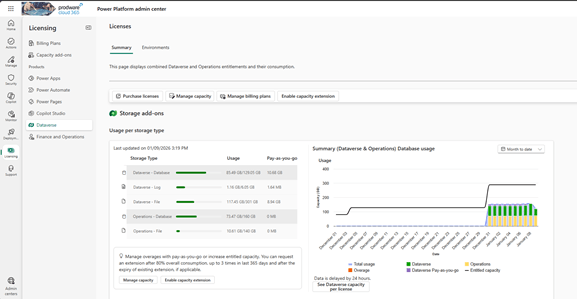
In this new reporting experience, the consumption attributed to Dynamics 365 Finance & SCM appears under the “Operations” category. In the graphical views, these values are represented with yellow bars, making it easier to identify the usage coming from Finance & SCM environments.
Preview Display Discrepancies: What You Need to Know?
In the preview version of the capacity report, Dataverse appears to have a higher allocated storage than expected. For example, in one tenant, the database allocation should be 129 GB. Yet the dashboard shows:
129 GB + 160 GB = 289 GB
This behavior is related to the way provisional consolidated capacity is being displayed, with part of it still treated as individual product capacity. Microsoft has acknowledged this gap and is actively working on fixing the visual inconsistencies.
Environment-Level Breakdown for Finance & SCM
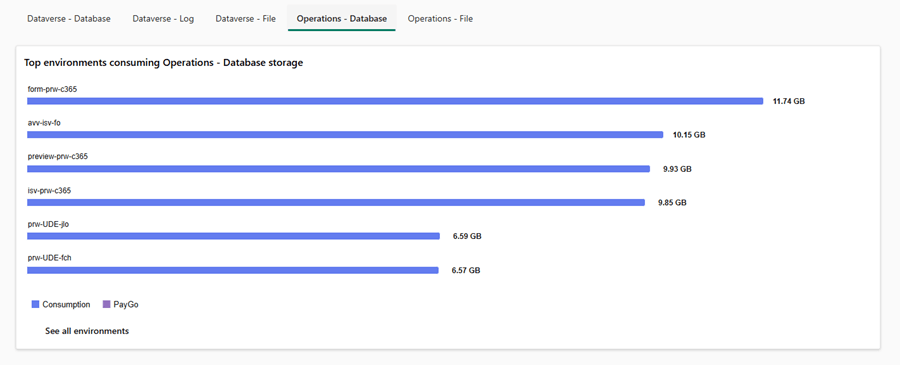
A very useful addition is the per-environment usage breakdown. At the bottom of the preview page, administrators can now view capacity consumption for each D365 Finance & SCM environment through dedicated tabs.
This gives organizations a clearer view of which sandbox or production environment contributes most to overall usage — something that used to require multiple admin centers or manual consolidation.
Limitation: Environment Page Still Unaligned
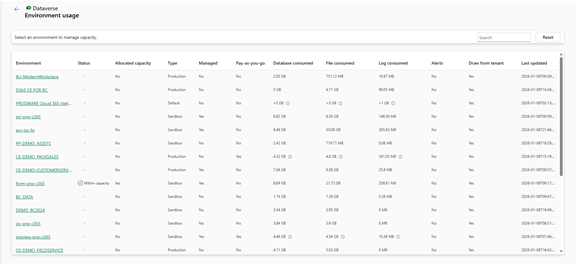
Despite the improvements in the preview dashboard, the Environment page in PPAC does not yet include the storage information related to D365 Finance.
Understanding Storage Entitlements Per License
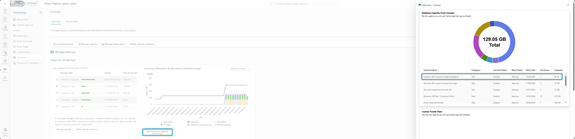
The new “Set Dataverse Capacity per License” button provides a transparent view of:
– The capacity provided by each license type,
– The number of licenses purchased,
– And the total resulting storage entitlement.
Final Thoughts
The consolidation of storage between Dataverse and D365 Finance & SCM is a major step forward in simplifying Microsoft’s capacity model. Although the preview experience still contains some display inconsistencies, it already provides a much clearer and unified view of capacity usage across environments.
As Microsoft continues refining the rollout, organizations can expect a more consistent and predictable capacity management experience — all from a single admin center.
 D365FOAdviceTips
Leave a comment