
- Why the Confusion?
- Business Performance Analytics (BPA)
- Business Performance Planning (BPP)
- BPA vs BPP: Side-by-Side Comparison
- The Strategic Difference
- The Ideal Approach
- Final Thoughts
At first glance, Business Performance Analytics (BPA) and Business Performance Planning (BPP) may appear almost identical. Their names are similar, their interfaces look familiar, and both rely heavily on Power BI, Excel, and the Microsoft Power Platform.
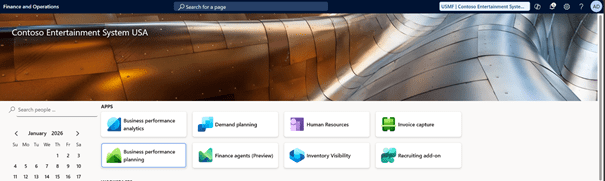
However, beneath the surface, these two capabilities serve very different business purposes. Understanding when to use BPA, when to use BPP, and how they complement each other is essential for finance and operations teams working with Dynamics 365 Finance.
Why the Confusion?
When users access the screens in Dynamics 365 Finance, BPA and BPP can look alike:
- Both use analytical cubes
- Both integrate with Power BI and Excel
- Both rely on structured financial and operational data
Yet the intent, architecture, and outcomes of each solution are fundamentally different.
So what’s the catch? Why would an organization need one over the other — or even both?
Let’s break it down.
Business Performance Analytics (BPA)
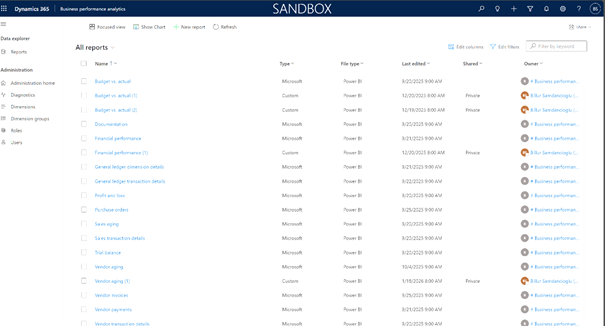
Business Performance Analytics is a modern analytics framework built directly into Dynamics 365 Finance. Its main goal is to provide real-time insights across financial and operational data.
Purpose
BPA focuses on:
- Reporting
- Monitoring
- Analysis
- Decision support based on actual data
It enables finance teams to analyze business performance using standardized data models without building complex custom integrations.
Key Features
- Prebuilt analytical data models (facts and dimensions)
- Optimized cubes designed for performance and scalability
- Seamless reporting through Power BI and Excel
- Real-time or near-real-time insights
- Strong foundation for future AI and advanced analytics
Technical Requirements
To enable BPA, the following are required:
- Tier-2 (multi-box) environment
- Dynamics 365 Finance version 10.0.38 (Application version 10.0.1777.94) or later: current version is 10.0.46
- Microsoft Power Platform configuration
- Microsoft Entra tenant configuration
- Required privileges in both Power Platform and Dynamics 365 Finance
- Power App users enabled in Finance
- Configuration in Power Platform Admin Center
- Optional: movement of production data to sandbox for analysis
When to Use BPA
Use BPA when your objective is to:
- Analyze historical and current performance
- Monitor KPIs
- Build enterprise reporting dashboards
- Gain a unified, real-time view of business operations
In short: BPA is about understanding what has happened and what is happening now.
Business Performance Planning (BPP)
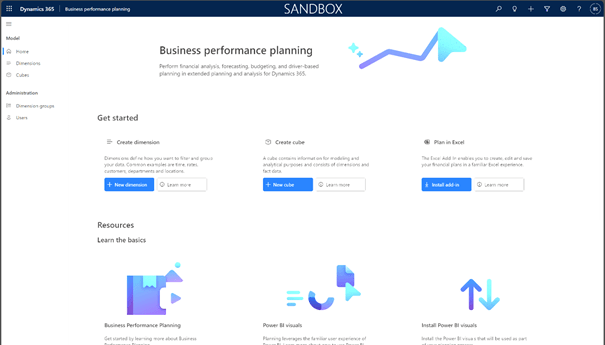
Business Performance Planning goes beyond analytics. It introduces planning, forecasting, and what-if analysis directly into the Dynamics 365 Finance ecosystem.
BPP is a native Dataverse-based solution designed to optimize planning efficiency across the organization.
Purpose
BPP focuses on:
- Budgeting
- Forecasting
- Scenario planning
- Version management
- Collaborative planning processes
Rather than only analyzing actuals, BPP allows organizations to shape future outcomes.
Key Capabilities
- Create and manage planning scenarios and versions
- Perform what-if simulations
- Load and manage fact data in analytical cubes
- Define and maintain custom dimensions
- Leverage Power Automate for workflows and approvals
- Use Power BI for tailored planning visuals
- Bulk editing of dimensional data to save time and effort
Power Platform Strength
One of BPP’s biggest advantages is its deep integration with the Microsoft Power Platform:
- Dataverse as the core data layer
- Power BI for interactive planning visuals (7 custom visuals available)
- Power Automate for workflows, approvals, and notifications
- Ability to extend with custom fields and business logic
Technical Requirements
- Tier-2 environment
- Dynamics 365 Finance version 10.0.37 with Platform Update 61
- Microsoft Power Platform environment
- Finance premium license
- Installation of the Business Performance Planning app
When to Use BPP
Use BPP when your objective is to:
- Build budgets and forecasts
- Run what-if scenarios
- Manage planning cycles
- Enable agile and collaborative financial planning
In short: BPP is about deciding what should happen.
BPA vs BPP: Side-by-Side Comparison
| Area | BPA | BPP |
| Primary focus | Analytics & reporting | Planning & forecasting |
| Main question | What happened? | What should happen? |
| Data type | Actuals | Planned, forecasted, scenario-based |
| Core platform | D365 Finance analytics framework | Dataverse & Power Platform |
| Power BI usage | Reporting & insights | Planning visuals & simulations |
| Power Automate | Limited | Strong (workflows, approvals) |
| Planning capability | ❌ No | ✅ Yes |
| Scenario modeling | ❌ No | ✅ Yes |
The Strategic Difference
Although both features fall under the performance management umbrella, they solve very different problems.
Business Performance Analytics
- Transforms complex data into actionable insights
- Provides a real-time enterprise-wide performance view
- Lays the groundwork for AI-driven finance
- Strengthens data-driven decision-making
Business Performance Planning
- Enables financial and operational planning
- Supports agile budgeting processes
- Encourages collaboration across departments
- Empowers users to test scenarios before execution
The Ideal Approach
Rather than choosing one over the other, the real value appears when both are used together.
The Winning Formula: Plan in BPP → Report and analyze in BPA
- Use BPP to create budgets, forecasts, and scenarios
- Use BPA to analyze actual results against those plans
This combination creates a closed performance management loop:
- Plan
- Execute
- Analyze
- Adjust
Final Thoughts
BPA and BPP are not competitors — they are complementary capabilities within Dynamics 365 Finance.
- BPA delivers insight
- BPP delivers direction
Organizations that understand this distinction can build a modern finance architecture that not only reports on the past but actively shapes the future.
If your goal is true enterprise performance management, the answer is not BPA or BPP — it’s BPA and BPP together.
 D365FOAdviceTips
Leave a comment