
- Introduction
- Architecture and operating principles
- The strategic benefits for organizations
- Implementation and good practices
- Conclusion: a founding brick of the future of D365 Finance
Introduction
The increasing complexity of ERP environments, the growing interconnection with Azure, Power Platform and third-party systems require new generation supervision.
Microsoft has evolved its approach : while Lifecycle Services (LCS) only offers limited monitoring, Application Insights is now the central platform for telemetry, diagnostics, and performance of D365 Finance. This integration is official, complete and native : Microsoft confirms that it is a direct‑ point-to-point integration between D365 Finance and Application Insights.
With Application Insights, organizations get:
- A real-time analysis of system state, SQL performance, integrations, errors and user activity.
- A vision defined thanks to metrics, traces, exceptions, sessions, user paths and external dependencies.
- Proactive alerts to prevent incidents before they impact users.
- A gradual replacement of LCS.
Application Insights becomes an essential component of D365 Finance governance, both for IT and for business teams.
Architecture and operating principles
A unified telemetry chain via Azure Monitor
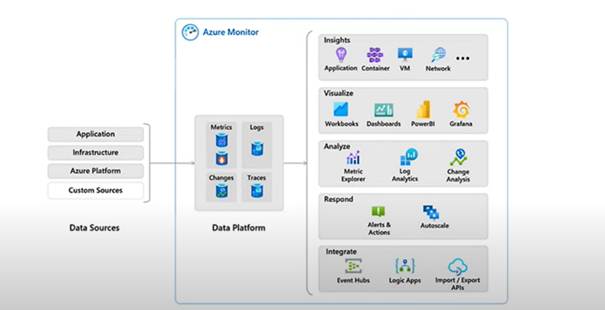
Application Insights is a component of Azure Monitor, which centralizes the collection of data from:
- From the D365 Finance application,
- Azure services used by the solution,
- Of the underlying infrastructure,
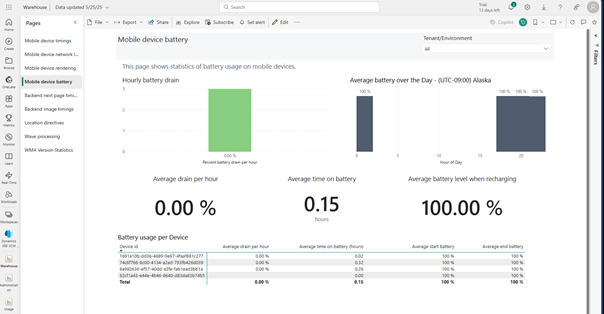
- And custom sources (X++, mobile WMS, integrations…).
All data is stored in a Log Analytics Workspace, which then serves as the basis for:
- Analytical queries in Kusto Query Language (KQL),
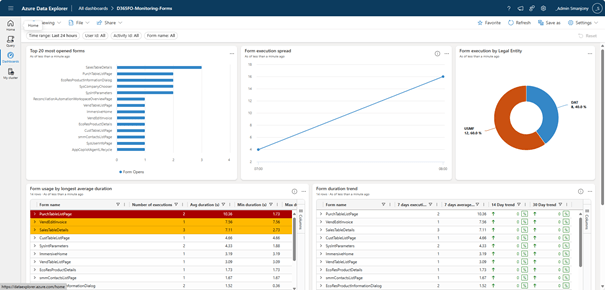
- Dashboards (Power BI, Workbooks, Azure Data Explorer),
- Alerting and automation rules (Logic Apps/ Power Automate).
Data collected natively
D365 Finance emits a rich set of signals without further development:
- Form runs (page views): form openings, loading times, user activity.
- User sessions : connections, durations, usage patterns.
- Custom traces : business or technical checkpoints via X++.
- X++ exceptions: runtime errors.
- Custom metrics: relevant numerical values for internal KPIs.
- DMF errors, Warehouse events, Batch telemetry (10.0.44+), etc.
This granularity provides deep visibility into how the ERP works.
The strategic benefits for organizations
Proactive supervision and incident reduction
Application Insights allows to anticipate performance degradations:
- Latency peaks,
- Application errors,
- SQL slowness,
- Integration failures,
- Stoppages or blockages of batches.
Improvement of the user experience
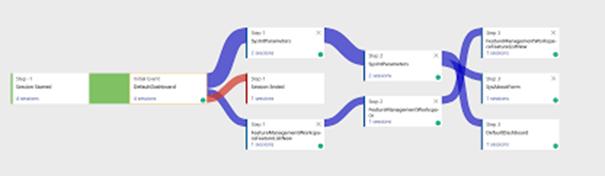
User dashboards (journeys, most visited pages, response times) allow to identify irritating areas of the system, optimize critical screens and accelerate business processes. These insights are essential to optimize performance and user satisfaction.
Management of quality and evolutions
End-to-end visibility makes it easy:
- The validation of new versions,
- The detection of regression,
- Monitoring the impact of customizations,
- The measurement of feature adoption.
Application Insights thus supports the entire life cycle of the project, from design to post golive.‑
Governance, audit and compliance
The tool provides key traceability for environments subject to strong compliance requirements (SOX, internal audit).
Implementation and good practices
Activation and configuration
The configuration is simple:
- Create an Application Insights resource in Azure.
- Retrieve the instrumentation key or the string connection.
- Map each D365 Finance environment (Dev, UAT, Prod) to the corresponding resource.
Exploitation via KQL
KQL becomes an essential tool for:
- Analyze the exceptions,
- Identify slow forms,
- Understanding user journeys,
- Diagnose integrations,
- Monitor the batches and SQL queries.
Dashboards and alerts
- Power BI, Azure Data Explorer and the Workbooks allow advanced visualization.
- Proactive alerts can be set up on:
- Response time thresholds,
- Peaks of errors,
- The activity of the batches,
- The anomalies on the most used forms.
Cost management
Azure Monitor applies a ‘pay as you go’ model. Costs come from ingestion, retention and queries. We recommend:
- The use of sampling,
- A controlled retention policy,
- The limitation of non-essential data.
Conclusion: a founding brick of the future of D365 Finance
Application Insights marks a strategic shift for ERP governance. With real-time monitoring, fine-grained telemetry, advanced analytics capabilities and deep integration into the Azure ecosystem, it allows organizations to:
- Drastically reduce incidents,
- Ensure the reliability of their operations,
- Optimize performance and adoption,
- Make data-driven decisions,
- Meet the expectations of users and listeners.
It is now the central tool for managing the health of D365 Finance environments, and a major accelerator for modernization and resilience.
 D365FOAdviceTips
Leave a comment