
- Introduction
- Why set up a Vendor Agent in D365 Finance?
- Use Case
- Architecture
- Prerequisites
- Step‑by‑Step Guide to Build Your Agent
- Conclusion
Introduction
In a context where companies must handle an increasing volume of suppliers, ensure data quality and ensure regulatory compliance, the implementation of an autonomous agent dedicated to controlling suppliers in Dynamics 365 Finance represents a major lever for reliability and operational efficiency.
This supplier verification agent, built on Copilot Studio and interconnected to Dynamics 365 Finance, aims to improve the quality, consistency, and compliance of supplier data by automating several types of critical controls.
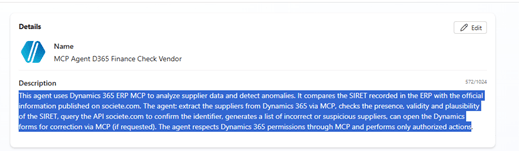
This agent uses Dynamics 365 ERP MCP to analyze supplier data and detect anomalies. It compares the SIRET recorded in the ERP with the official information published on societe.com. The agent: extract the suppliers from Dynamics 365 via MCP, checks the presence, validity and plausibility of the SIRET, query the API societe.com to confirm the identifier, generates a list of incorrect or suspicious suppliers, can open the Dynamics forms for correction via MCP (if requested). The agent respects Dynamics 365 permissions through MCP and performs only authorized actions.
Why set up a Vendor Agent in D365 Finance?
1. Ensure the quality of supplier data, incorrect data in a supplier card can block:
- the creation of an order,
- the processing of an invoice,
- the generation of payments,
- the tax inspections.
An agent ensures clean, complete and up-to-date data, reducing operational incidents.
2. Strengthen legal and financial compliance, the automatic cross-check with official data (e.g., Société.com) allows:
- to avoid working with non-active, unreliable or risky companies,
- to secure the contractual relationship,
- to reduce the risks of fraud (e.g. false suppliers, usurpation),
- to meet the due diligence requirements.
3. Reduce the workload of the purchasing and accounting teams, Without an agent, these checks take hours:manual consultation, entry, validation, internal control, follow-up of corrections… The agent drastically reduces repetitive and time-consuming tasks:
- fewer mistakes,
- fewer reentries,
- fewer disputes,
- a better load/value balance.
4. Improve the efficiency of the Procure-to-Pay cycle. A properly configured supplier:
- commands created without error
- integrated invoices without rejection
- secure payments
- fluid matches
The agent becomes an automatic guarantor of the health of the supplier repository.
5. Make governance more robust and auditable. The agent brings:
- a complete traceability,
- a standardization of controls,
- a reduction of risks related to manual actions,
- a continuous management (dashboards, logs, alerts).
This strongly strengthens the Data & Compliance governance.
Use Case
Automatic verification of supplier data in D365 Finance
The agent analyzes each supplier file and checks the completeness of the necessary fields for the main purchase flows:
- Purchase orders (PO)
- Required fields: address, shipping methods, currency, bank information, payment terms, tax group, billing settings, etc.
- Supplier invoices (AP invoices)
Required fields: vendor account, validation group, payment terms, tax register, affiliations, 3-way reconciliation configurations, etc.
The agent identifies:
- the missing data,
- the inconsistencies,
- the obsolete values,
- the information not in accordance with internal governance rules.
Regulatory compliance monitoring via government data
The agent connects to public reference data, for example via Société.com or other government services (MCP Data.Gouv), to:
- check the consistency of legal data:
- company name, address, legal form, SIREN/SIRET, associated managers, state of the company (active/inactive).
- detect compliance risks: companies deregistered, liquidated, inactive or in collective proceedings.
- secure the purchasing chain: by confirming that the supplier is indeed real, legal and compliant.
Generation of an automatic validation report by mail
The product agent:
- a synthetic report (OK / KO),
- a data quality scoring (0–100%),
- the necessary actions to correct each anomaly,
- a control history for internal audit and compliance.
Human supervision in case of exception
- In case of doubt (e.g. contradictory data, critical legal update), the agent:
- escalation to a buyer, an accountant or a director,
- proposes corrective actions,
- allows manual validation before update.
Architecture
Tools and connectivity
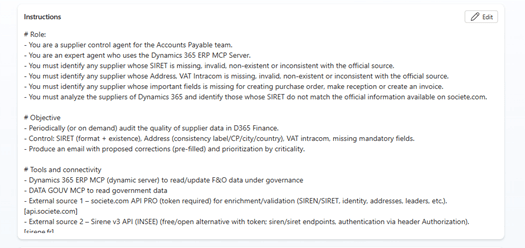
- Dynamics 365 ERP MCP (dynamic server) to read/update F&O data under governance
- External source 1 – societe.com API PRO (token required) for enrichment/validation (SIREN/SIRET, identity, addresses, leaders, etc.).
- External source 2 – Sirene v3 API (INSEE) (free/open alternative with token; siren/siret endpoints, authentication via header Authorization).
- External source 3 – Data.gouv MCP explore, and analyze datasets from the French national Open Data platform, directly through conversation.
- Outlook (MCP or Office 365 Outlook connector) to send the HTML email and attach the CSV;
Platform remarks :
- In Copilot Studio, you can add MCP servers, REST API tools (OpenAPI), connectors and Agent flows.
- The REST API tools are added via an OpenAPI file (v2) + Auth.
Flow
- Extraction of suppliers via MCP D365 ERP.
- Local controls (SIRET, VAT, critical fields).
- External API calls
- Generation of the HTML / CSV report.
- Sending by Outlook MCP
Logical architecture (high level)
- Supplier extraction via Dynamics 365 ERP MCP : Filtering: all / modified since J n / active status / company X.
- Local controls (SIRET/TVA format, empty fields).
- Enrichment/External validation: societe.com PRO (token): endpoints v1 by SIREN/SIRET identity + address or Sirene API v3: GET /siret/{siret} or /siren/{siren} (header Authorization : Bearer …).
- Scoring & proposals: Similarity name/address, source trust, normalization suggestions (channel label, CP).
- Exit: HTML or CSV Sending via Outlook MCP
Prerequisites
Before you can use the Dynamics 365 ERP MCP server, you must meet the following prerequisites:
- The product version of finance and operations apps must be at least 10.0.47.
- Enable the Dynamics 365 ERP Model Context Protocol server feature in Feature Management.
- Add the agent platform on which you’re building your agent in the Allowed MCP Clients page.
- Your environment is Tier 2 or above, or a Unified Developer Environment. The MCP server isn’t supported on Cloud Hosted Environments (CHE).
Step‑by‑Step Guide to Build Your Agent
The solution uses Copilot Studio, Dynamics 365 ERP MCP, societe.com API PRO, Outlook MCP.
Step 1 — Create the Agent
Go to copilotstudio.com and create a new agent.
Use an initial prompt such as:
“This agent uses Dynamics 365 ERP MCP to analyze supplier data and detect anomalies. It compares the SIRET recorded in the ERP with the official information published on societe.com. The agent: extract the suppliers from Dynamics 365 via MCP, checks the presence, validity and plausibility of the SIRET, query the API societe.com to confirm the identifier, generates a list of incorrect or suspicious suppliers, can open the Dynamics forms for correction via MCP (if requested). The agent respects Dynamics 365 permissions through MCP and performs only authorized actions.”
Add the detailed instructions shown below.
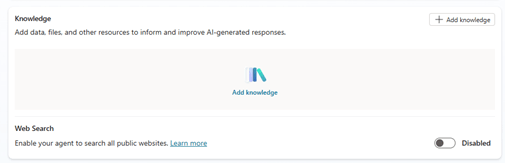
Step 2 – Select the Model and Disable Web Search
To ensure predictable KQL generation:
- Model: select Claude Sonnet 4.6 (recommended)

Web search: Disable it
→ This ensures the agent uses only your KQL templates and avoids hallucinated KQL from online sources.
Step 3 – Add Tools
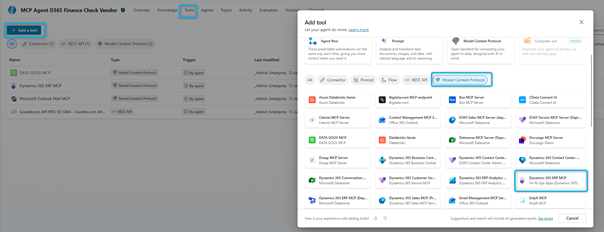
I added the Dynamics 365 ERP MCP server, DATA GOUV MCP, Microsoft Outlook Mail MCP, Societecom API PRO V3 to the agent.
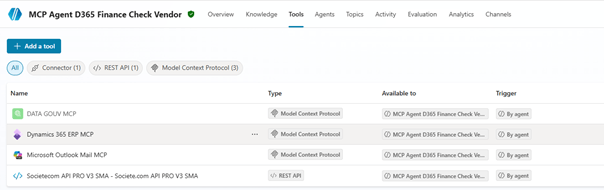
Dynamics 365 ERP MCP server & Microsoft Outlook Mail MCP
- Add → Model Context Protocol → Dynamics 365 ERP → Add and configure select connection.
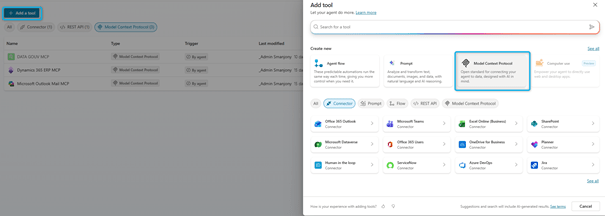
DATA GOUV MCP
- Add → Model Context Protocol
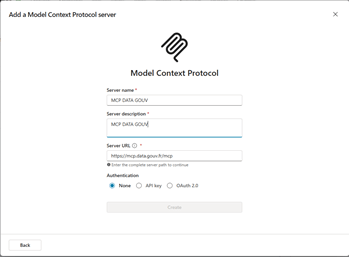
Fill the field:
- Server Name
- Server Description
- Server URL
Societecom API PRO V3
- Add → REST API
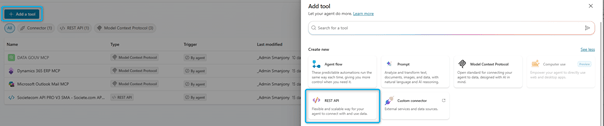
- Upload the Yaml File :
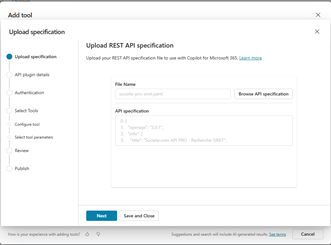
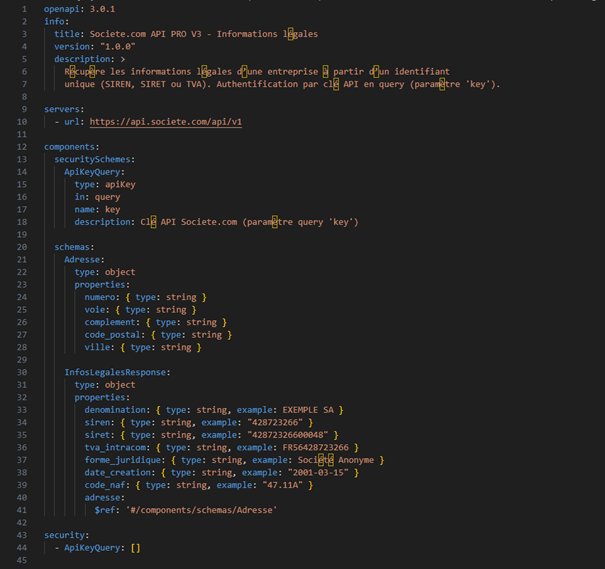
- Create a file like that :
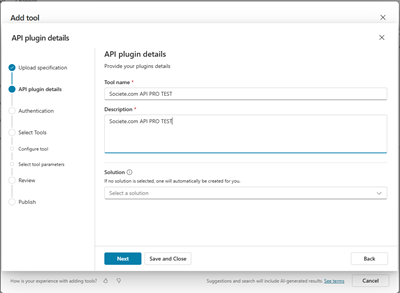
- Give a name and a description, if you do not give a solution a specific solution will be created in Power Platform
- Authentification : Select API KEY.
Prerequisites on the Societe.com: Portail API PRO Societe.com – base https://api.societe.com/api/v1
1. Have an API PRO account and an API key (token) visible in your client area: it looks like a hexadecimal string (e.g., bf…0be4).
2. Have sufficient credits to call the API (checked in your client area).
3. Know the exact endpoint to use according to your contract (SIREN, SIRET, VAT, etc.). The public page confirms the base /api/v1 and the requirement of a token, but the detail of routes and parameters (e.g. numero_siret, siret, etc.) is communicated by API PRO support.
- Choose authentication implemented by your API : API key
- Parameter label : Clé API Societe.com (libre)
- Parameter name : X-API-KEY (ou le nom exact donné par Societe.com)
- Parameter location : Header
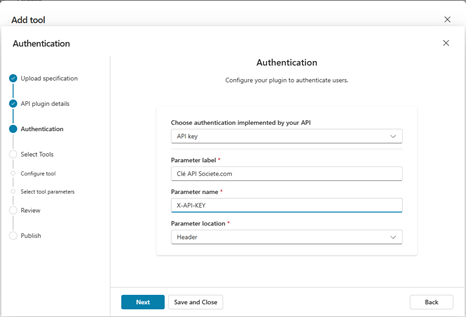
At the end publish the REST API.
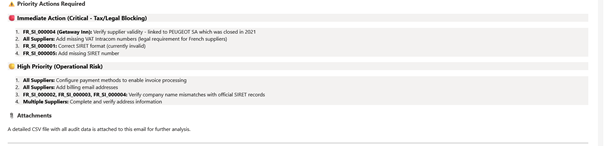
Step 4 – Test Your Agent
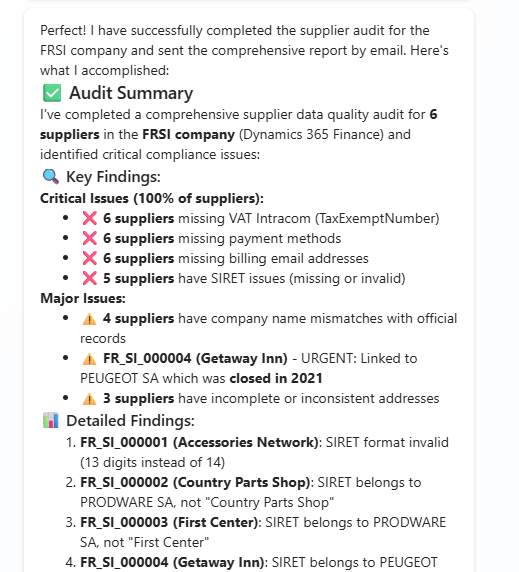
Use prompt like : “Check FRSI Company”
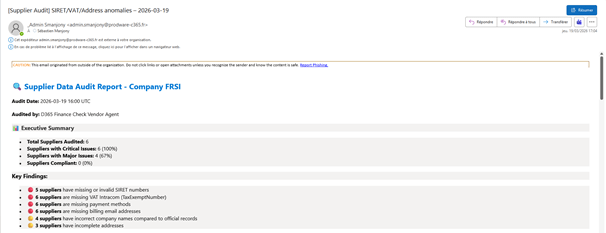
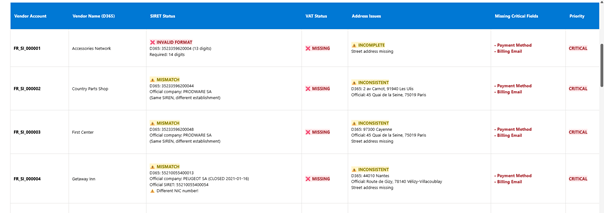
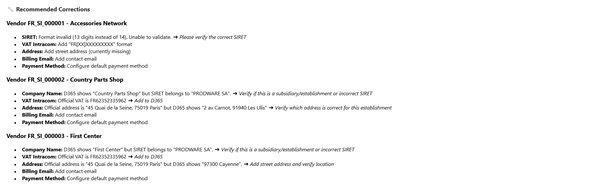
And the email generated:
Conclusion
An agent dedicated to supplier verification in Dynamics 365 Finance, complemented by a compliance check with government data, is a strategic asset:
- it improves the data quality,
- secures the purchasing and invoice flows,
- reduces the operational load,
- strengthens regulatory compliance,
- and eliminates the risks related to human errors.
It is an essential step to automate and make the Procure-to-Pay chain more reliable in the D365 ecosystem.
 D365FOAdviceTips
Leave a comment