
- Introduction
- What Is the Sales Order Details Performance Option?
- What Happens When It Is Enabled?
- The Trade-Off You Need to Know
- Why This Setting Matters in Real Life
- Conclusion
Introduction
Performance tuning in Dynamics 365 Finance often focuses on heavy technical optimizations or complex architecture decisions. Yet some of the most effective improvements come from small, almost invisible configuration settings. One such example is the Sales order details performance option — a simple switch that can dramatically improve the user experience for anyone working daily with sales orders.
What Is the Sales Order Details Performance Option?
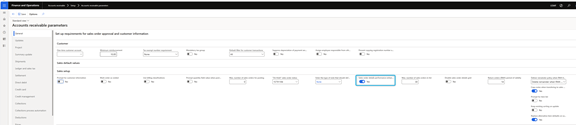
The Sales order details performance setting controls how sales order details are opened from list pages in D365 Finance. While easy to overlook, this option directly affects form loading times and navigation flow for users.
What Happens When It Is Enabled?
When the setting is switched to Yes, Dynamics 365 Finance changes the way sales orders are opened:
- Opening sales order details becomes noticeably faster
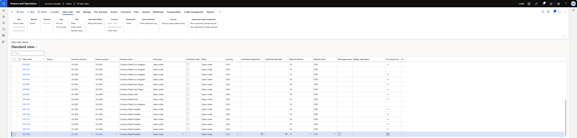
- The intermediate SalesTableListPage is skipped entirely
- Users are redirected straight to the SalesTable form in list mode
- The behavior applies to all sales orders and similar sales-related list pages
The Trade-Off You Need to Know
This performance gain does not come entirely for free. Because the SalesTableListPage is bypassed, any saved views created on that page are no longer available. For most organizations, this is a reasonable compromise — especially when performance and usability matter more than list-page personalization.
Why This Setting Matters in Real Life
For users who spend a significant part of their day opening, reviewing, and managing sales orders, every extra second adds friction. Reducing form load times may seem like a minor improvement, but multiplied across hundreds or thousands of interactions, it has a tangible impact on productivity.
Conclusion
The Sales order details performance option is a perfect example of a low-effort, high-impact optimization in D365 Finance. It requires no development, no refactoring, and no architectural changes — yet it can significantly improve day-to-day usability. If your users frequently navigate through sales orders, this small configuration switch is well worth enabling.
 D365FOAdviceTips
Leave a comment