In this post we will cover from a high level point of view the Power Platform Administration Center also known as PPAC. This administrative center becomes the Finance and Operations application.
Introduction
Technically, this is certainly the most important topic we have had for several years on the D365 Finance and Operations platform. It will lead to radical changes in the way projects are run, environments are managed, developments are implemented and the associated life cycle (ALM) is implemented.
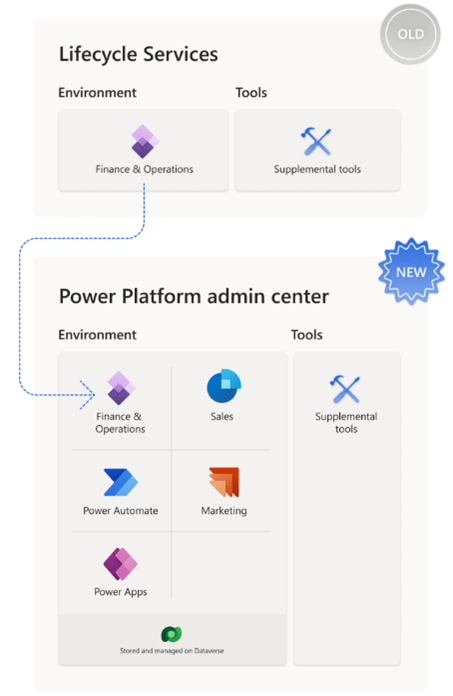
The Finance and Operation applications have been reimagined as integrated applications in the Power Platform. In LCS you have sandbox, production or even development environments with a D365FO instance. But if you look at the Power Platform admin center and the ecosystem, an environment is a container and it can have many different things inside. Everything is powered by the Dataverse, you can have as well D365 Sales, as Marketing and Finance or SCM installed in the same environment.
You can have a large number of power apps, flow and so all installed in the same environment, all sharing the same data, all sharing the same integration technology. The objective is to take customers into this unified environment in order to simplify the life of the IT administrator. You can have an environment that you need to manage, backup, restore and a set of applications to manage as well. It is easier to have a single administrative portal.
D365 Finance and Operations users can now administer their environments, policies, licenses and capabilities in the Power Platform (PPAC) Admin Center.
As part of the unification of D365 Finance and Operations application administration within the Power Platform, environments are now considered applications. This unification provides a consistent and unique set of lifecycle operations that an administrator can perform on all artifacts in a particular environment.
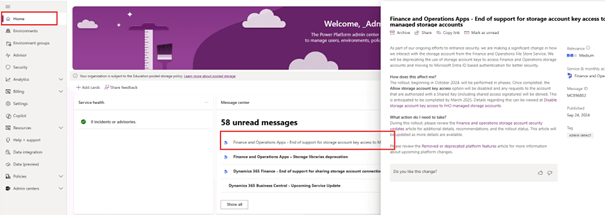
As announced by Microsoft, the depreciation of Lifecycle Services (LCS) has begun, as shown in the notification message “LCS System Diagnostics being removed in September 2024”, but also via the Road Map provided by Microsoft. Microsoft is removing LCS functionality as part of the transition to the Power Platform Administration Center (PPAC). This is a strong signal for organizations that must start preparing for the transition as more LCS features will be deprecated in the coming months. It is essential that customers understand the transition plan and what they need to do to ensure a migration from Lifecycle Services (LCS) to the Power Platform Admin Center (PPAC).

Customers and integrators must therefore prepare for this technical transition now as new projects will start on this UDE at the end of this year and customers will migrate in the coming year.
Home page
When you log in to the home page, you will be hosted with a set of notifications. So you can see notifications about D365FO versions, patches, new releases. You can click to read the documentation and give your opinion on the different notifications. You will see urgent things that need to be done. You will also see more informative things, such as new features that have just been made available and that you can try.
Environment
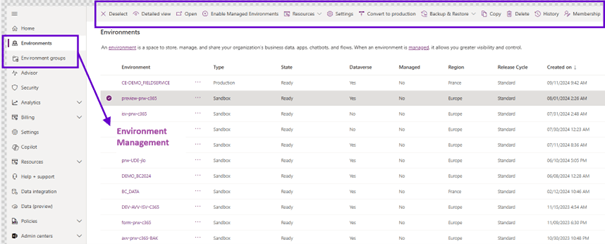
In the left navigation menu, we have a set of options for managing the environment. You can see all the environments through the tenant. You can perform a large number of actions directly from this page, instead of having to click on each environment and start a copy or a backup, etc
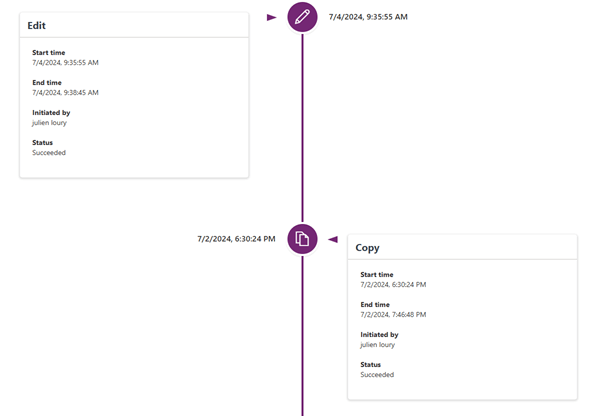
You can also, of course, click through the history and see who did what at what time, and click on the environment to get more details about that particular environment.
Advisor
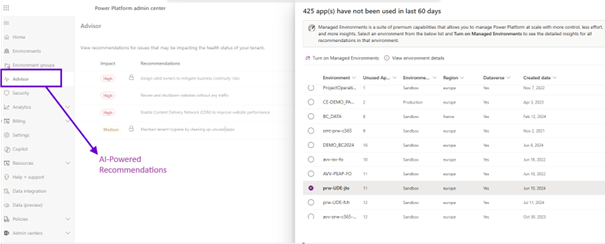
The advisor tab is the recommendation engine powered by AI. It will scan the telemetry and various aspects of your tenant and provide recommendations either for you to do something more efficient, or simple things such as cleaning applications that have not been used. I can choose to quarantine these applications. Or I could choose to use another part of the Microsoft Stack such as Teams. I can contact a colleague and ask if they know these applications.
We also have automatic recommendations through an API, so you can detect these items by programming and act without having to log in.
Billing
We have a billing section. It allows you to have a better understanding of your license usage in the power platform and Dynamics. You can see the different licenses. If a license is missing, you can see it. You can see the current number of licenses you have available, the different types, basic licenses to teams and activities

You will also see intelligent recommendations powered by the advisor, and you can also look at a particular environment and choose a workload to determine if something is sub-licensed or over-licensed.
Resources
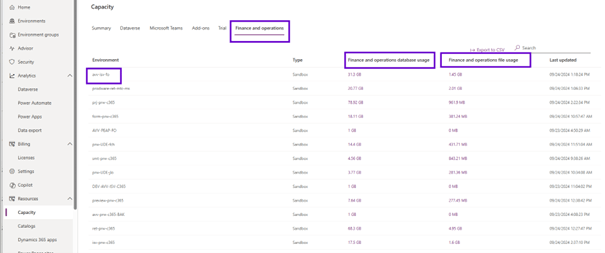
Then we have the resources. This is capacity management. So when you purchase Dynamics or Power platform licenses, they come with storage and will appear as gigabytes here for both Dataverse and Finance and Operations. You will see what you have at your disposal in the overview. You can explore the environments and click to see where storage consumption is.
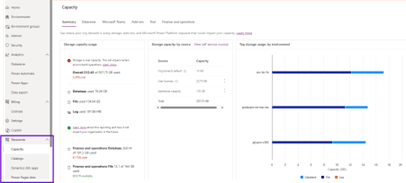
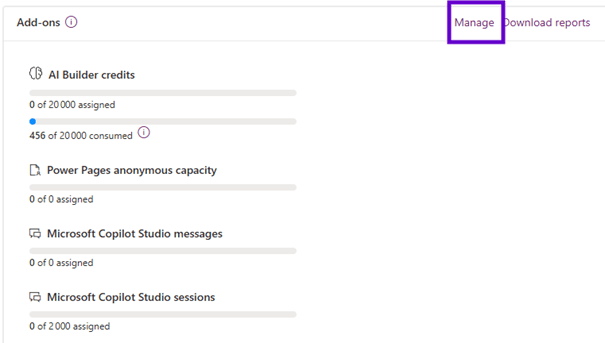
On the summary tab, we have a section add ons as well. You can click on the Manage tab and choose an environment and assign different types of add ins available. Some of these additions are added with the initial purchase of licenses. Other add ons that you can actually just buy ad hoc through the Microsoft 365 admin center.
In the PPAC you can now allocate per environment how much data each environment can consume. This will make it much easier to control how much an environment can consume and keep the consumption from spinning out of control.
- Select the environment in PPAC
- Click the “Allocate capacity” button
- This dialog appears
- Set the capacity for each data area
- You can be alerted when getting close to the allocated amount of data

Help & Support
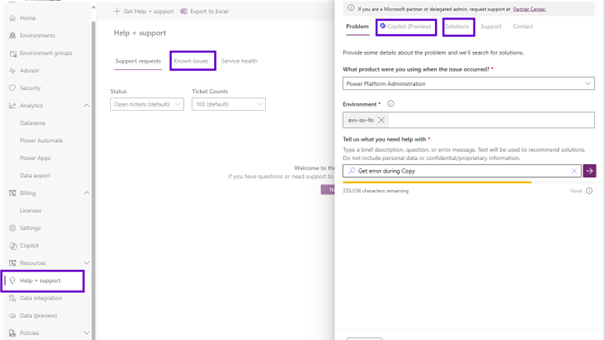
The next step is help and support. When you want to create a ticket or if you have a problem, the first thing is to click on the known issues tab where you can search. This is very similar to finding problems in LCS. You will be able to look at health services to see if there are any outages that are happening right now, which could impact your environments.
You can simply start the ticket creation process and choose a category. . As I start typing, I get a list of known issues and context. I can move on to trying to get a solution or use Copilot. This function will look at the telemetry of your environments, see if there is something like a problem. He suggests documents. Then, of course, you can go on and create the known ticket that occurs at that time
Policies
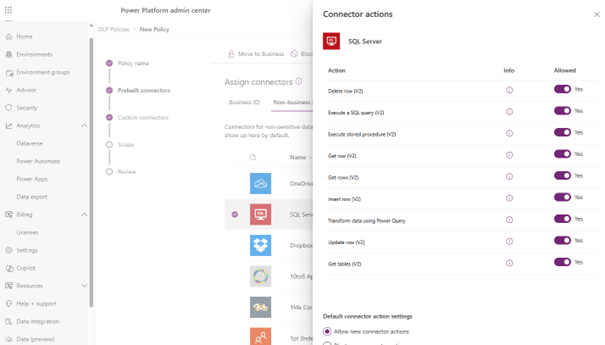
Finally, we have this section called Policies, which is related to Governance and security for your tenant. Data policies allow you to control the use of connectors in low code applications. As an administrator I can say that I want to block the use of certain connectors, or vice versa indicate which ones they can use. I can define more granular actions they cannot perform. Once you have defined your Policy, you choose the environments to which you want to apply this Policy. You can imagine a Policy applying to all your developer environments, to all your sandboxes, to all your production environments, or a certain Policy by Geo
Beyond the user interface, it is possible to use different APIs of the Power Platform to automate tasks, connectors with Power Automate or Logic Apps and Powershell to manage other aspects of the Microsoft ecosystem. There is also PAC CLI: this is used by developers as it works with Dataverse solutions as well as for packaging new X++ packages.
 D365FOAdviceTips
Leave a comment