In this post we will cover the subject related to roles, licenses and permissions in relation to the Power Platform Administration Center and D365FO.
Roles
The most important question to start with is who can create environments in the admin center. By default, everyone in your company can create environments for Low Code scenarios. So, one of the first things to do is to immediately limit this to specific administrators.
When you access the power platform, you can click on the tenant settings tab, and you can disable this command so that only specific administrators can deploy environments and start consuming capacity. MS introduced the concept of service level administrators.

These functions are based on the roles of Azure Active Directory or Microsoft Entra, and you can assign them from the 365 admin center, or you can go to the Azure portal and click tenant to access users and manage roles. The first role we have available is the Dynamics 365 administrator role. This role can manage about anything, which is test management, sandbox, or production environments. You can install FNO and other Dynamics applications in these environments, you can manage their settings in Dataverse.
But we also have the role of administrator of the power platform that can do everything that D365 administration can do, as well as manage developer-type environments, tenants settings, as well as governance and billing policies.
This role is also used for partners when they make requests for delegated administration.
The service level administrator can see everything through the tenant. In LCS we had the concept of project that partitioned environments where I can only see the environments in my project and not the environments of other projects. We have isolation and therefore the same kind of capacity in PPAC. We do not have the concept of a project. So, what is done here: we have the role of environment administrator, and so you can assign each environment to a dedicated administrator.
When you do this, that user will only see the environments they are the administrator of when they connect to the power platform. I can click on this environment and do what I want with it. I can change the settings; I can delete it. I can restore it; I can copy it. I could only copy it in another environment of which I am also the administrator. There are therefore levels of Administrators: the service administrator can work through the whole tenant while the environment administrator can only work on these environments.
Licenses
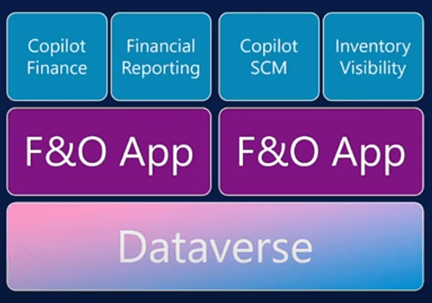
When you create an environment in the admin center you will use templates to speed up deployments through bundles. So, for Finance and Operation we have a Finance Template (included with the Finance license) which includes the D365FO application as well as Copilot for Finance and Reporting and we have a supply chain management template with the same D365FO application that includes Copilot for SCM and inventory visibility. So that’s how these different licensing models interact. They provide a starting point.
But of course, after the environment is created, a finance client could install the copilot for SCM and vice versa.
Capabilities
You also get the capacity that is expressed in gigabytes. You will see here the overview of the gigabytes for Dataverse, those available for D365FO.
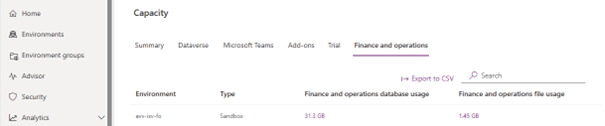
The good news about the power platform is that we no longer have an environment-based purchasing model. It is all about capacity. You can have any number of environments if you have the capacity to deploy.
We are moving from a procurement model based on environmental locations to a capacity-based model.
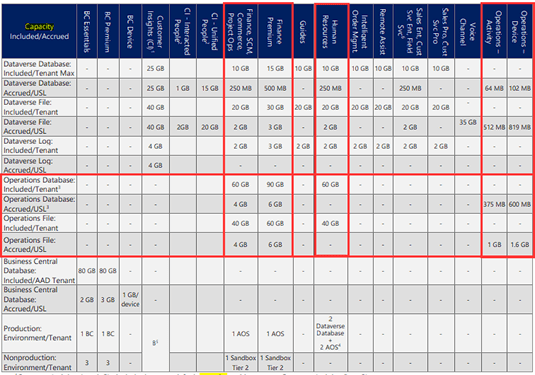
When you purchase a license for an application such as Dynamics 365 Finance or Dynamics 365 Supply Chain Management, your tenant provides 60 GB of operations database capacity and additional 10 GB of Dataverse database capacity. With each user license, you receive an incremental amount of Dataverse database and operations database capacity.
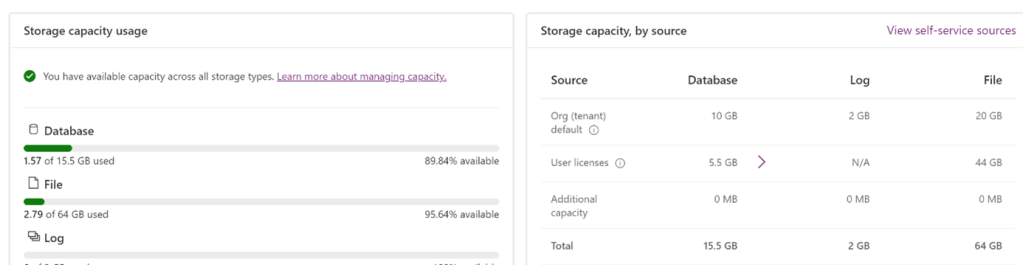
A license is required to create or install a Finance and Operations application in the Power Platform admin center. You must also have at least 1 GB of D365FO Database and Dataverse Database capacity to provision an additional environment. If you have available capacity, you can simply create a new environment. This is based on the number of licenses you have purchased.
As part of the capacity-based model, both sandbox and production environments benefit from the same level of compute performance. This capacity is based on the number of user licenses purchased and increases or decreases dynamically as you adjust your license quantities.
 D365FOAdviceTips
Leave a comment