
Overview
Developers can create shareable and secured URLs (also known as deep links) to specific forms that are root navigable. An optional data context can be passed to the form to display filtered or specific data when the form is opened. The URL Generator enables scenarios such as embedding links in reports, email, and external applications. The URL Generator enables users to quickly and easily locate the specified forms or data by navigating using the generated link.
Purpose:
- Empower developers to generate URLs that can be used to navigate to root navigable forms in a specified instance.
- Empower developers to optionally specify a data context that should be displayed when navigating to the specified form.
- Empower users to share, save, and access the generated URLs from any browser with Internet access.
- Secure the URLs to prevent unauthorized access to the system, forms, or data.
- Secure the URLs to prevent exposure of sensitive data or tampering.
Access to forms is controlled through Menu items, as Menu items are the entry points where security is enforced. If a user navigates using a URL that contains a Menu item that the user does not have access to, the Menu item security prevents the form from opening. The user receives a message indicating that they do not have the necessary permission to open the form.
Access to data is controlled through the existing form-level queries. When a form is opened with a generated URL, the form runs its existing form-level queries, which restrict the user’s access to data. The data context specified in the generated URL is consumed after these form-level queries are applied, and results only in further filtering of the data displayed to the user. In short, a generated URL can, at most, open a form and display all the data that a form would display to the user based on the form-level queries. A generated URL cannot grant a user access to data that is otherwise inaccessible on the form when not using the generated URL.
There are two options for creating deep links for finance and operations apps:
- The URL Generator is a .NET library available for generating deep links from X++ code and uses the menu item and partition to determine the deep link target for navigation in the client.
- System entity navigation enables generation of the deep link URL outside of X++ code. Developers can construct the URL by providing parameters based on the entity name and ID of the record to which the deep link URL should navigate.
Example with System entity navigation
Developers can construct a deep link URL dynamically outside of X++ code using the SysEntityNavigation action. The developer can construct the URL using the entity name and record ID of the record to which the deep link should navigate. The SysEntityNavigation action then navigates to the primary menu item for the defined entity and populates the form with the defined record in finance and operations apps.
The entities supported for navigation are based on the Dataverse virtual tables for finance and operations apps.
Linking to a record in Dynamics 365 Finance is always a challenge. It is possible to generate X++ code to generate a deep link, but you often must generate a link on the fly from your Power Apps app or another external application and this is not possible in X++.
Now, all this is possible thanks to Dataverse and virtual entities. To create a deep link to D365 Finance, you need the following information:
- The URL of your D365 Finance environment.
- The name of your Dataverse data entity schema.
- The GUID of the Dataverse record.
| Parameter | Description |
| cmp | The company ID of the legal entity. In the Dataverse virtual table, this is identified in the Company Code column (mserp_dataareaid). |
| entityName | The plural of the schema name of the Dataverse virtual table, as defined in the Maker Portal. For example, mserp_custcustomerv3entities is the plural schema name for the Customers V3 (mserp) virtual table. |
| entityGuid | The GUID of the unique identifier property for the selected record in the Dataverse virtual table. For example, the unique identifier column of the Customers V3 (mserp) virtual table is mserp_custcustomerv3entityid. |
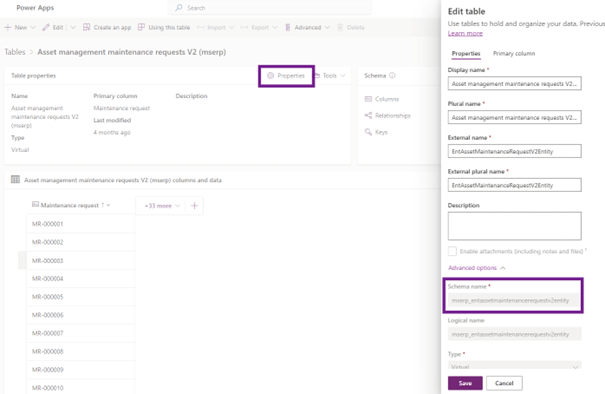
The name of the table schema is found in the properties of the Dataverse table.
The registration GUID is a unique identifier generated by the system for registration in Dataverse. You can only get this value by searching for the record via its natural key.
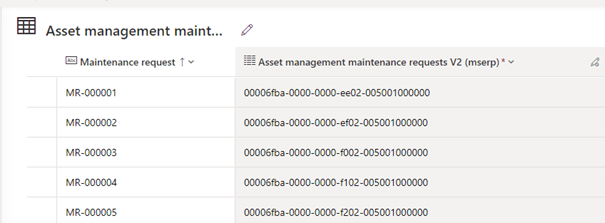
Construct the URL in the following format for deep links using system entity navigation.
https://%5BRoot URL for the environment]/?cmp=[data area ID]&mi=action:SysEntityNavigation&entityName=[entity plural schema name]&entityGuid=[GUID of entity record]
Please note that you must specify the applicable D365 Finance legal entity in the “cmp” parameter. In this case, the legal entity is “usmf.”
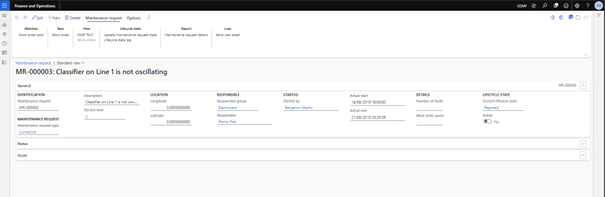
By pasting the link in a browser, D365 Finance opens with the correct form and record. This is an example to show how easy it is now to create deep links to D365 Finance data without X++ code.
 D365FOAdviceTips
Leave a comment