
- Overview
- Key Steps in the go-live process
- Prerequisites
- Review with Microsoft
- Production environment deployment
- Go live Management
Overview
To ensure that the production environment is used for live operations, Microsoft provides the production instance when the solution is ready and after the project readiness level has been validated in the Go-live Readiness Review with Microsoft.
Projects must use the FastTrack Dynamics 365 Implementation Portal for their Go-live Readiness Review with Microsoft.
Key Steps in the go-live process
| Step | Duration/When | Who |
| Validation of prerequisites | A project is close to the end of the testing phase, and you are planning the go-live review. | Customer/Partner |
| Go-live Readiness Review with Microsoft | No later than four weeks before the go-live | Customer/Partner submits answers to review questions in the FastTrack for Dynamics 365 implementation portal. Microsoft FastTrack provides a review report. |
| Go-live review workshop with Microsoft (only for eligible projects) | The workshop is part of the Go-live Readiness Review. | Microsoft FastTrack together with the project team |
| Production deployment | Production deployment can be initiated as soon as the Go-live Readiness Review is completed. After deployment is triggered, production deployment takes approximately 30 minutes. | Customer/Partner triggers the deployment in Microsoft Dynamics Lifecycle Services. |
| Deployable package installation | An average of 30 minutes | Customer/Partner |
| Data migration to production | The duration/time depends on the method that is used. | Customer/Partner |
| Cutover activities | The duration/time depends on the project. | Customer/Partner |
| Go-live | Customer/Partner |
Prerequisites
The project team should validate the solution with readiness. The following prerequisites must be met before the launch of the Go-live Readiness Review with Microsoft. The production environment can be deployed after the Go-live Readiness Review with Microsoft has been successfully completed.
User acceptance (UAT) and performance testing are almost complete in a Tier- 2 (or higher) environment.
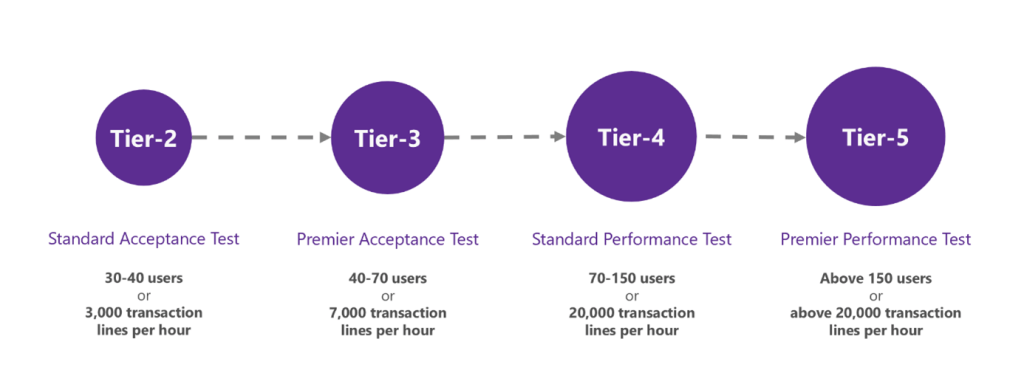
During the UAT phase, evaluate all business processes you have implemented and all customizations you have made.
- Use migrated data for testing. This should include master data, transactions, and opening balances.
- Use appropriate security roles for testing, including default roles and custom roles that are assigned to users.Ensure that the solution is compliant with company and industry-specific regulatory requirements.
- Obtain customer approval.
Environment version that is planned for the go-live is in accordance with the software lifecycle policy: https://learn.microsoft.com/en-us/dynamics365/fin-ops-core/dev-itpro/migration-upgrade/versions-update-policy .
Key members of the customer team are added to the Lifecycle Services project.
A generic service account used to deploy the production environment is added to Lifecycle services.
All licenses required for the go-live were purchased from the correct tenant.
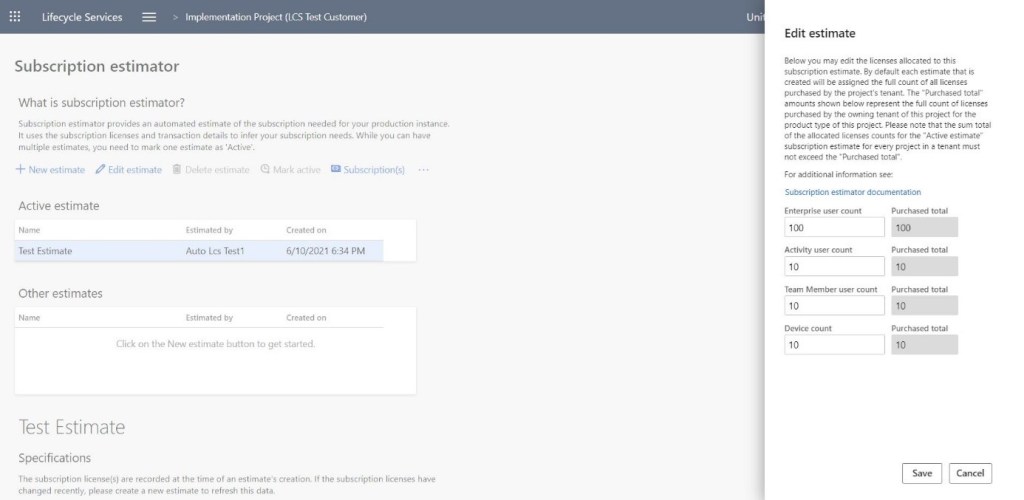
Once all licenses are purchased, the final subscription estimator is uploaded and activated in the life cycle services: https://learn.microsoft.com/en-us/dynamics365/fin-ops-core/dev-itpro/lifecycle-services/subscription-estimator.
The Customization Analysis (CAR) report is executed, and critical issues are addressed. The Customization Analysis report is a tool that analyzes your customization, and extension models and executes a predefined set of best practice rules. The report is one of the requirements in the solution certification process. Report is in the form of a Microsoft Excel workbook: Customization Analysis Report (CAR).

The go-live date in Life Cycle Services correctly represents the target go-live date. This date is the date on which end-users begin live operations, not cutover activities.
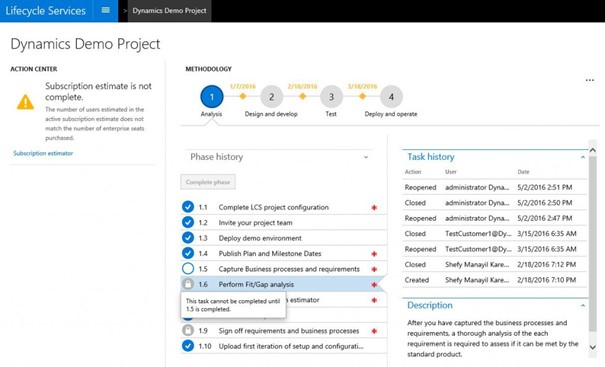
All relevant tasks and phases of the Life Cycle Services methodology are completed https://learn.microsoft.com/en-us/dynamics365/fin-ops-core/dev-itpro/lifecycle-services/lcs-works-lcs#methodologies.
Production can only be deployed after all phases, including the test phase, are complete.
To complete a lifecycle services phase, start by completing all the steps required in that phase. When all the steps in a phase are completed, you can complete the entire phase. You can always reopen a phase later if you need to make changes. The process of completing a stage is divided into two parts:
- Mark the corresponding step in the Life Cycle Services methodology as you complete it.
Follow the steps in the methodology as you move through implementation. Do not wait until the last minute.
Review with Microsoft
All D365 Finance application customers must complete a Go-live Readiness Review with the Microsoft FastTrack for Dynamics 365 team before production environments can be deployed. The primary objective of the review is to assess project readiness and help you have a successful and smooth go-live experience. Projects Users of the Life Cycle Services receive an email reminder about the Go-Live readiness review, based on the go-live date in Lifecycle Services.
The review may take up to three business days for the initial report, plus more time for any required risk mitigation measures. Determine the appropriate time to begin this review, to meet the go-live schedule.
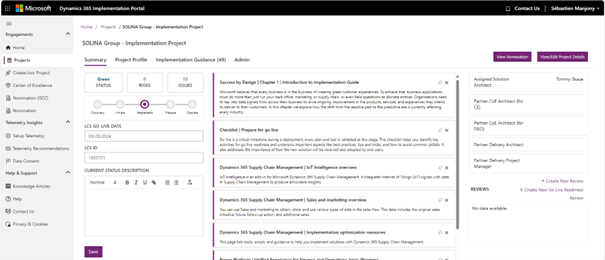
For projects, the Go-Live readiness review is done in the FastTrack for Dynamics 365 implementation portal.
Dynamics 365 Implementation Portal
Partners and customers can submit the go-live readiness exam in the Dynamics 365 implementation portal without having to use Microsoft.
The Onboarding Wizard in the Implementation Portal has simplified the steps to create the project, add admin and users, and submit the Go-Live review for self-service.
- Create the project in the implementation portal.
- Ensure that the project administrator is from the client organization. This user from the client organization can then add other users and serve as a key participant in the review of the Go-Live readiness.
- Once the project is created, the project team can create and complete the Go-live readiness review in the portal by following the guidelines in the Portal Help article.
Go-live readiness workshops
The Go-Live Readiness workshop is designed to help ensure the success of Dynamics 365 projects. This workshop covers the validations necessary to ensure that the solution meets the needs and expectations of the client, both functional and non-functional. The goal is to ensure a smooth transition to Dynamics 365 in the available cutover window and avoid surprises during and after launch.
The workshop should cover some of the following topics:
- Confirmation of the Go-Live date and scope
- Solution acceptance and user training
- Performance
- Integrations
- Code management
- Configuration Management
- Review of blocking issues
- Final data migration and Cutover plan
- Review of risks and mitigation measures
- Go/no-go client criteria.
- Support process and hyper-care plan.
The usual format is a 90-minute meeting on Microsoft Teams. Mandatory participants are Hyper-care team leaders. Recommended participants include key users and subject matter experts.
Submit the review
The project team should answer all questions in the review. The portal review process allows for scenarios where multiple users are present. Several team members can provide details for the go-live review at the same time.
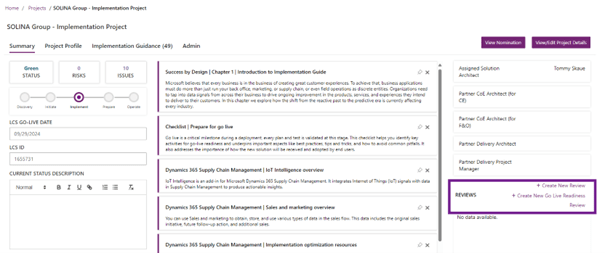
When all the questions in the Go-Live exam are answered, submit the review to Microsoft by selecting Submit.
After the review is submitted
Microsoft FastTrack reviews the project and provides a report that outlines potential risks, best practices, and recommendations for successful project Go-Live. The review may take up to three business days for the initial report, plus more time for any required risk mitigation measures.
Users who are selected as Review participants in the portal receive an email communication that provides updates on the exam.
When all critical risks are addressed and the review is complete, Microsoft enables the production environment into the Lifecycle Services project. The customer/partner can then trigger the deployment of the production environment.
Production environment deployment
Microsoft recommends selecting a service account for environment deployment: select a generic user account as administrator user of the environments you are deploying. If you select a named user account, you may not be able to access an environment if that user is unavailable. Here are some examples of scenarios where the administrator user needs to access an environment:
- First connection to an environment after initial deployment – The administrator user is the only user who can access the environment.
- First connection to a sandbox environment after database refresh from the production environment – no user account except the administrator account can connect.
The production environment must be deployed in the same datacenter where your sandbox environments are deployed, and where performance and UAT tests have been performed.
Production deployment takes approximately 30 minutes. Once the deployment is complete, an email notification is sent to the environment administrator.
Production environment is sized based on the number of licenses assigned to the Lifecycle Services project and transaction volumes in the subscription estimator:

Once the production is deployed, the project team can apply the deployable package and then migrate the data. For data migration, MS recommends preparing and validating the data in a non-productive environment and then copying the sandbox database to production.
Go live Management
Environments management
In each D365 Finance project, Microsoft provides a unique Tier 2 environment as part of the standard subscription. It is important to name this environment correctly from the start. If your project involves continuous development (major bug fixes and new developments roll out), I recommend having at least two Tier 2 environments: one for PRE-PROD and one dedicated to user testing (UAT).
Most post-Go-Live issues are data related and cannot be replicated in DEV. You will often need a copy of the PROD database to review these issues. The PROD database can be copied to PRE-PROD before being distributed to other environments for debugging. This is why it is crucial to establish from the beginning that the PRE-PROD environment can be updated from PROD at any time and should never contain valuable data.
Proactive Data Restore Process
In the first few days after Go-Live, I recommend proactively refreshing the PRE-PROD environment with PROD data at the end of each day (or morning). The main challenge is that some data, such as integration related or encrypted data, cannot or should not be copied during update. To manage this, create an automated procedure to restore these settings. The key is to ensure that this process does not require significant manual intervention.
The process that can be followed:
- Run the PRE-PROD data refresh from PROD (for small databases, it usually takes about an hour).
- Run a script that adjusts the PROD-specific parameters to their test values (in our case, it was a SQL script to change integration settings, enable users, etc.).
- Perform a database export task for PRE-PROD to LCS (which usually takes at least one hour).
This proactive approach offers a significant advantage: if a problem occurs with PROD, there is a good chance that it can be replicated on the restored data from PRE-PROD. In such cases, a developer can restore the database from LCS and start debugging within 1-2 hours after the issue is reported.
There is also an option to further automate this process using the LCS and Power Automate API. If your database is large and the restore takes too long, make sure first that there are no unnecessary “log” tables inflating its size.
Timings the Project Team Should Know
When a problem occurs in PROD, the first step is to investigate and try to understand the problem. If it is not clear yet, you will need to run a data refresh in the DEV environment. It is important that all team members are aware of the timelines for this process. For example, if a normal data restore procedure is required, debugging can usually start within 4 hours.
Once the issue is resolved in the DEV environment, depending on the criticality of the bug, it will be deployed in the following environments:
If the bug is non-blocking it will be deployed on the UAT to be validated (Main branch). Once validated it will be part of the next release for the PROD (Release Branch and Release Candidate for the Package).
If the bug is blocking it will be deployed directly in PRE-PROD (Release Branch) (ensure the team understands how long this will take). After validation on PRE-PROD, the fix will be delivered in PROD (hotfix mode) then goes through the normal update cycle (Dev branch) and it will be deployed in UAT to be validated (Main branch). Once validated it will be part of the next release for the PROD.
It is critical that the entire team be aware of the PROD deployment schedule to ensure smooth coordination.
Release Management
Effective release management is essential to ensure a smooth Go-Live experience. It is unrealistic to expect that the first few days will be error-free – even with a fully tested system, issues are likely to occur.
Therefore, good planning should include an action plan to resolve errors, and it is best to avoid relying too much on an “agile” approach during this critical period.
During Go-Live, you will encounter critical and non-critical issues. Critical issues should be resolved as quickly as possible through a dedicated process, while non-critical issues should be assessed. If they are not of immediate concern, it is best to process them in the queue for the ongoing work.
Ignoring non-critical issues can cause users to lose interest in reporting issues. Maintaining user engagement by responding quickly to feedback and making improvements with minimal delay is critical.
PROD Deployments Planning
One of the biggest technical limitations of D365 FINANCE is that each release of PROD requires 30-50 minutes of system downtime, which makes planning your deployments around this window crucial.
During the first two weeks of the Go-live period, A recommendation planning:
- A scheduled release window every 2 or 3 days (in the evening)
- An emergency release window in the morning or at noon.
Even if these windows are not always used, planning them in advance saves time and avoids last-minute discussions with users about system outages. It also helps to set realistic expectations for users in terms of how their problems will be resolved. Here is a breakdown of how a typical release happens and the associated timings:
- The developer fixes and evaluates the issue in the DEV environment.
- The fix is deployed in PRE-PROD for final validation via the deployment pipeline, which takes approximately 2 hours.
- The release manager connects to the LCS, marks the PRE-PROD package as a release candidate, opens the PROD environment and plans the release (30 minutes of downtime).
Keep in mind that the PROD releases cannot be fully automated and will require some manual effort, which may vary depending on the project. Finally, be sure to contact the person who manages releases to clarify that overtime may be required during this period.
Code Branch Management
During the Go-Live phase, it is essential to keep your code branch management as simple as possible. In projects, we used Main and Release branches. This approach requires quality control.
Two strategic factors should be considered when planning your branch strategy:
- Speed of deployment: How quickly can a validated solution be deployed in PROD? During Go-Live, this should ideally be done within one day.
- Effort required: How long does it take to deploy? A good setup should not take more than an hour of work.
Integration Issues
During the initial Go-Live phase, you will encounter a wide range of integration-related errors.
For inbound integrations, typical problems include:
- External systems send messages in an incorrect format (for example, missing XML tags, incorrect date, or numeric formats)
- Messages with incorrect values (e.g., references to data that does not exist in D365 Finance)
- Duplicate messages
- Incorrect field mapping on the side D365 Finance
- Incorrect or missing D365 Finance parameters during message processing
For outbound integrations, common problems are:
- External systems report they have not received some documents from D365 Finance
- Received messages with erroneous values for individual fields.
For Service/OData based integrations:
- External system complaints about incorrect data returned by D365 Finance, showing empty or incorrect fields in their user interface.
In addition to these issues, you may also encounter errors in the X++ code that manages onboarding messages, so you need to reverse and reprocess existing messages, or experience performance bottlenecks when you have high message volumes.
If you are using a different integration approach, ensure that the team has a plan in place to address at least the types of issues mentioned above.
Tooling
Having the right tools can simplify troubleshooting during Go-Live
- SQL Execute: is extremely useful for data analysis and allows the export of results to Excel with appropriate formatting, including displaying Enum labels and converting the converting DateTime to the user’s time zone.
- Field list: useful for quick checking of data and comparing values between different records.
- Call to the Infolog: some D365 Finance error messages may not be clear, for example, the mention “Account not specified” during the display of a complex document. With this tool, you can see the exact X++ call stack that generated the message, which gives a crucial insight into the issue.
 D365FOAdviceTips
Leave a comment