- Introduction
- Key features of the Portal implementation
- Success by Design Framework
- How to Start?
- Conclusion
Introduction
We are in a transition period where LCS will become obsolete in 2025 and will become One Dynamics One Platform. Dynamics One Platform focuses on the convergence of D365 Finance applications with Microsoft Power Platform, enabling customers to fully leverage the Power Platform with each D365 Finance environment. New features will improve development, administration, and user experience by removing barriers, facilitating integrations, and enhancing cross-platform capabilities.
For the management of environments in LCS this will be replaced by the unified administration experience (or UAE) which essentially introduces the administration of environments via the Power Platform Admin Center (PPAC) instead of Lifecycle Services (LCS). For the development part, new features are introduced via the unified development experience (or UDE) and the transition under GIT in Devops.
For other LCS features such as telemetry, support, or BPM, this is where Dynamics 365 Implementation Portal makes sense, it uses the Success by Design framework from Microsoft to implement any solution with Dynamics 365, not just D365 Finance as in LCS. And this with the support and supervision of the Microsoft Fast Track team and Fast Track solutions architects.
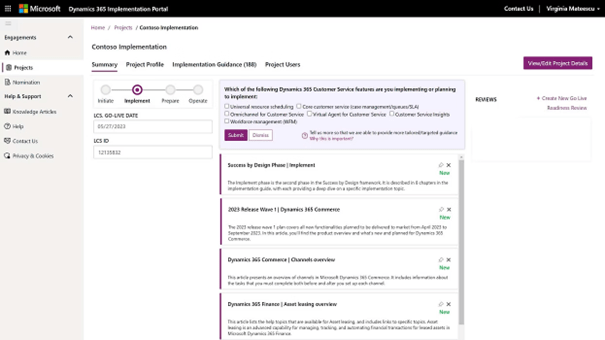
This tool helps project managers, consultants, and technical teams by providing guided workflows, templates, and resources specific to Dynamics 365 implementations. This structured approach aims to improve both efficiency and collaboration while reducing reliance on external project management tools.
Key features of the Portal implementation
- Project management: provides project management functionality. Users can create and join projects, manage project data, and track progress through an intuitive interface. This ensures that all stakeholders have visibility into the status of the project and can collaborate effectively.
- Integration wizard: simplifies the process of setting up new projects. This feature guides users through the steps needed to create a project, add users, and configure project details, making it easy to get started quickly.
- Telemetry information: one of the most notable features of the implementation portal is its telemetry information tool. This tool analyzes usage patterns and provides practical recommendations to optimize the implementation process. It helps to identify potential problems quickly and suggests improvements based on real-time data.
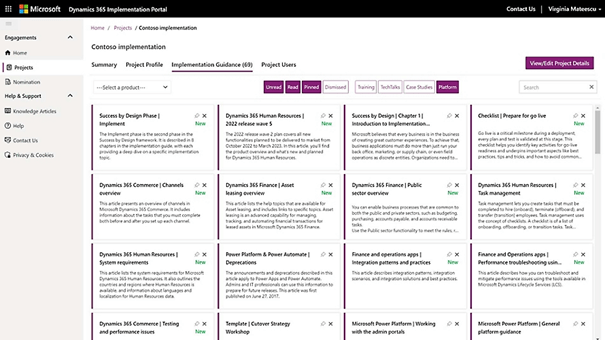
- Knowledge articles: the portal provides access to a multitude of knowledge articles that provide scenario-based recommendations. These articles are from thousands of Dynamics 365 implementation projects and provide best practices and solutions to usual challenges.
- User-friendly interface: makes the integration process accessible to users from all technical backgrounds. Acting as a virtual assistant, it provides clear instructions and prompts, allowing you to effortlessly create your implementation project.
- Instant project availability: Once the integration process is complete, your Dynamics 365 implementation project is immediately available. This instant availability streamlines collaboration and ensures that all stakeholders can quickly access project resources, facilitating more seamless project execution.
- Data protection: The integration wizard includes an automatic approval flow to protect the data. If the implementation project targets a tenant other than the one you are connected to, the wizard launches an approval process. Two reviewers of the target tenant must approve the request before sensitive information such as client names and telemetry information are shared. This process ensures compliance with data protection regulations and builds customer confidence.
Success by Design Framework
The Dynamics 365 implementation portal is based on Microsoft’s “Success by Design” framework, a systematic approach to successful cloud deployment. Success by Design provides prescriptive guidance for designing, building, and deploying your Dynamics 365 solution. The integration wizard improves this framework:
- Support in the creation of your implementation projects.
- Facilitate necessary revisions.
- Provide relevant information to maximize the potential of Dynamics 365.
How to Start?
- Create your implementation project: Log in to the Dynamics 365 Implementation Portal and create your implementation project.
- Follow the integration wizard: the wizard will guide you through each step with clear instructions, making the process simple and accessible.
- Collaborate and access resources: Once completed, your project will be ready for collaboration, ensuring that all stakeholders have timely access to the necessary resources.
- Ensure data protection: if your project involves a different tenant, the wizard will manage the approval flow to ensure data protection and compliance.
Conclusion
The Dynamics 365 Implementation Portal is a significant step forward from Lifecycle Services (LCS) to facilitate the management of Dynamics 365 implementations. With its enhanced user experience, integrated guidance, real-time insights and streamlined onboarding process, the implementation portal has become the go-to tool for Dynamics 365 projects. It helps your business tap into the full potential of Dynamics 365 e
 D365FOAdviceTips
Leave a comment