
- Open Data Protocol (OData)
- Custom Service
- Recurring integrations
- Data management framework package API
- Office Integrations
- External web service
I want to share with you a list of simple and useful tips that can help you improve the efficiency and usability of your D365 Finance system without any customization or configuration. These advices are available to all users.
When building the solution and interacting with other applications, teams must make thoughtful decisions about data integration scenarios when implementing D365 Finance.
D365 Finance has several types of APIs that support integration scenarios:
- Open Data Protocol (OData)
- Custom services
- External web services
- Office integrations
- Recurring integrations
- Data management package API
Depending on the answers to the questions to ask about volume, recurrence, frequency, who is master or slave, error management on the interface, planning and whether you make full or incremental for data exchange, you reach a level of complexity that will define the right API to use.
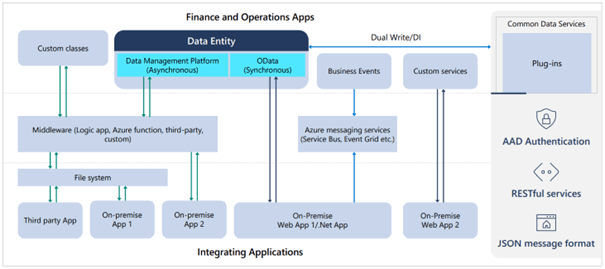
How to choose the best API for each scenario:
Open Data Protocol (OData)
The OData service endpoints should be used for the integration scenario when real-time data is required. For example, when a product is created or modified in the third-party application, the user will see the same changes in D365 Finance in real time.
- Determine which legal entities are required for integration.
- Ensure that the OData service endpoints are available for the same set of legal entities identified as required for integration.
- In the third-party application, ensure that when data is created or modified, an OData call is made to D365 Finance to make the same modification.
OData is a standard protocol for data creation and consumption. The purpose of OData is to provide a protocol for creation, read, update, and delete (CRUD) operations. OData uses web technologies such as HTTP JSON to provide access to information from various applications. It allows developers to interact with data using RESTful web services. It is possible to display a list of all exposed entities, via a URL. OData enables a SQL language that allows you to create rich queries on the database, so that the results include only the desired data elements.

Custom Service
The custom service can be used when the data entity is not readily available, and its development is not desired.
For example, when a person places a sales order, the third-party system needs information from D365 Finance to inform whether the item is in stock in real time. This scenario can be implemented using a custom service.
The recommended solution is:
- A custom call is created in D365 Finance to calculate the physical inventory available for a given item.
- In the third-party application, a real-time call is made to a custom service endpoint via REST (or SOAP) to retrieve an item’s inventory information.
This scenario can also be achieved by using an OData action that would execute the specific logic to obtain the required data.
With OData, customs services and synchronous integration models, business logic is immediately executed when APIs are called. Customs are rather oriented towards the execution of requests whose logic requires specific code or specific actions (validation, change of status). Processing times are subject to the web services’ expiration time, which does not exceed a few minutes. This is extremely useful for quickly querying highly fluctuating data.
For example, if a custom service is used to search for available stock, the business logic is immediately executed as part of the JSON/SOAP endpoint call and when implemented, the stock sum is immediately returned. Alternatively, OData can be used to insert records, the records are immediately inserted as part of the OData call.

Recurring integrations
This API allows the exchange of documents or files between the D365 Finance service and any third-party application or service: we send files or data packages. It uses secure REST APIs and authorization mechanisms to receive and send data to integration systems.
The Recurring Integrations API supports both import and export of data with many benefits.
- Task Planning: done in D365 Finance
- Multiple data formats: Files and data packages for import and export.
- Transformation: If your data is in XML format, XSLT is supported to convert the data.
- Protocols: The two supported protocols for recurring integrations are SOAP and REST.
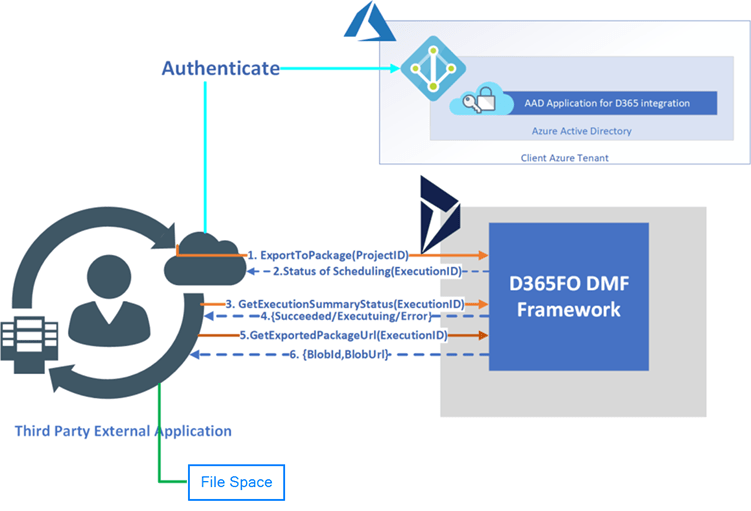
Data management framework package API
The Data management Framework is a file-based integration scenario that is supported by D365 Finance. There are several reasons your organization may choose this scenario:
- Planning: Unlike recurring integrations, planning is done outside of D365 Finance
- Formats: data packages only.
- Transformation: Data transformations external to the system.
- Protocols: REST is supported.
Office Integrations
The integration capabilities of Microsoft Office provide users with a productive environment that helps them do their work using Office products.
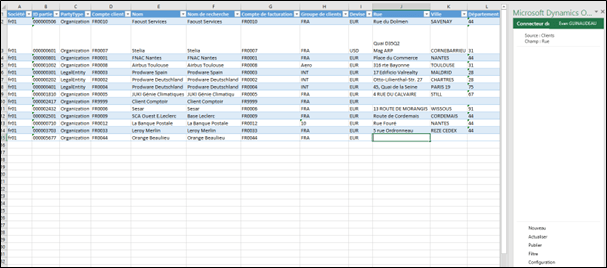
Microsoft Excel can quickly modify and analyze data. The Excel Data Connector application interacts with Excel workbooks and OData services created for publicly exposed data entities. The Excel Data Connector add-in allows Excel to become a transparent part of the user experience. This add-in allows the CRUD (Create, Read, Update, Delete) operations to be performed in connection with D365 Finance. The add-in runs in a task pane.
External web service
The external web service is implemented in D365 Finance by calling or consuming the external web service that facilitates data exchange.
 D365FOAdviceTips
Leave a comment