
Suppose you have a list of Sales orders, and you want to use the information according to the column “Created date and time”:

For example, you want to have a preview of sales orders created in the last 5 days. To make this filter, I use «Advanced filter or sorting». I select the field “Created date and time” and use the “DayRange” command:


And the result is:

I use the following filtering criteria: (DayRange(-5,0)) which will only filter on customer orders created in the last 5 days.
- DayRange: I will calculate a number of days based on today. This is specified using the word “DayRange” in the formula, other commands are “MonthRange” and “YearRange”.
- -5: How long you will look back from today, I will look back up to 5 days.
- 0: how long will you look to the future from today. I am not looking zero.
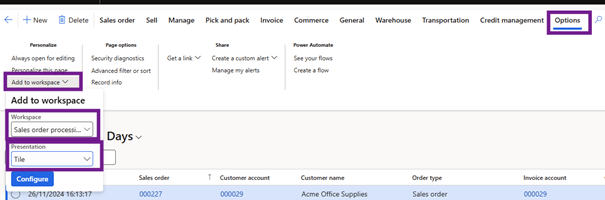
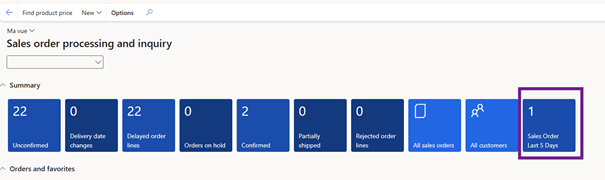
When I save the result of my view, I can add this list to the workspace so that I always have an actual picture of the number of sales orders created in the last five days:


Another example is the filter to find all the commands entered by date and time after the current time: (GreaterThanUtcNow ())
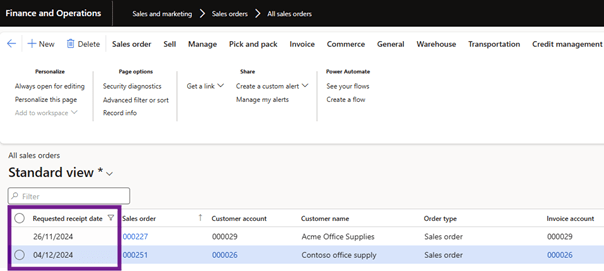
I have a list of sales orders with past and future Requested receipt dates:

I can now use the (GreaterThanUtcNow()) option:

And the result is:

You can also use a filter on a range of Months:

On the operation of this filter: (MonthRange(0,4)).
- MonthRange: I will calculate a number of months based on today.
- 0: how long you will look back from today in months. I do not look back in months.
- 4: How long you will look into the future from today in months. I will investigate the next three months.
The result is that, on today’s basis, only the requested receipt dates for the current month and the next 3 months (total 4 months) will be presented:
You want a filter with only the results related to today? Then select the “D” (for Day) in the date field:

This will give you the current day’s transactions.
- T = System date: date when using the PC (not related to session date in D365FO)
- D = Session date: selected session date in D365FO
 D365FOAdviceTips
Leave a comment