
- Overview
- Provisioning a New Environment: UI & PowerShell
- Provisioning from Power Platform Admin Center (PPAC)
- Provisioning Using PowerShell
- Final Thoughts
Overview
Introduction
The unified developer experience consolidates disparate developer tools and environments for Finance and Operations applications and the Power Platform in order to reduce friction and simplify work across these applications. Finance and Operations applications provide a rich ecosystem for developers, using a metadata- and code-based development environment for mission-critical scenarios.
Power Platform enables the rapid and seamless creation of solutions using low-code development paradigms and Microsoft Dataverse as a relational data store. Power Platform also adds the ability to create and deploy solutions using continuous integration and continuous deployment (CI/CD) pipelines.
Why the Unified Environment Matters
Traditionally, ERP environments and Power Platform solutions were managed separately. Today, Finance and Operations applications are hosted directly on Dataverse, which means:
- One environment for ERP and low-code
- Built-in CI/CD compatibility
- Real-time integration with Power Apps
- Simplified security and governance
This model enables scenarios such as capturing sales orders in Power Apps while instantly validating availability and pricing from Finance and Operations.
Typical Scenario
Let’s consider a typical scenario in which a developer builds an application to capture sales orders using Microsoft Power Apps and stores the collected data in Dataverse. Using the data synchronization engines described below, the data becomes available to Finance and Operations applications to determine item availability, pricing, and other business information. The results are then returned to Power Apps almost in real time.
Finance and Operations Apps Development
Development for Finance and Operations applications is performed through Visual Studio using the dedicated Visual Studio extension. This development environment provides everything a developer would expect. Because the unified environment runs in the cloud, Microsoft has introduced several changes and improvements to the way developers work with Finance and Operations applications.
However, existing Finance and Operations developers will find that most workflows remain very similar to what they are already familiar with. Most existing documentation—such as extending existing code—remains relevant.
Power Platform
Power Platform is supported by a rich development ecosystem. A wide range of tools is available for solution development. In particular, Dataverse—the relational database management system—is used by the unified developer experience.
Many unified solutions rely on data synchronization between Finance and Operations tables and Dataverse tables. Two technologies are available for this purpose:
- Dual-write
- Virtual entities
Power Platform Admin Center
The Power Platform Admin Center (PPAC) is Microsoft’s centralized administration portal for managing all Power Platform services: Power Apps, Power Automate, Power Pages, Copilot Studio, and certain Dynamics 365 components. It allows administrators to manage environments, security, deployments, licensing, and AI usage.
Provisioning a New Environment: UI & PowerShell
Introduction
Finance and Operations applications have been redesigned as applications hosted by Microsoft Dataverse. Customers no longer need to provision their ERP system separately from their low-code applications and other Dynamics 365 platform apps.
Most administrative actions in Power Platform are available through the admin center and via API-based experiences.
Environment Provisioning
The easiest way to make Finance and Operations applications operational in Power Platform is to create a new environment using a template. A template improves efficiency by creating a Dataverse-based Power Platform environment with several preinstalled applications. In this scenario, the Finance and Operations application is automatically installed during environment creation.
Prerequisites
You cannot provision Finance and Operations applications in Power Platform unless you have an assigned license granting this permission.
Examples include:
- Dynamics 365 Finance
- Dynamics 365 Supply Chain Management
- Dynamics 365 Operations Application Partner Sandbox (for partners and ISVs)
The license must be assigned to your user account in Microsoft Entra by a license administrator. You can view your assigned licenses on the MyAccount subscription page.
You must also have at least 1 GB of database capacity for both Finance and Operations and Dataverse.
Without these, provisioning will fail.
Choosing the Right Template
All Dynamics 365 environment templates are mapped to specific user licenses. This means the administrator creating the environment must have the corresponding full license assigned.
| License | Template Name | Template ID |
| Dynamics 365 Finance | Finance (preview) | D365_FinOps_Finance |
| Dynamics 365 Supply Chain Management | Supply Chain Management (preview) | D365_FinOps_SCM |
| Dynamics 365 Project Operations | Project Operations Integrated (preview) | D365_FinOps_ProjOps |
| Dynamics 365 Operations Partner Sandbox | Project Operations Integrated (preview) | D365_FinOps_ProjOps |
| Dynamics 365 Commerce | Commerce (preview) | D365_FinOps_Commerce |
Current Limitations
- Environment name cannot exceed 20 characters.
Provisioning from Power Platform Admin Center (PPAC)
This is the easiest and most common approach.
To create an environment:
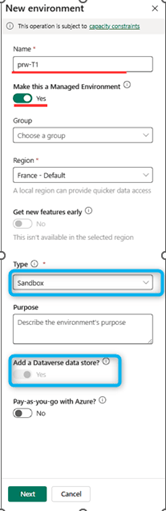
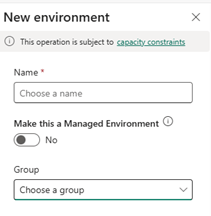
- Create a new environment with a Dataverse data store.
- Enter the environment name.
- Ensure “Add a Dataverse data store” is checked.
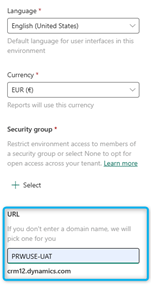
The Security Group field is critical for access management. It controls environment visibility based on group membership and assigned environment administrators.
You may also define the Domain Name. If not specified, the environment URL will be auto-generated (for example: orgXXXXXXXXX). This URL will also be used for the Dynamics 365 Finance environment.
You may enable “Enable Dynamics 365 apps” to deploy Finance or Supply Chain Management, depending on your assigned license.

After saving, wait for the Dataverse environment to be ready.
Once completed:
- Open environment details.
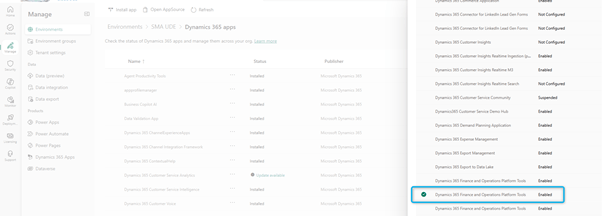
- Go to Dynamics 365 apps.
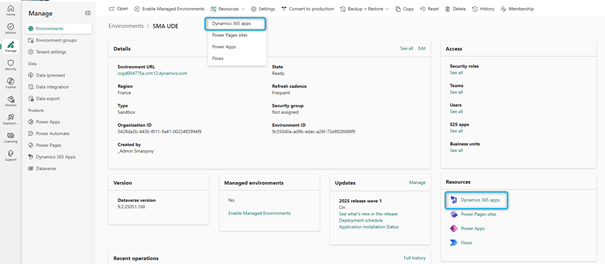
- Install Dynamics 365 Finance and Operations Platform Tools.
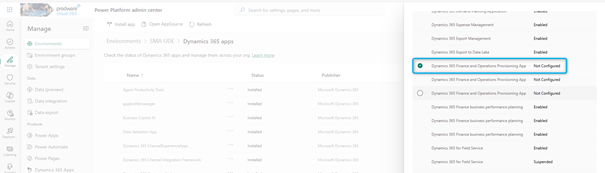
- Then install Dynamics 365 Finance and Operations Provisioning App.
During provisioning, you can enable:
- Developer tools for Finance and Operations
- Demo data (Contoso)
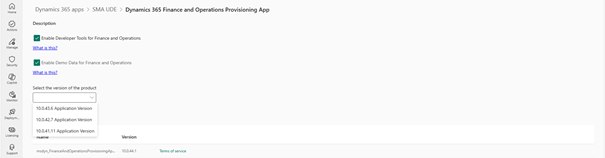
Finally, select the available version (usually the latest supported PU) and start installation.
Provisioning typically takes 1 to 1.5 hours.
Provisioning Using PowerShell
PowerShell allows full automation of environment creation.
For automation and DevOps scenarios, PowerShell is the preferred approach.
Using the Power Platform Administration module, you can:
- Fully automate environment creation
- Control developer tools activation
- Enable preview features
- Standardize deployments across teams
This approach is ideal for partners, ISVs, and enterprise ALM strategies.
Key parameters:
- DevToolsEnabled: Enables X++ development
- DemoDataEnabled: Installs Contoso demo data
- EnvironmentSku: Sandbox or Production
- DomainName: Defines readable environment URL
- FirstRelease: Enables preview features
Two examples are provided:
- Unified Sandbox Environment (USE / T2)
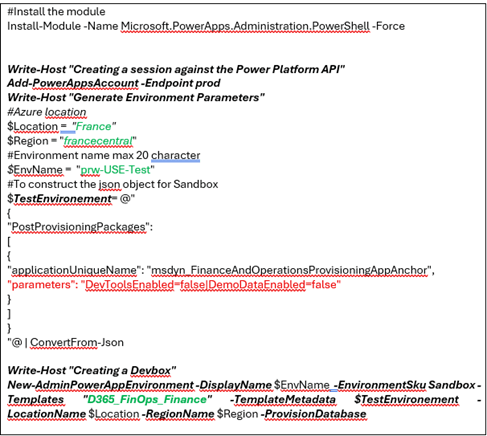
- Unified Development Environment (UDE / DevBox)

Final Thoughts
The unified Dynamics 365 Finance and Operations environment represents a major step forward in Microsoft’s ERP platform strategy. By leveraging Dataverse and Power Platform natively, organizations can:
- Reduce environment complexity
- Accelerate development cycles
- Improve governance
- Enable true low-code / pro-code collaboration
Whether you choose the admin portal or PowerShell automation, adopting unified environments is now a foundational best practice for modern Dynamics 365 implementations.
 D365FOAdviceTips
Leave a comment