- Why Delete an Environment?
- Option 1: Delete an Environment Using the Power Platform Admin Center (PPAC)
- Option 2: Delete an Environment Using PowerShell
- Best Practices
- Final Thoughts
Managing environments is a common responsibility for Power Platform administrators. Over time, unused or temporary environments can consume valuable Dataverse capacity. Deleting these environments helps free up resources and keeps your tenant clean and efficient.
In this article, we’ll walk through two ways to delete a Power Platform environment:
- Using the Power Platform Admin Center (PPAC)
- Using PowerShell
Why Delete an Environment?
Administrators often delete environments to:
- Reclaim Dataverse storage capacity
- Remove test or sandbox environments
- Maintain governance and organization standards
Once an environment is deleted, the Dataverse storage it was consuming becomes available for other purposes.
Option 1: Delete an Environment Using the Power Platform Admin Center (PPAC)
This is the most user-friendly method and is ideal for administrators who prefer a graphical interface.
Steps
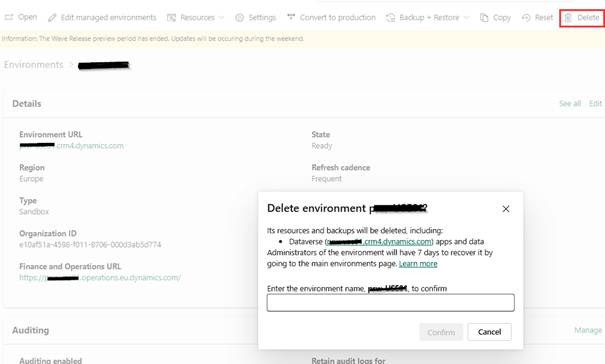
- Open the Power Platform Admin Center (PPAC).
- Select the environment you want to delete.
- In the top action bar, click Delete.
- Confirm the deletion when prompted.
✅ The deletion process will begin, and the Dataverse operational storage used by the environment will be released.
Option 2: Delete an Environment Using PowerShell
PowerShell is useful for automation, bulk operations, or scripted administration.
Prerequisites
- PowerShell installed
- Administrator permissions
- Internet access to connect to the Power Platform API
Step 1: Install the Required Module
Install-Module -Name Microsoft.PowerApps.Administration.PowerShell -Force
Step 2: Connect to Power Platform
Write-Host “Creating a session against the Power Platform API”
Add-PowerAppsAccount -Endpoint prod
Step 3: Define the Environment ID
Replace the value below with the Environment ID you want to delete.
$EnvName = “3c2f7648-ad60-4871-91cb-b77d7ef3c239”
Step 4: Remove the Environment
Write-Host “Remove Environment”
Remove-AdminPowerAppEnvironment -EnvironmentName $EnvName
⚠️ Warning: This action is irreversible. Always double-check the environment ID before running the command.
Best Practices
- Always confirm the environment is no longer in use
- Avoid deleting production environments without formal approval
- Keep a record of deleted environments for audit purposes
- Consider automation scripts for recurring cleanup
Final Thoughts
Deleting unused environments is an important part of Power Platform governance. Whether you prefer the simplicity of the Admin Center or the power of automation through PowerShell, both approaches help ensure your tenant remains optimized and cost-effective.
If you manage multiple environments, combining governance policies with periodic cleanup can significantly improve long-term platform health.
Happy administering!
 D365FOAdviceTips
Leave a comment