Licenses
For administrative operations such as creating an environment and adding applications, a SCM or Finance license is required, depending on the model being used.
For USE and UDE environments, no license is currently required.
Only the production environment requires a per-user license, with a grace allowance for the “System Administrator” role.
Azure Roles
To create an environment, the following roles are required:
- Power Platform Administrator role for PPAC access
- Dynamics 365 Administrator role for managing D365 applications
These roles must be assigned to the technical project manager, and at minimum the Dynamics 365 Administrator role is required for application management.
These roles must be assigned through GDAP.
PPAC Roles
For administration purposes:
- The creator must have the System Administrator role
- The technical project manager must also have this role in order to perform maintenance operations
Storage Capacity
To create an environment, you must have at least 1 GB of database capacity available for Finance & Operations databases and Dataverse.
Minimum storage requirements:
- Dataverse: 7 GB minimum
- Finance & Operations:
- 3 GB for an empty database
- 7 GB for the Contoso demonstration database
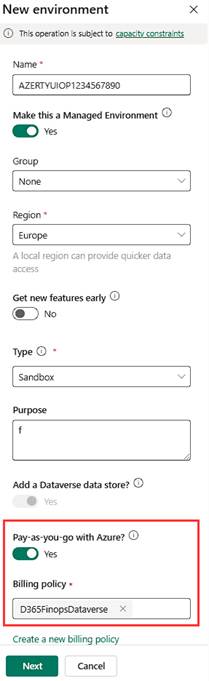
If there is not enough available capacity to install a new environment, it is currently possible to proceed by using the Pay-As-You-Go option during environment creation (available only through the PPAC UI).
This option — Pay as you go with a billing policy — can be used as a workaround when storage capacity is insufficient.
Billing Plan
It is possible to install an environment through PPAC by linking it to:
- an Azure subscription
- a billing plan
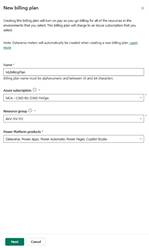
Billing Plan / Billing Policy
- Creation of a billing plan
- PPAC and Billing Plan integration
- Environment creation via Billing Plan
 D365FOAdviceTips
Leave a comment