
- Introduction
- Production Environment
- ALM – Build Pipeline
- ALM – Production Release
- Required DevOps Tasks
- PPAC Storage
- Best Practices
- Environment Groups
- Current Gaps
- Available Add-ins
- Roadmap
Introduction
Several new features have recently appeared, notably the availability of the production environment for D365 Finance and Operations in PPAC-only mode, without LCS!
First of all, the Unified Admin for Sandbox is now generally available, also known as USE (Unified Sandbox Environment), along with the new TIER X feature, also called elastic compute, based on Power Platform Requests.
From now on, when you create a USE, its environment will be sized like a Production environment. This represents a major improvement compared to LCS. No more costs for T3, T4, or T5 environments.
⚠️ Attention must be paid to older USE environments created several months ago, which are still sized as T2 environments in LCS, with three fixed AOS instances.
This means you can finally run production-level performance tests or manage load peaks at any time—during implementation or even later—without purchasing performance environments in LCS.
As long as you have sufficient storage, you can create environments without suffering from the poor performance experienced on T2 environments. This is particularly useful for data migration, as it allows execution times to be measured exactly as they would be in production.
In the future, depending on your usage, additional deployments for other legal entities, or the purchase of additional licenses, Microsoft will be able to automatically and proactively resize environments.
This resolves long-standing issues with the LCS subscription estimator, which often produced severely underestimated results across projects.
Since the launch of D365 Finance & Operations, the operating model was flawed:
if you posted one million inventory transactions during peak load and only had 20 user licenses, you would not get 50 AOS — and it was not easy to purchase additional AOS capacity.
Now, a new option is available: Power Platform API requests.
You can purchase more if you need higher performance (for example, many integrations but few users). These licenses can even be purchased via Azure Pay-As-You-Go, which is ideal for companies with seasonal activity or regular rollouts that need additional performance during data migration, while maintaining stable activity the rest of the year.
In summary
We finally have true automatic scaling.
If you have sufficient:
- Storage
- User licenses
- Power Platform API requests
Then the platform should support your workload.
Microsoft has not yet published the exact calculation details but plans to make them public so that customers and partners can better anticipate load peaks. Telemetry and FastTrack recommendations will also play an important role.
For example, with only 20 base Finance licenses, you get:
- 2 AOS
- 2 batch AOS → 4 total, which is generally the minimum required.
For a Unified Production Environment, this is exactly the same configuration.
Reminder:
A Unified Development Environment (UDE) is always configured with 1 fixed AOS and is not included in automatic scaling.
Production Environment
You can now create a Unified Production Environment (UPE) at any time — and even multiple ones within the same tenant.
You may do this from the very beginning of the project if desired.
This is the latest major update:all environments are now managed through PPAC.
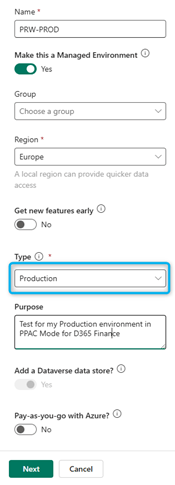
The procedure is identical to creating a Test environment (Sandbox USE).
You simply select “Production” when creating the Dataverse environment in PPAC.
Provisioning takes approximately 2 hours.
Although you can technically create a production environment without FastTrack approval (unlike LCS, where FastTrack Go-Live review is mandatory), it is strongly recommended to do so in collaboration with Microsoft.
(It would not be surprising if Microsoft reintroduced mandatory controls through PPAC by 2026.)
This change significantly improves agility and reduces dependencies, but best practices must still be followed.
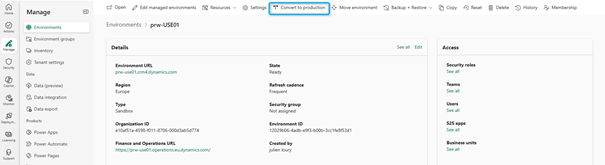
It is also possible to convert a Sandbox environment into Production directly in PPAC
(Promotion of the Golden Configuration → Production & Go-Live).
- The environment name can be changed at any time in PPAC — it is only a label.
- However, naming conventions are critical, because UDE and USE are all considered Sandbox environments in Dataverse.
- The URL cannot be changed due to D365 Finance & Operations limitations.
Example:
If you create a USE with the URL: ProjectName-golden.operations.dynamics.com
That same URL will remain after conversion to production — which can be problematic.
To avoid this:
- Create a new USE shortly before go-live
- Copy the reference USE into it
- Convert this new environment to Production
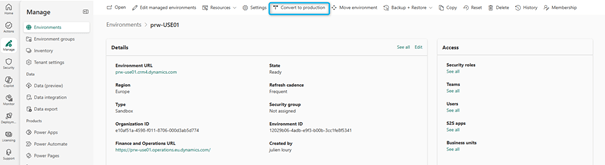
To complete the conversion, simply click Convert, wait about 30 minutes, and you’re done.
ALM – Build Pipeline
For the build pipeline, configure it to generate a UDP (Unified Deployable Package) for Power Platform.
Reminder:
Best practice is now to move as early as possible to:
- Git (instead of TFVC)
- YAML pipelines for both build and release
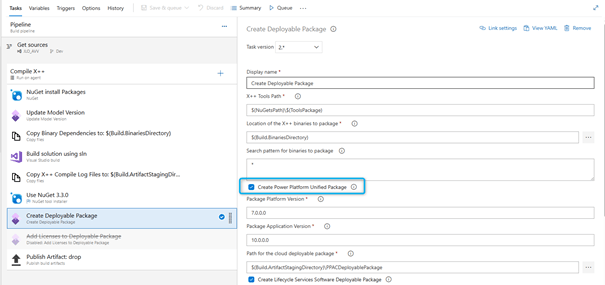
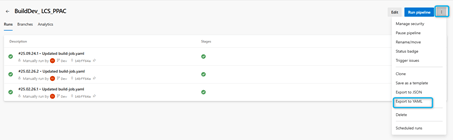
A quick tip: you can extract the YAML file from the classic build pipeline UI.
ALM – Production Release
Technically, it is possible to deploy directly to production from PPAC and UDE.
However, this is not recommended.
The traditional and recommended approach is:
- Deploy to a Test environment (Sandbox) as a release candidate
- Validate
- Deploy to Production
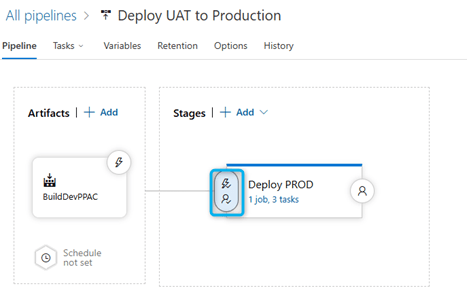
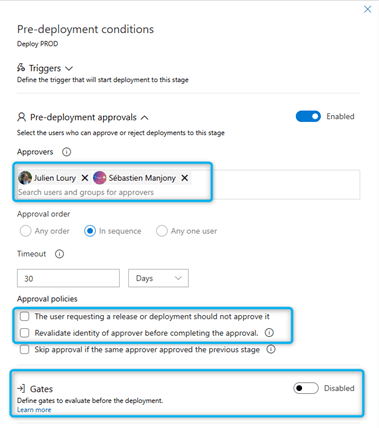
Approval workflows and deployment strategies should be implemented, similar to standard DevOps practices.
For example:
- Deploy to USE
- Validate
- Promote to Production once approved
What Microsoft has not yet clarified is how to create a true all-in-one package that includes both:
- Microsoft service updates
- Custom developments
In LCS, the release candidate process allowed a snapshot of both code and platform version.
For now, it is preferable to apply service updates manually in production when needed, as the current deployment pipeline mainly supports custom code deployments.
With PAC CLI, it will also be possible to trigger these operations externally (for example from Azure DevOps), including approval workflows.
You can configure delayed deployment so that production release occurs at a specific date and time.
Required DevOps Tasks
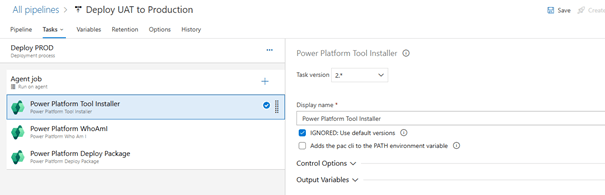
Power Platform Tool Installer
Purpose:
Installs required Power Platform build tools on the agent.
Why:
Ensures all required modules and dependencies are available before executing Power Platform operations.
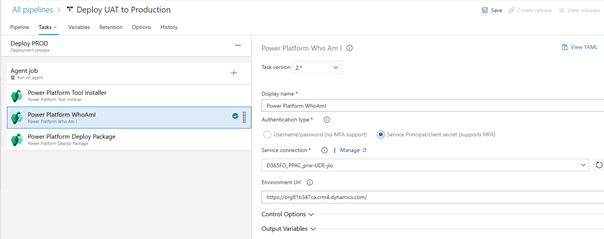
Power Platform Who Am I
Purpose:
Validates the connection to the Power Platform environment.
Why:
Confirms identity and permissions of the service connection and helps with troubleshooting.
The environment URL can be left empty, as it is defined in the DevOps service connection.
Power Platform Deploy Package
Purpose:
Deploys the solution package (managed or unmanaged) to the target environment.
Why:
This is the main deployment step used to publish new features, fixes, and updates.
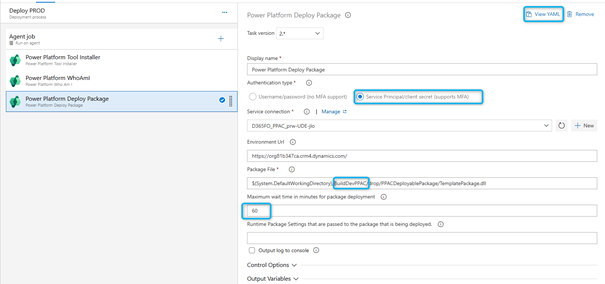
You can now configure a Service Principal instead of using username/password as in LCS — a much more secure approach.
Best practice: one service principal per environment.
Deployment duration
Deployments usually take:
- 30 minutes to 1 hour
- sometimes longer
This is important if you rely on the 1,800 free DevOps minutes per month.
A new DevOps limitation exists:
- In free mode, each pipeline can run only 1 hour maximum
Therefore, using at least one paid agent is strongly recommended.
Previously in LCS, API calls took only 2–3 minutes.
Now the process may appear stuck with error logs even when no error exists, giving the impression of “waiting for nothing”.
Always retrieve deployment logs from the Model-Driven Finance and Operations Package Manager via https://make.powerapps.com. Logs are available under Operations History.
You can also configure DevOps notifications for failed and successful deployments to replicate the email flow previously provided by LCS.
You are now fully in the PPAC world.
From an administration perspective, this brings:
- Powerful APIs
- SDKs
- Automation capabilities outside the UI
There is much to learn:
- PAC CLI
- Power Platform Admin Connector V2
- .NET SDK
PPAC follows an API-first approach, especially for environment lifecycle management.
PPAC Storage
To address storage issues:
- Use the archiving framework
- Cleanup routines
- Limited Transaction Copy (LTC) for UDE
After LTC, selected DMF packages can be reimported automatically to provide developers with sample transactions.
Remember:
- The Copy button in PPAC works like Refresh Database in D365 Finance
- Point-in-Time Restore (PITR) is now available for UDE, USE, and UPE
— previously impossible with CHE
Storage is a major consideration when moving to Unified Experience, especially for CHE → UDE migrations.
However, once licenses are endorsed, Microsoft will not allow long-term storage overages.
This rule applies to both LCS and Unified environments.
Storage should therefore not block migration to PPAC.
Best Practices
- Create UDE environments via PowerShell and DevOps, not via PPAC UI
- Create environments in PPAC using a blank Dataverse with the provisioning app
- For USE and UPE, prefer PPAC UI with predefined templates
- During provisioning, you can:
- select the desired version
- include or exclude the Contoso demo database
Environment Groups
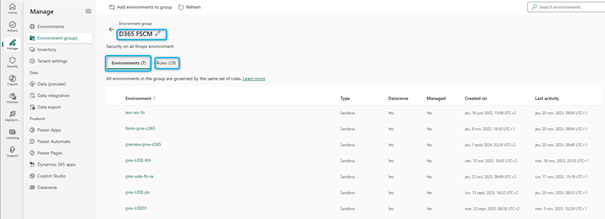
Environment groups replace what LCS projects used to provide.
By grouping UDE, USE, and UPE environments:
- Shared rules can be applied
- Future Finance-specific rules will be introduced
Examples:
- Maintenance windows
- FastTrack project creation
- Storage allocation per group
Example:
If a customer buys 1,000 licenses and receives 3 TB of storage, they may want:
- 1 TB per environment group (equivalent to LCS projects)
Reminder:
Environment groups are Dataverse managed features.
Current Gaps
- Finance-specific LCS features (such as maintenance windows) will move to environment groups
- NuGet package storage needs an alternative to LCS Shared Asset Library
- Commerce and e-commerce:
- Supported in Unified Experience
- Currently Private Preview
- Public Preview: December 2025
- General Availability: April 2026
Available Add-ins
(Status as of October 2025)
Analytics & Reporting
- BPA: ✔ PPAC only
- Finance Insights: ❌ (will be merged into BPA)
- Financial Reporting: ❌ (support request only)
- Export to Data Lake: ❌ deprecated (use Synapse or Fabric Link)
Planning & Forecasting
- BPP: ✔ PPAC only
- Demand Planning: ✔ PPAC only
- Planning Optimization: ✔ both
Supply Chain & Operations
- Inventory Visibility: ✔
- IoT Intelligence: ❌ LCS only
- Traceability Service: ✔
Financial Operations
- Expense Management: ✔
- Financial Dimension Service: ✔
- Optimize Year-End Close: ❌ LCS only
Inventory & Costing
- Global Inventory Accounting: ✔
Regulation & Compliance
- Tax Calculation Service: ✔
- Electronic Invoicing: ❌ (pre-prod exists)
Roadmap
Technically, everything is in General Availability, but many features have only been released in recent weeks.
Still missing:
- Environment group maintenance windows
- Some add-ins in PPAC
- Commerce GA
- AX 2012/2009 migration support
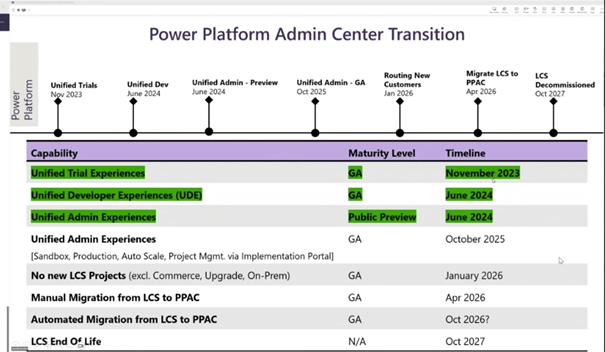
From 2026 onward:
- New projects must start exclusively on PPAC
- No new LCS implementation projects
Microsoft will likely announce the end of LCS after a transition period (probably one year).
LCS is expected to remain in use at least until 2027.
Despite storage challenges, the Unified Experience provides far superior:
- Development
- Administration
- ALM capabilities
D365 Finance and Dataverse storage will now be combined.
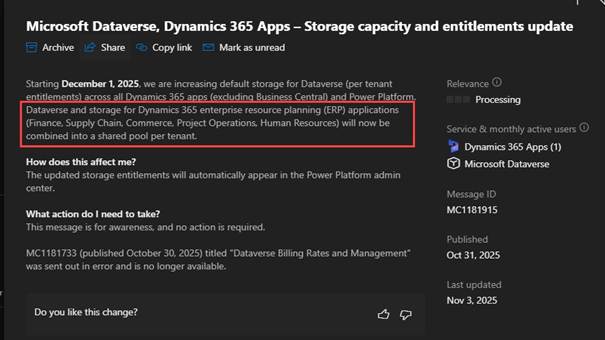
It is hoped that Microsoft will soon publish storage allocation by environment group, as currently this must be managed environment by environment.
 D365FOAdviceTips
Leave a comment