Introduction
This article describes the steps required to update the version of a D365 F&O environment deployed through the Power Platform Admin Center.
Prerequisites
A unified D365 F&O environment provisioned via the Power Platform Admin Center.
Steps
- Go to: https://admin.powerplatform.microsoft.com/
- In the menu, select Manage → Environments, locate the environment you want to update, and click it to open its environment details page.
- From here, click Dynamics 365 apps in the Resources section.
- In the list of Dynamics 365 applications, find the app named Dynamics 365 Finance and Operations Provisioning App. Click the three‑dot menu, then select Manage.

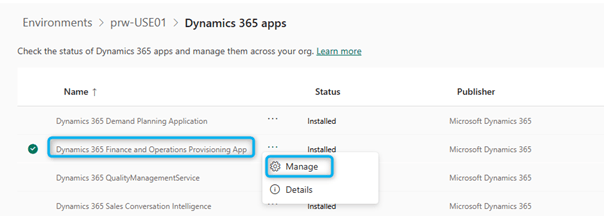
- Clicking Manage will display the following warning; click OK to continue to the provisioning application.
- Click the dropdown under “Select the version of the product” to view the available Finance and Operations versions. If the updated environment is configured for the preview version, the preview build will also appear as an option (not the case here).

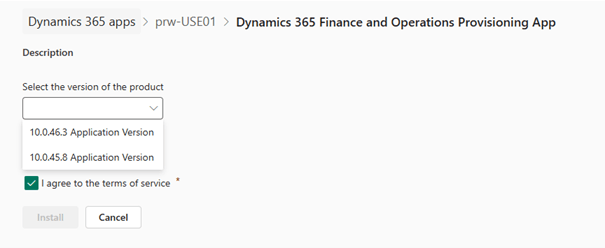
- Check the box to accept the terms of use, then click Install.
- Back on the Dynamics 365 Apps screen, Dynamics 365 Finance and Operations Provisioning App will show the status “Installing”.
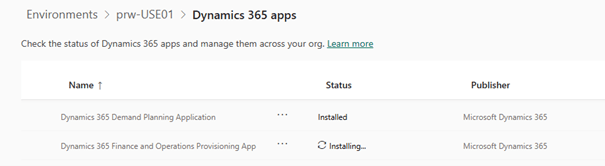
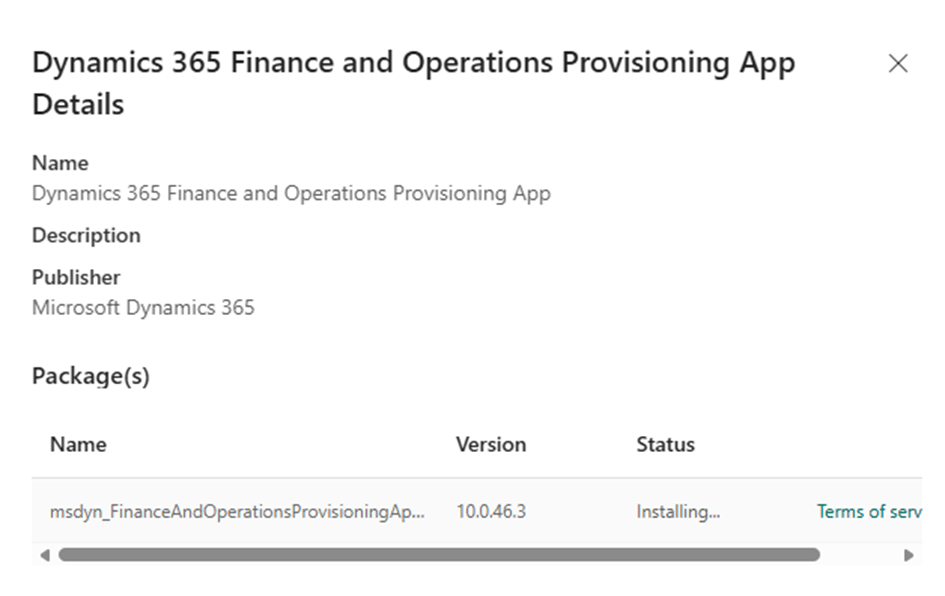
- To verify that the installed version is correct, click the three‑dot menu again, then select Details.
- The panel that opens on the right side of the admin center will also show the status “Installing…” and display the Finance and Operations version being installed.

As with LCS, the update usually completes within a few hours.
Enjoy the latest features in your D365 Finance ERP environment managed by the Power Platform Admin Center.
 D365FOAdviceTips
Leave a comment