
- Introduction
- So what exactly is Work IQ MCP?
- What makes Work IQ MCP production-ready
- Security and compliance, without the headaches
- How to add Work IQ tools to your agent
- What happens when you combine the two?
- A concrete test: sales order verification
- Where this is heading
Introduction
Microsoft is quietly laying the groundwork for something that could fundamentally change the way we interact with ERP systems — and most people haven’t noticed yet.
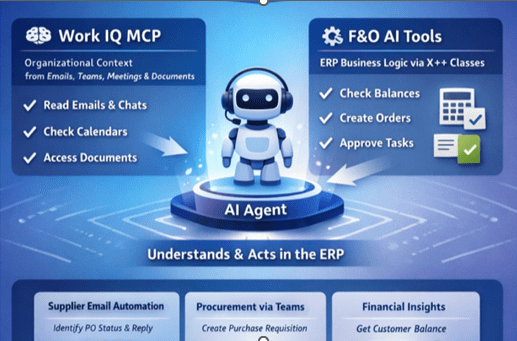
Two preview features, still flying under the radar, are interesting on their own. Put them together, though, and they become genuinely powerful:
- Work IQ MCP — organizational context pulled from email, Teams, meetings, and documents.
- D365 Finance AI tools — ERP business logic exposed directly to AI agents through X++ classes.
Combine them, and you get a brand-new class of AI agent: one that actually understands what’s happening inside your organization and can take action inside your ERP — all in natural language.
So what exactly is Work IQ MCP?
Think of Work IQ as the intelligence layer that grounds Microsoft 365 Copilot — and your custom agents — in your organization’s real-time context. It enables personalized search, advanced reasoning, and sharper semantic understanding by connecting signals from across Microsoft 365 and your business systems.
In other words: Work IQ gives Copilot and your agents a working knowledge of how your business actually operates.
Three layers, one brain
Work IQ rests on three tightly integrated layers — Data, Memory, and Inference:
- Data unifies signals from files, emails, meetings, chats, and business systems to capture how work really happens.
- Memory builds a lasting understanding of how people and teams work, so agents stay aligned with priorities across tasks, apps, and sessions.
- Inference combines models, skills, and tools so agents can reason and act — while Agent 365 ensures traceability, governance, and compliance.
The shift is subtle but profound: Copilot and your agents don’t just understand your work — they actively move it forward.
Plugging Work IQ into your agents
You extend your agents with Work IQ MCP tools inside Copilot Studio. Add a Work IQ MCP server to an agent and, just like that, it has access to real work context. Your agent can scan email threads, check calendars, identify who owns what, and act accordingly.
The real shift: agents no longer just answer questions — they understand the situation.
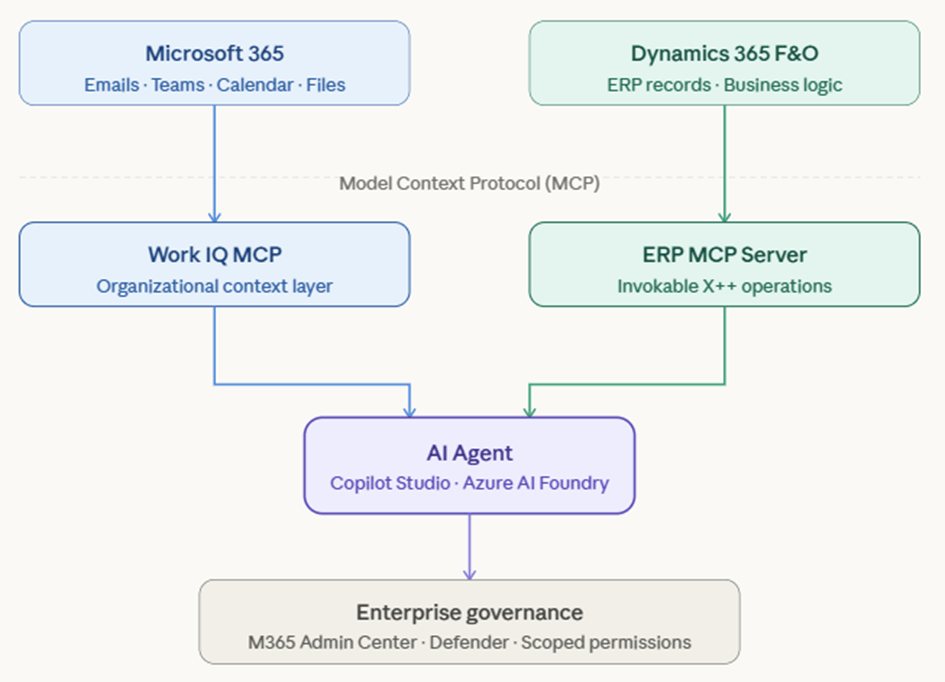
And governance stays intact. Admins manage which MCP servers are enabled, which agents can use them, and at what scope — all from the Microsoft 365 Admin Center. Full operational tracing is available through Microsoft Defender.
What makes Work IQ MCP production-ready
Work IQ MCP tools are designed to be secure, scalable, and compliant. Here’s what that means in practice:
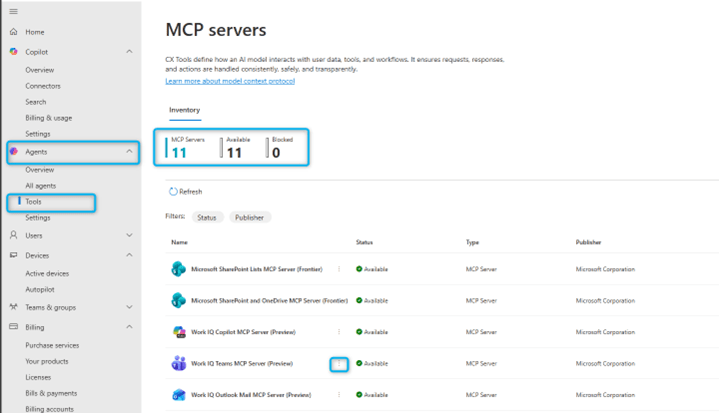
- Centralized governance — admins manage Work IQ MCP servers from the Microsoft 365 Admin Center and can allow or block servers across the organization.
- Enterprise-grade security — agents operate within compliance boundaries through scoped permissions, policy enforcement, and real-time observability.
- Continuous evaluation — every Work IQ MCP server is tested across diverse datasets and models to measure accuracy, latency, and reliability.
- Integrated developer experience — tooling is baked into Microsoft Foundry and Copilot Studio, so you’re building in familiar territory.
Security and compliance, without the headaches
IT admins keep centralized control over which MCP servers agents can reach, so every tool call aligns with organizational policy. The highlights:
- Admin control — enable or block servers directly from the Microsoft 365 Admin Center.
- Least privilege — grant only the permissions an agent actually needs.
- Observability — complete tracing of tool calls for audit and troubleshooting.
- Policy enforcement — rate limits, payload controls, and runtime security scans.
Governance via the Microsoft 365 Admin Center
Admins get a single, unified view of every Work IQ MCP tool and other MCP servers. Block something, and it’s blocked everywhere — for all users, for all agents. Permissions always win over configuration, giving IT the final word on security and compliance.
Each Work IQ tool and MCP server maps to a permission in the Agent 365 app. When onboarding an agent, an admin grants the permissions it needs. The agent only accesses the MCP server after that consent is granted — so every interaction is authorized.
Inside the Microsoft 365 Admin Center, under Agents and Tools, admins can:
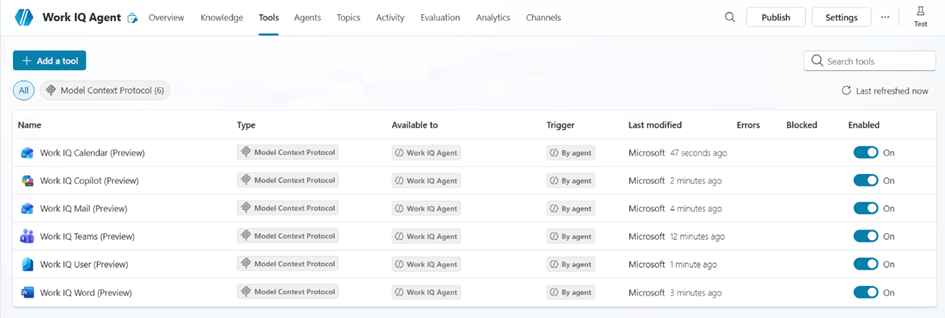
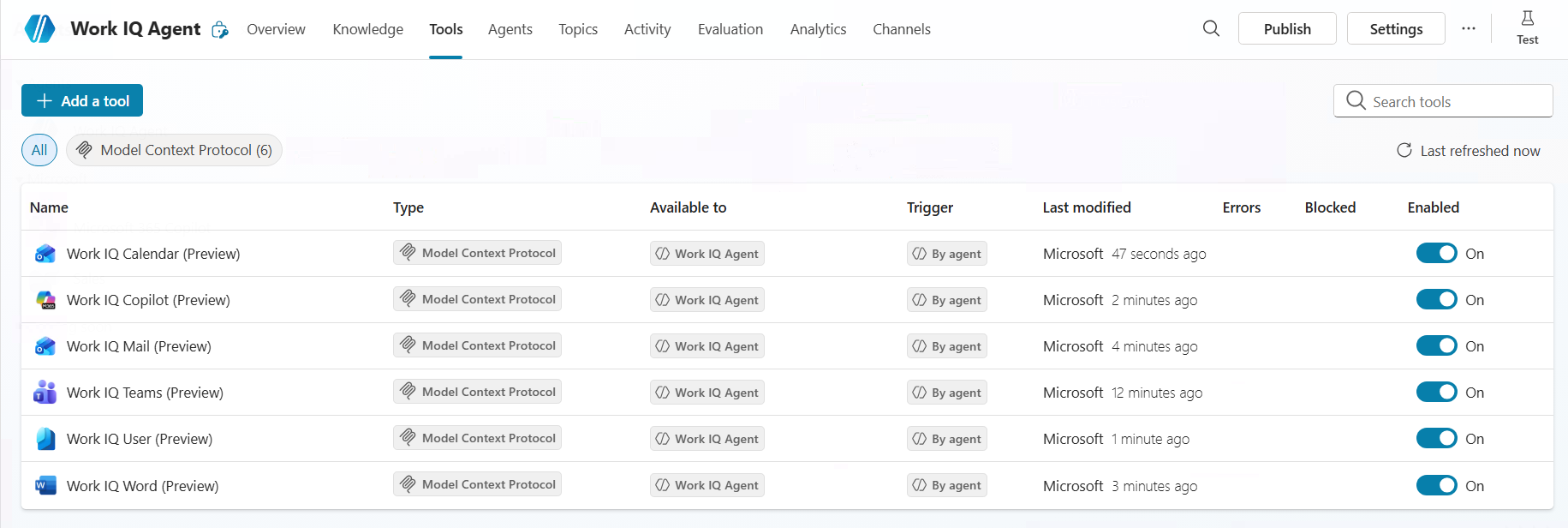
- View every enabled Work IQ MCP server — Work IQ Mail, Calendar, Teams, and any custom servers.
- Allow or block specific servers based on org policy.
- Apply scoped permissions so agents only access what they need.
How to add Work IQ tools to your agent
Before you start
You’ll need a Microsoft 365 Copilot license. That’s it.
Connect your agent to Work IQ
You can connect your agent to several Work IQ MCP servers in Copilot Studio. Here’s the short version using Work IQ Mail — which gives your agent insight into your emails:
- Sign in to Copilot Studio and select (or create) your agent.
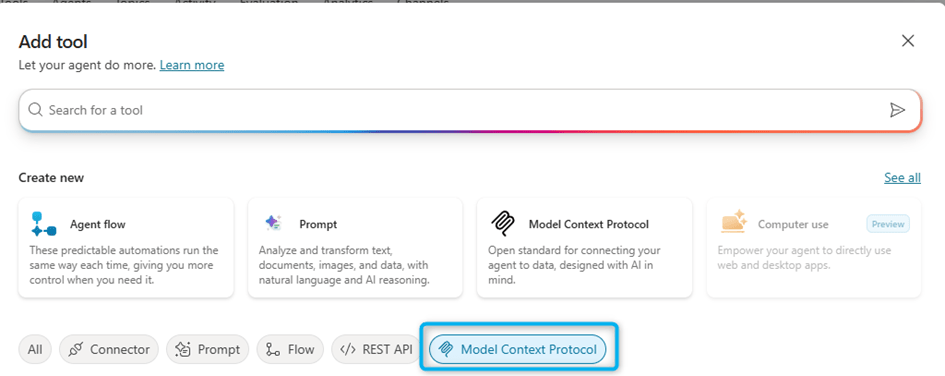
- Go to Tools → Add Tool.

- On the Add Tool page, choose Model Context Protocol to see Work IQ MCPs and other MCP servers.
- Type “mail” in the search box.
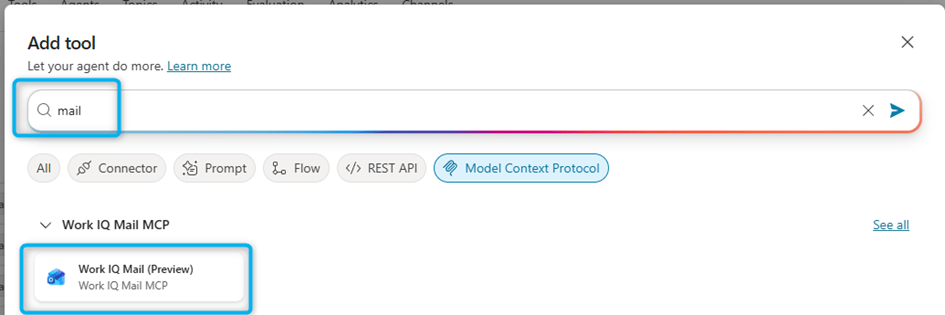
- Select Work IQ Mail, expand the connection dropdown, and pick Create a new connection.
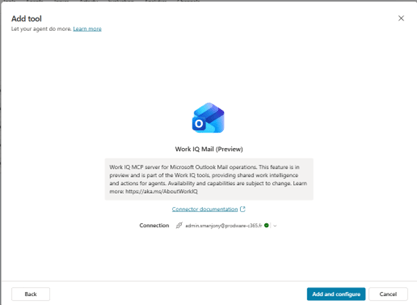
- Click Create, provide your credentials, and finish the connection flow.
- Click Add and Configure, then Allow when prompted to authorize the Work IQ tool.
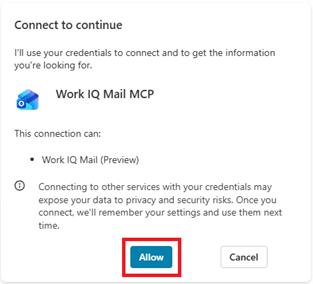
That’s it. Your agent can now read email content, understand the context, and respond appropriately. Rinse and repeat for Work IQ Calendar, Work IQ Teams, and anything else you want to layer in.
AI tools built on D365 Finance business logic
On the ERP side, Dynamics 365 Finance and Operations lets developers expose ERP business logic directly to AI agents — no separate API layer required.
How it works
- Create an X++ class with the right attributes.
- It becomes visible and invocable through the Dynamics 365 ERP MCP server.
- Agents can trigger these operations in natural language.
What your agent can do
- Retrieve calculated ERP values — balances, stock levels, KPIs.
- Create or update records — tasks, purchase requisitions, orders.
- Trigger business processes — approve expenses, confirm orders.
Security piggybacks on the role-based access control (RBAC) already configured in D365 Finance. Agents only do what the signed-in user is allowed to do. Nothing more.
What happens when you combine the two?
This is where it gets interesting. An agent that has both organizational context and ERP execution capabilities can handle scenarios that previously required human coordination.
- Automated supplier communication. An agent reads an email from a vendor, identifies the related purchase order, pulls its status from D365 Finance, and drafts a contextual reply — no manual lookup required.
- Procurement via Teams. A user types “Create a purchase requisition for 3 PCs.” The agent interprets the intent and runs the ERP operation directly.
- Financial insights on demand. A finance user asks “What’s the current balance of customer Contoso Europe?” The agent calls the ERP business logic and returns the calculated value instantly.
A concrete test: sales order verification
To make this real, here’s something I tested myself in Copilot Studio with both MCP servers connected.
The prompt: “I received an email from a customer asking me about the status of their order. Find the last email he sent me and check the status of the corresponding order in D365 Finance, then write a response.”
A single instruction. Here’s what the agent did — automatically, in order:
- 1. Work IQ Mail. Found and read the latest email from the customer, extracted purchase order number 001687, and understood the request.
- 2. ERP MCP. Queried Dynamics 365 Finance and Operations via the SalesOrderHeadersV4 entity and retrieved the actual status — BackOrder, requested ship date January 9, 2026, confirmed date not yet set.
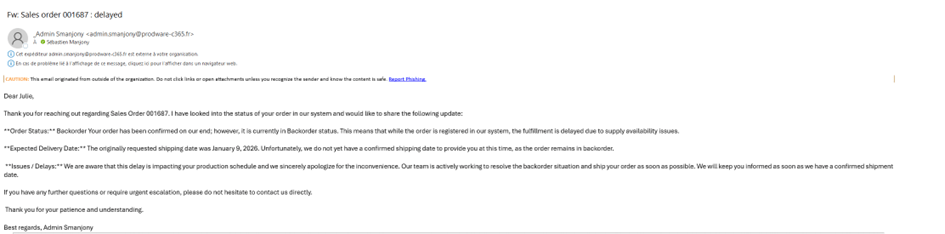
- 3. The response. Drafted a professional, context-aware email containing the precise order status.
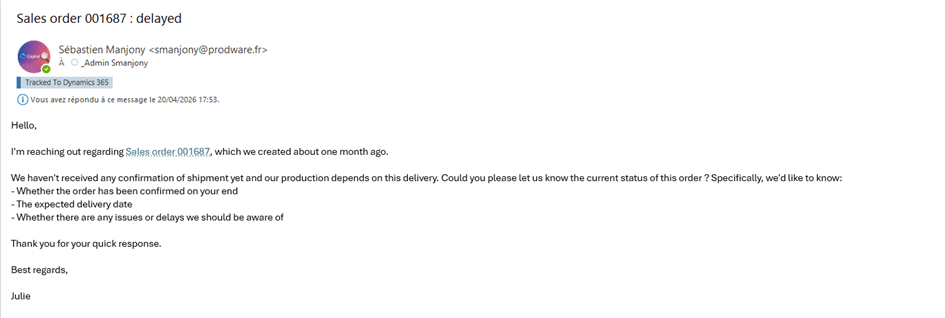
In a single instruction, the agent automatically chained steps:
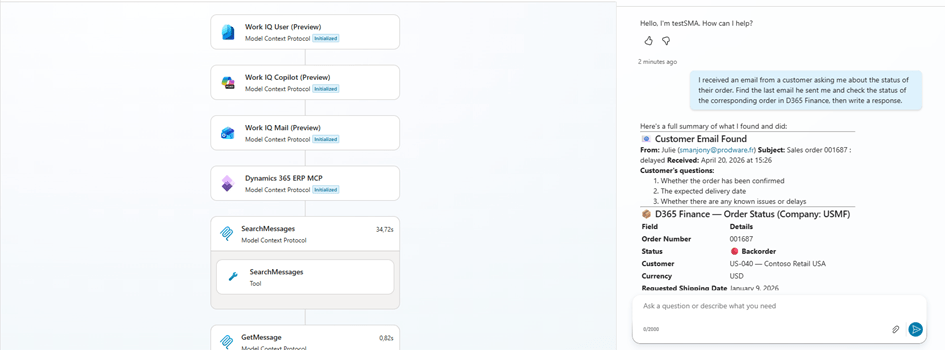
What’s striking here: the user never opened Outlook. Never searched D365 Finance. Never wrote a single word of the reply. One natural-language sentence orchestrated two distinct enterprise systems and produced something immediately actionable.
Where this is heading
We’re moving toward AI agents that don’t just assist users — they execute business operations, grounded in real organizational context, inside the guardrails of enterprise governance.
Agents that understand your business. Agents that act on your business. All while respecting the rules your business already has.
One caveat worth repeating: both features are still in preview. Not production-ready yet. But they offer a pretty clear glimpse of what the next generation of enterprise agents will look like — and it’s closer than you might think.
 D365FOAdviceTips
Leave a comment