Executive summary
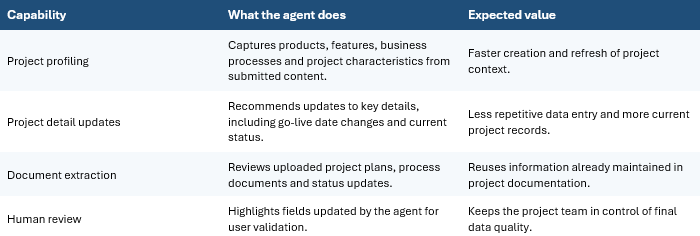
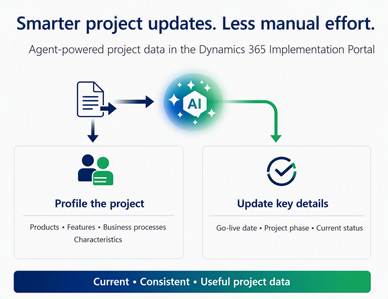
The Dynamics 365 Implementation Portal now includes AI agent functionality intended to reduce manual project administration and improve the quality of project data. The agents analyze uploaded project documents, derive relevant project information and propose updates directly on the project record. Users remain responsible for reviewing and confirming the proposed information before acceptance.
Functionalities
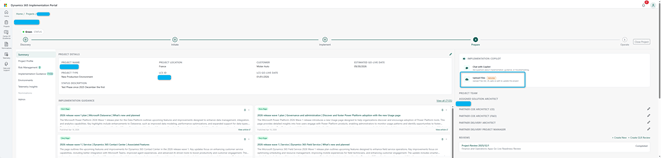
- From a project record, the user selects “Upload files” in the Implementation Copilot section.
- TXT, VTT, DOCX and PDF documents can be submitted.
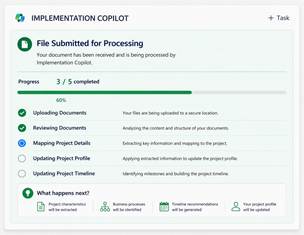
- The agent processes the submitted content and derives relevant project information.
- Progress is visible while the document is being processed.
- Proposed values are displayed on the project record, with a visual indicator on the fields changed by the agent.
- The same agent-assisted approach is available during onboarding, where documents can populate the initial project profile.
Primary value proposition
The central value is not autonomous project management. It is assisted project-data maintenance. The agent converts existing project documentation into structured recommendations, while the user retains accountability for validation. This can help implementation teams keep project records more current, consistent and useful without duplicating information manually.
Operating flow
| 1 Open the project record | Navigate to the relevant project in the Dynamics 365 Implementation Portal. |
| 2 Upload source documents | Use the Implementation Copilot upload option and submit supported project material. |
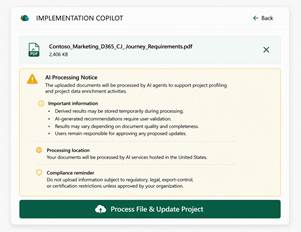
| 3 Agent analysis | The agent reviews the content and derives project profile information or proposed changes. |
| 4 Review the proposals | Updated values are displayed directly on the project record and changed fields are visually identified. |
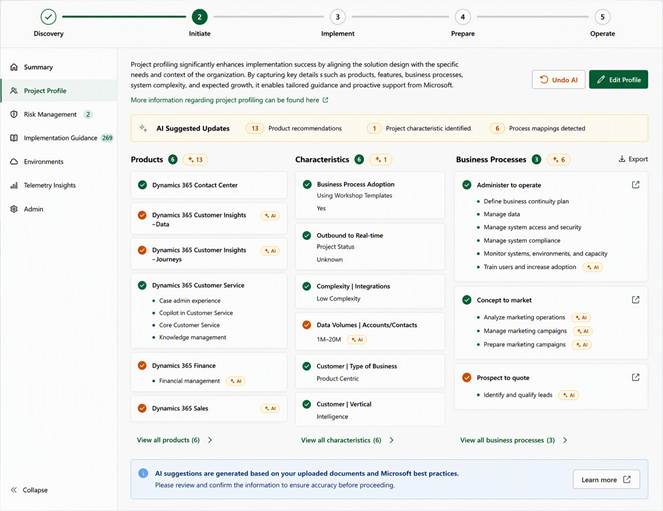
| 5 Confirm or reject | The user checks that the recommendations reflect the latest approved project information before acceptance. |
| 6 Repeat as the project evolves | Use the capability following major milestones, scope changes or governance reviews. |
Key governance principle
| Human validation remains mandatory The agent provides recommendations. The project team remains responsible for confirming accuracy, currency and alignment with approved decisions before accepting any update. |
Benefits and implementation considerations
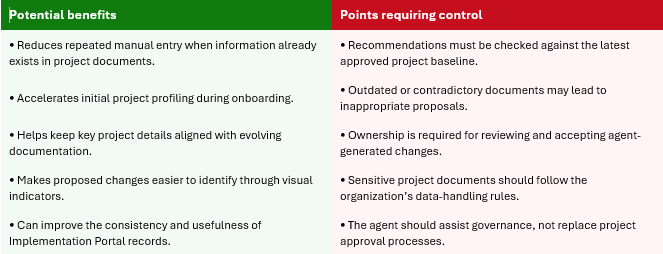
Recommended operating controls
Document eligibility: Define which document types, versions and approval statuses may be submitted.
Reviewer accountability: Assign a responsible reviewer for each category of proposed update.
Project baseline alignment: Compare recommendations with the approved plan, scope and governance decisions.
Update cadence: Use the capability after major milestones, scope changes and governance reviews.
Exception handling: Reject or correct recommendations that cannot be substantiated by approved project information.
Auditability: Retain a clear project-level record of reviewed and accepted updates according to organizational policy.
Suggested adoption approach
- Start with a limited set of active projects and well-controlled documents.
- Agree the authoritative sources for dates, scope, status and project characteristics.
- Measure whether the agent reduces re-entry while maintaining review quality.
- Document the validation responsibility within the project governance model.
- Extend usage only after the review process is understood and repeatable.
Conclusion
The AI agents in the Dynamics 365 Implementation Portal provide a practical mechanism for turning project documentation into structured project-profile recommendations. Their strongest contribution is the reduction of administrative effort while preserving human control over final updates. For implementation teams, the capability is most valuable when combined with disciplined document management, clear reviewer ownership and alignment with established project governance.
 D365FOAdviceTips
Leave a comment