A better, more transparent way to collaborate with FastTrack
What you can do with Topics
✓Submit
Technical questions, product guidance requests, architecture discussions, and implementation challenges directly in the portal.
✓Submit
Technical questions, product guidance requests, architecture discussions, and implementation challenges directly in the portal.
✓Track
Progress and status updates in real time.
✓View
Historical Topics and their resolutions for easy reference.
✓Receive
Automatic notifications on important updates.
✓Collaborate
With your FastTrack team in a single shared experience.
How it works
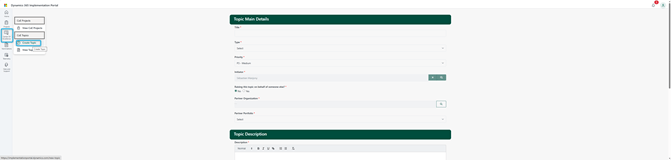
1Create a Topic
Submit a new Topic in the portal with a clear title, a description of the question, the relevant customer or project context, and any supporting detail. It is then automatically routed to the right FastTrack team.
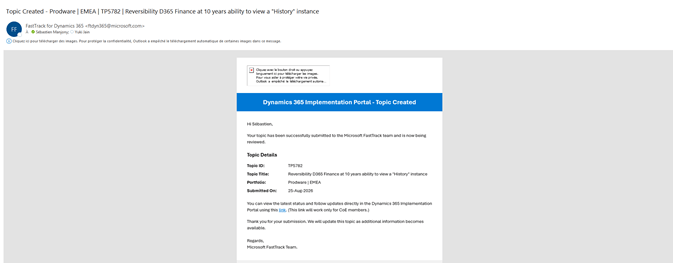
2Receive confirmation
You receive an automated confirmation email with the Topic number, a direct link, and your submission details, so you can reference and track it immediately.
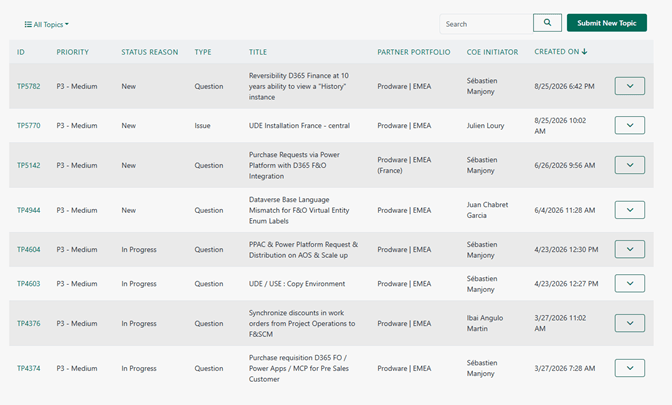
3 Track progress
View all open and historical Topics in the portal. Engineers and Solution Architects update each Topic as the investigation progresses, so your team stays informed without separate email chains.
4Stay updated
When there is significant progress, the status is updated in the portal and a notification email is sent automatically, for example when a Topic is answered, resolved, or closed.
Benefits for your CoE team
✓ Faster engagement with FastTrack
✓ Improved visibility into open technical discussions
✓ Easy access to previous questions and resolutions
✓ Better tracking and governance of requests
✓ Single collaboration experience shared with Microsoft
Best practices for the fastest response
Create one Topic per issue or question.
Include relevant screenshots, error messages, and business context.
Use Topics for technical and implementation guidance rather than general administrative requests.
Review existing Topics before creating a new one to avoid duplicates.


Leave a Reply