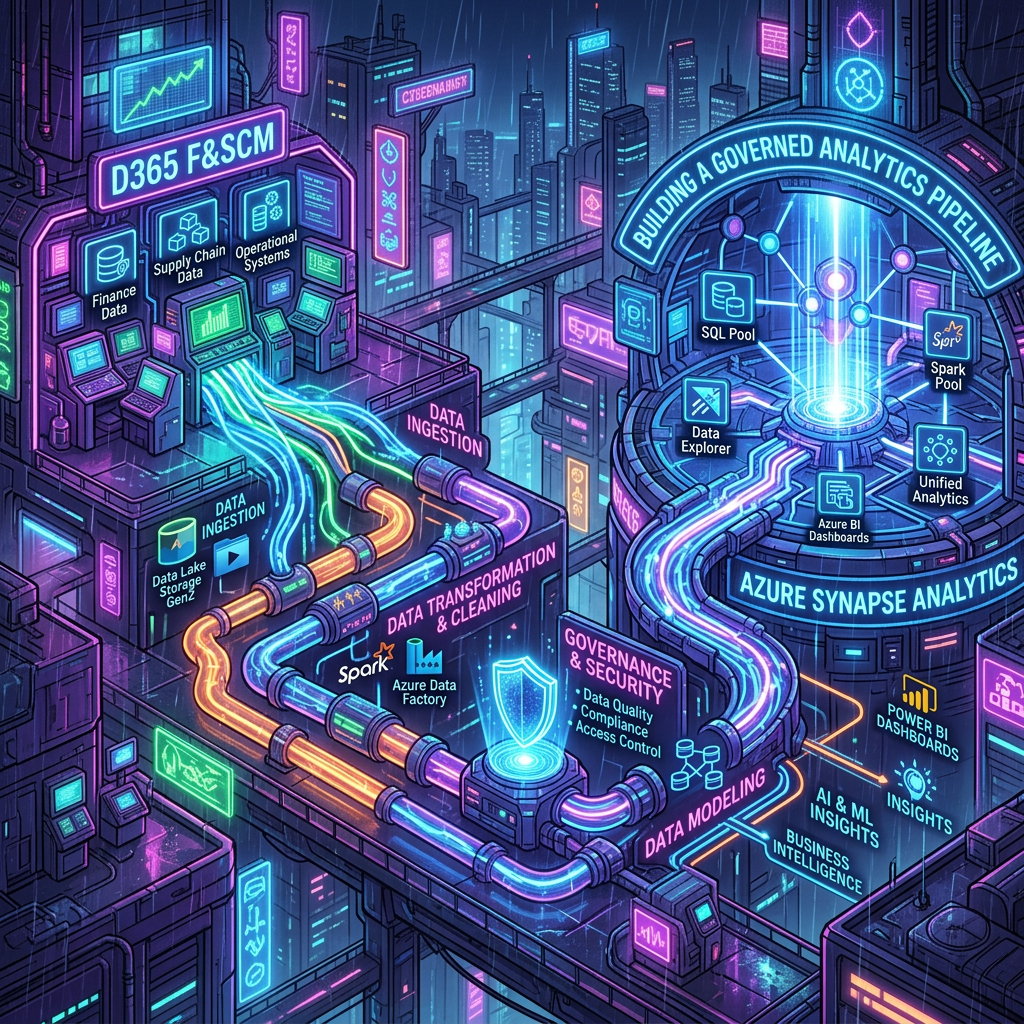
Updated technical walkthrough covering Dataverse, Azure Synapse Link, ADLS Gen2, Azure Synapse Analytics, Power BI, and the positioning of Microsoft Fabric
Executive summary
The source walkthrough remains a useful foundation when an organization needs to replicate eligible Dynamics 365 Finance and Operations data into an Azure Data Lake Storage Gen2 account it controls and then consume that data with Azure Synapse Analytics, Power BI, or another analytical platform. The architecture should not, however, be described as a simple physical copy from D365 F&SCM into ordinary Dataverse tables. The Finance and Operations environment participates in the Power Platform and Dataverse administration plane, while Azure Synapse Link provides the selection and replication experience for eligible D365 F&SCM tables and entities.
In 2026, this pattern coexists with Link to Microsoft Fabric. Azure Synapse Link to ADLS gives the customer explicit ownership of the storage account, downstream ingestion design, network controls, processing engines, and operating model. Link to Fabric favors a managed SaaS experience based on Microsoft Fabric and OneLake. Fabric is therefore not merely a renamed Synapse Link destination: it changes the target platform and the division of operational responsibilities.
| Keep Azure Synapse Link to ADLS Gen2 when a customer-managed Azure lake, interoperability with third-party engines, explicit network and storage control, or an established Synapse platform is a structural requirement. Evaluate Link to Microsoft Fabric when OneLake, Lakehouse/Warehouse, Direct Lake, and the integrated Fabric operating model are the strategic analytics foundation. |
Key takeaways
- Export to Data Lake is a legacy mechanism; current designs should be assessed against Azure Synapse Link and Link to Microsoft Fabric.
- Replication delivers raw or lightly prepared operational data. It does not replace dimensional modeling, business calculations, reconciliation rules, or report-level security.
- Eligibility, change tracking, customizations, and ISV tables must be validated explicitly before committing to a table scope.
- Opening a Parquet file in Power BI is a useful technical smoke test, not a production BI architecture.
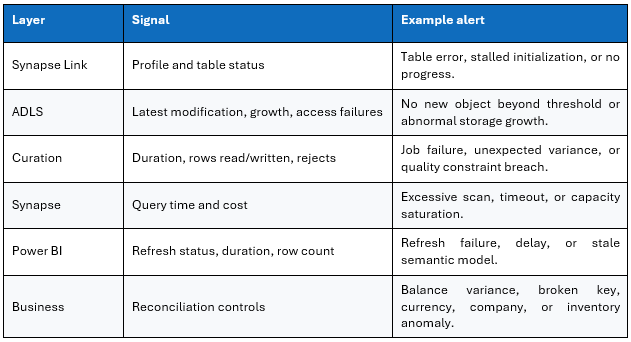
- Operational monitoring must cover the link profile, freshness by table, lake storage, downstream processing, semantic models, and Power BI refreshes.
Why move D365 F&SCM data to an analytics platform
Dynamics 365 Finance and Operations is a transactional SaaS system designed to execute reliable business processes across finance, procurement, sales, inventory, manufacturing, projects, and related domains. It is not intended to absorb unrestricted analytical scans, exploratory joins, or large historical calculations. A robust data architecture therefore separates the transactional plane from the analytical plane.
Typical use cases
- Consolidate multiple legal entities and functional domains into a governed enterprise model.
- Build Power BI reporting without pushing analytical workloads onto the operational ERP.
- Feed a lakehouse, warehouse, or third-party data platform from replicated D365 F&SCM data.
- Maintain history and reconstruct facts and dimensions with controlled quality rules.
- Combine D365 F&SCM with CRM, e-commerce, WMS, IoT, corporate reference data, and external datasets.
- Provide an approved foundation for data science, AI, audit, and operational controls.
What replication does not provide
A table being available in the lake does not make it business-ready. D365 F&SCM tables use technical keys, indirect relationships, financial dimensions, legal-entity context, coded statuses, units, currencies, and validity rules that must be interpreted. The data team must establish a stable analytical contract above the replicated layer.
| Keep the bronze/raw layer faithful to the source. Business-friendly names, calculations, slowly changing dimensions, data-quality controls, security rules, and certified KPIs belong in curated and semantic layers rather than in the replication mechanism. |
Updated architecture and component responsibilities
The source flow – D365 D365 F&SCM to Dataverse to ADLS Gen2 to Azure Synapse Analytics to Power BI – is pedagogically useful but needs qualification. Dataverse provides the associated environment and administrative experience used by Azure Synapse Link. Do not assume that every D365 F&SCM row is first materialized as a conventional Dataverse table copy.
Logical architecture
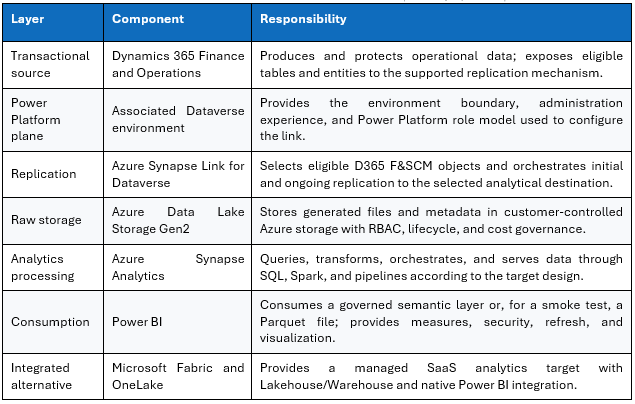
End-to-end data path
- An eligible D365 F&SCM table or entity is selected in the link profile.
- The service performs the initial synchronization for the selected scope.
- Subsequent changes are propagated according to the supported behavior and selected format.
- Files and metadata land in the raw zone of the target storage.
- Synapse or another approved engine builds a validated, optimized curated layer.
- Power BI consumes a governed semantic model rather than a collection of individual generated files.
Choosing between Azure Synapse Link and Link to Microsoft Fabric
The decision is not just a technology choice. It defines who owns storage, capacity, processing, networking, lifecycle, and support. The following comparison should be finalized against current Microsoft documentation and the tenant capabilities available at implementation time.
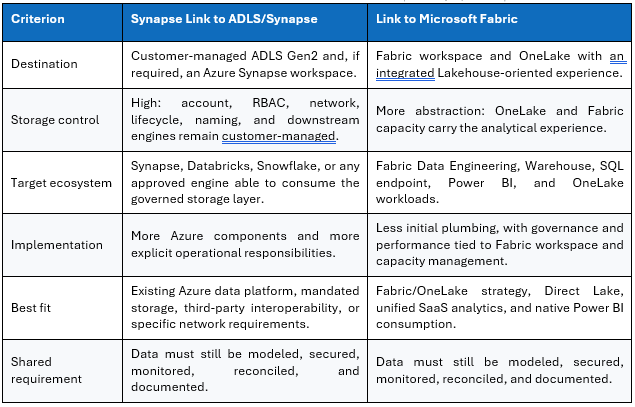
| Document the analytical target, storage owner, curation technology, network constraints, freshness objective, third-party consumers, capacity cost, and support model. Comparing only the setup wizards produces a fragile architecture decision. |
Technical prerequisites and responsibility model
D365 F&SCM prerequisites
- An D365 F&SCM environment associated with a compatible Power Platform/Dataverse environment.
- Application and platform versions that meet the Microsoft prerequisites in force at deployment time.
- A table and entity scope derived from documented analytical requirements, including grain, keys, legal entity, volume, and expected change rate.
- Required change tracking enabled and explicitly validated for custom and ISV objects.
- Privileged administration used only for setup; operational identities separated where supported.
- Tests covering create, update, delete, schema changes, legal-entity behavior, and sensitive data.
Power Platform prerequisites
- Access to the correct environment in Power Apps and PPAC.
- A role authorized to create and administer Azure Synapse Link in the Dataverse environment.
- Visibility of the Finance and Operations selection experience.
- Security groups, and environment governance compatible with the solution.
- An inventory of existing link profiles to prevent duplicated scopes and avoidable cost.
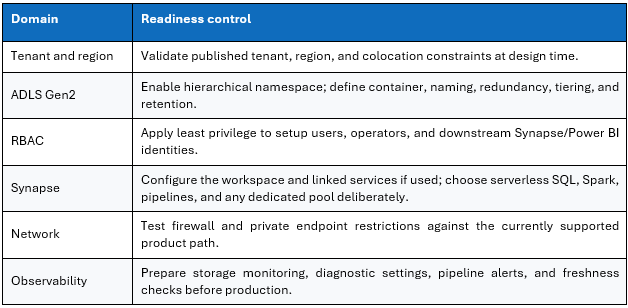
Azure prerequisites
Detailed walkthrough: from PPAC to table selection
Step 1 – Identify the target environment in PPAC
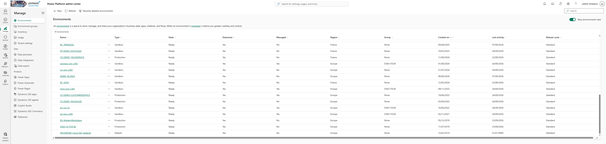
Confirm the exact environment name, URL, type, region, tenant, security group, Dataverse database, and associated Finance and Operations workload. This prevents the most common multi-environment error: creating a valid link in the wrong sandbox. Record the Environment ID and the approved Azure destination in the change record.
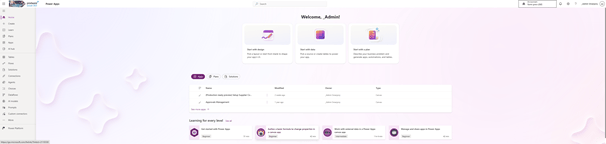
Step 2 – Open Azure Synapse Link in Power Apps
In make.powerapps.com, select the validated environment and open Azure Synapse Link. Navigation may move between the Data area and dedicated link pages, but the environment shown in the portal header is the controlling context.
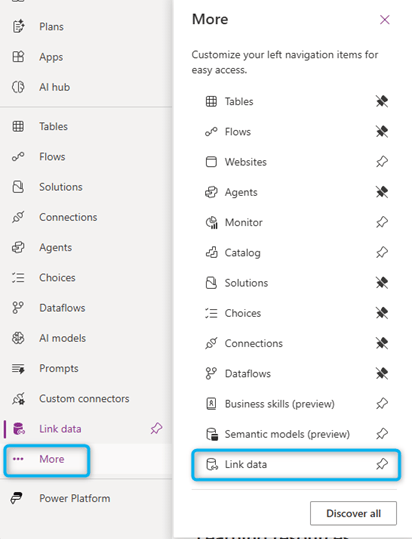
Step 3 – Create the link and select the destination
Select the approved subscription, resource group, storage destination, and – when required by the chosen pattern – the Azure Synapse workspace. Align the wizard selections with the architecture decision: dedicated raw zone, region, naming, RBAC, network design, and support ownership.
- Do not reuse a generic container without clear environment isolation.
- Do not mix production and non-production data in an uncontrolled shared zone.
- Validate the identity used by the service and its effective permissions.
- Record every profile option because some structural choices are difficult to change later.
- Start with a small test scope before adding high-volume tables.
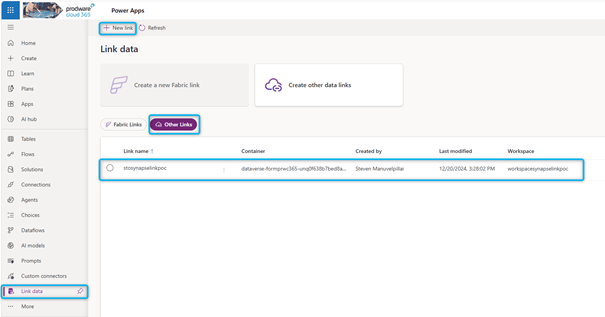
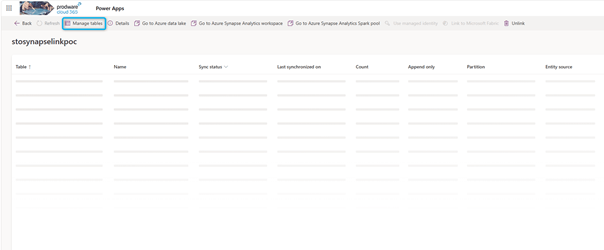
Step 4 – Open Manage tables
Manage tables is the scope-control point for the profile. Treat its contents as an interface contract. Each addition must have an owner, purpose, sensitivity classification, expected volume, validation evidence, and downstream consumer.
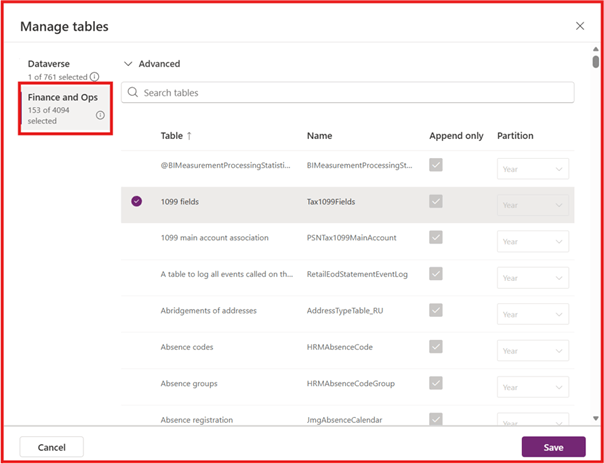
Step 5 – Select Finance and Operations tables
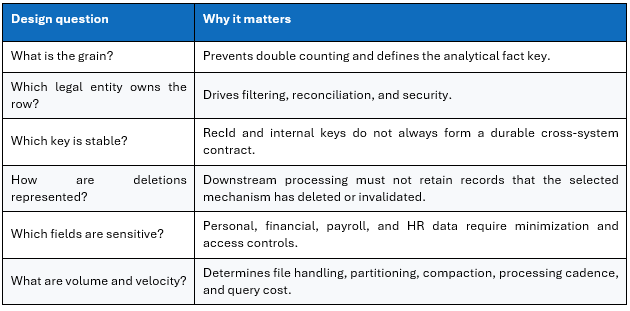
Open the Finance and Operations tab and select only the tables or entities required by an approved data use case. Begin with a coherent business domain rather than a bulk export. For every object, document grain, functional key, relationships, sensitive columns, company context, initial volume, change rate, deletion semantics, and consuming products.

After Save – monitor the initial synchronization
A saved table list is not yet consumable data. Follow initial synchronization table by table. Large objects can take longer depending on volume, activity, and format; do not promise a universal SLA without measurements from the actual tenant and selected tables.
- Wait for the expected link and table statuses.
- Compare controlled row counts, keys, and aggregates with D365 F&SCM.
- Run create/update/delete scenarios and measure observed freshness.
- Retain validation evidence and timestamps.
- Start production downstream processing only after initial load stabilization.
Validating ADLS Gen2 and understanding the files
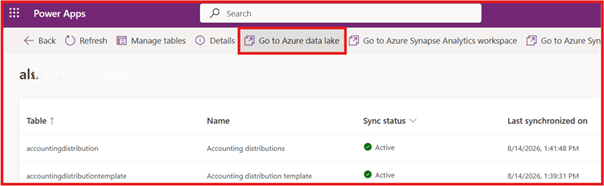
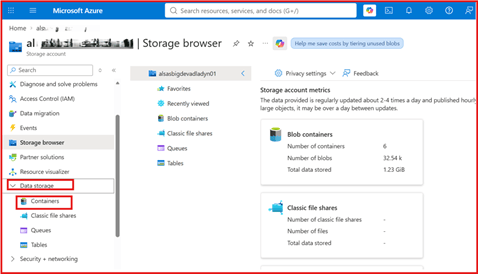
Step 6 – Open the target container
Use Azure portal or Storage Explorer to open the storage account and container associated with the link. Folder conventions vary with profile configuration and output format. Do not hard-code a path from a screenshot without checking the active profile and generated metadata.
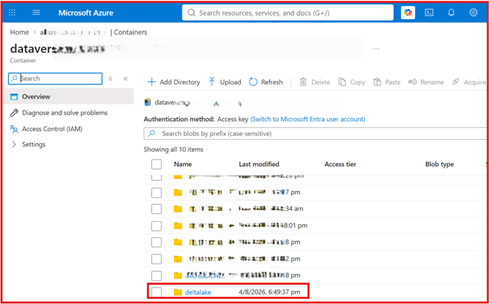
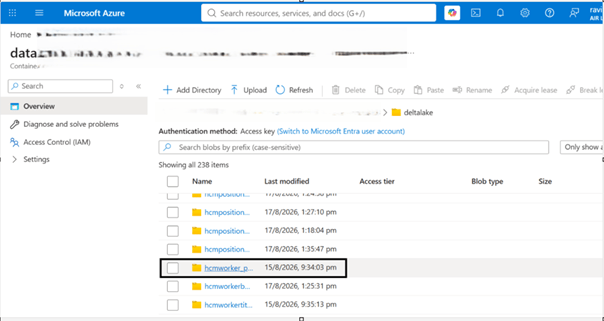
Step 7 – Read the lake structure
The lake structure separates exported objects and supporting metadata. The synchronized Finance & Operations data is stored in Parquet format, which is highly optimized for analytical workloads.
Steps 8 and 9 – Understand partitions and PartitionId
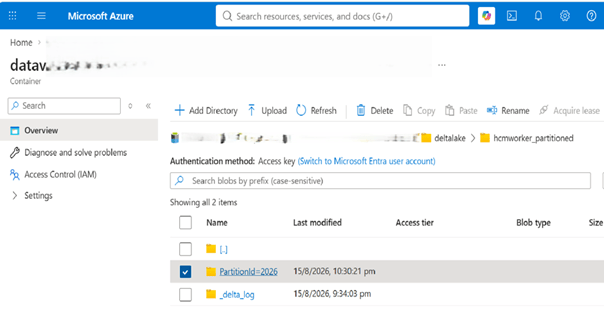
A partition is more than a visual subfolder: it affects how engines eliminate irrelevant data during a query. Preserve useful partition columns in downstream design and avoid uncontrolled small-file proliferation. The PartitionId folder in the source document is a navigation landmark; validate the actual semantics against the generated output.
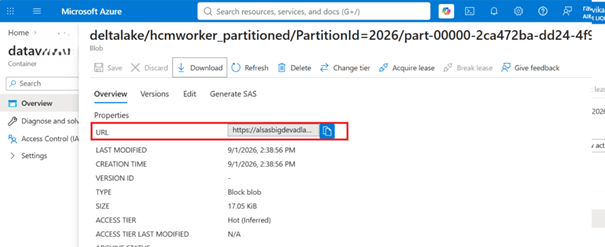
Step 10 – Copy a Parquet file URL
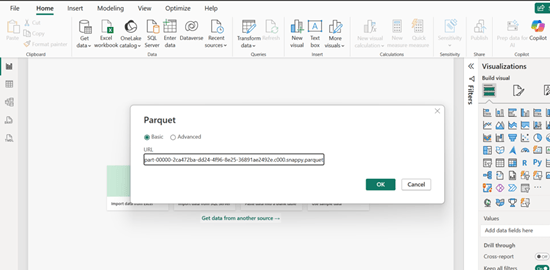
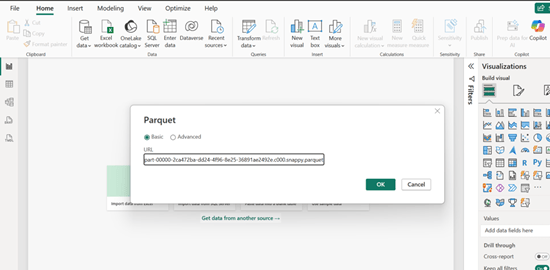
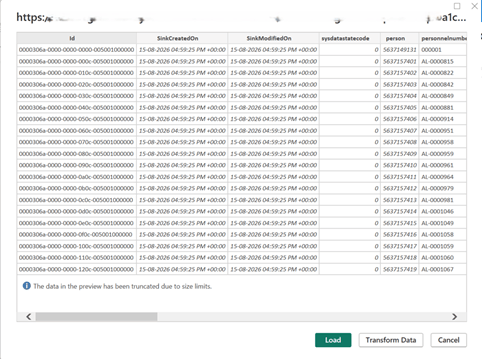
Copying one file URL is a fast diagnostic. It proves that the user identity can reach the object and that the connector can interpret the file. It does not prove table completeness, delete handling, freshness, or resilience when generated files change.
| Do not build a production Power BI dataset on the URL of one generated file. File names, counts, and lifetimes belong to the replication mechanism. Use a table abstraction, SQL view, curated table, or managed folder layer. |
Consumption with Azure Synapse Analytics and Power BI
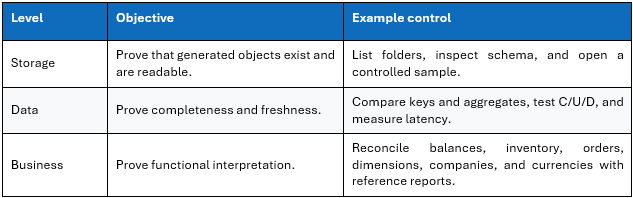
Three validation levels
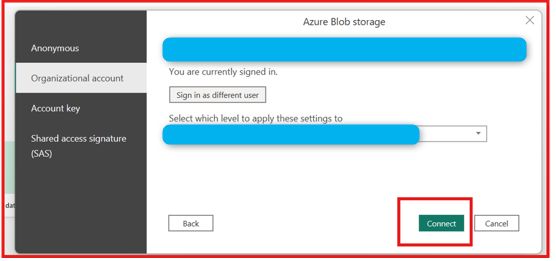
Direct validation in Power BI
You can use Get Data, select Parquet, and paste the file URL. This is appropriate for a sample-level smoke test. Production should use a stable layer such as a serverless SQL view, curated Lakehouse/Warehouse table, partitioned import model, or Direct Lake semantic model in a Fabric design.
Recommended Synapse consumption pattern
- Keep the replication/raw zone read-only for downstream workloads.
- Create a curated layer that handles deduplication, deletions, conversions, dimensions, and quality rules.
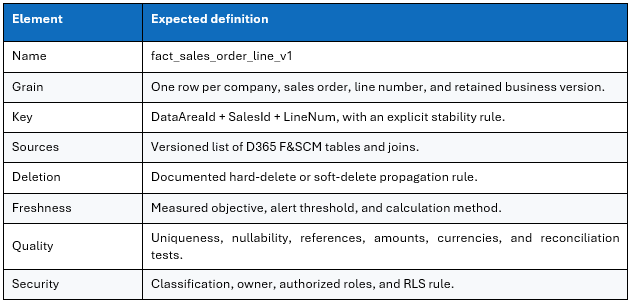
- Expose stable, versioned views or tables.
- Build Power BI semantic models on the contractual layer.
- Apply row-level and object-level security based on consumer personas.
- Monitor source freshness, pipeline completion, semantic-model refresh, and report availability together.
Example curated data contract
Security, networking, and governance
Identity and least privilege
Security spans multiple planes: PPAC administration, Dataverse roles, Azure RBAC, storage data access, Synapse permissions, Power BI workspace roles, and semantic-model security. The broad administrator role used during setup must not become the normal operating model.
- Separate setup identities, runtime identities, and consumer identities.
- Use Microsoft Entra groups and managed identities where the selected service supports them.
- Avoid storage account keys in notebooks, scripts, and Power BI parameters.
- Use Key Vault for secrets that cannot be eliminated.
- Review workspace owners, storage roles, service principals, and guest access periodically.
- Audit profile changes and table-scope changes.
Sensitive data
A raw table export may bypass restrictions normally presented through the application experience. Export decisions must therefore be based on column classification and documented need. HR, bank, personal, payroll, or health-related fields require specific justification, minimization, retention, and access controls.
| Technical exportability is not authorization to expose a column in the lake or Power BI. Recreate and test analytical security end to end. |
Networking
Architectures using firewalls, private endpoints, or restricted egress must be tested against the currently supported connectivity path. Do not enable a restrictive network policy after setup without regression testing: link configuration, replication, Synapse processing, and Power BI may use different network paths.
Environment lifecycle
Environment copy and refresh operations can change associations, data, identities, and security expectations. The post-copy runbook must verify analytical links, prevent accidental replication from non-production into production destinations, and restore environment-specific identities and access controls.
Performance, scale, and cost
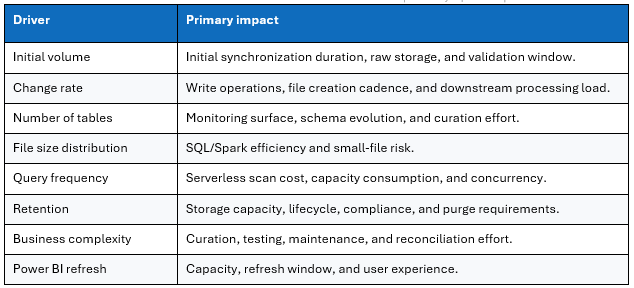
Size by cost and workload drivers
Replace “near real time” with measured latency
Define the source event time, raw availability time, curation completion time, and semantic-model availability time. End-to-end latency is the useful measure and should be monitored by critical table or business domain rather than represented by one generic platform claim.
Include the full cost model
- ADLS capacity and read/write operations.
- Synapse serverless data scanned or provisioned pool capacity.
- Spark transformations, format optimization, and compaction.
- Pipelines, notebooks, orchestration, diagnostics, and alerting.
- Power BI or Fabric capacity where applicable.
- Data-model development, testing, support, and schema-change management.
- Business impact of undetected freshness or quality failures.
| FinOps guidance Estimate from measured initial volume, daily delta, file-size distribution, terabytes scanned, job duration, and refresh cadence. Public pricing examples age quickly; recalculate for the target region, agreement, and current service tiers. |
Monitoring and troubleshooting
Monitoring model
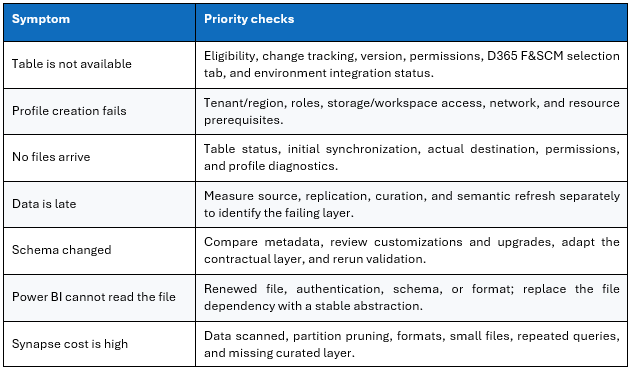
Diagnostic decision table
Minimum incident runbook
- Qualify environment, profile, table, timestamp, and impacted consumer.
- Freeze non-essential configuration changes.
- Check link status and the latest object written to storage.
- Compare with a known-good table and known record.
- Check downstream processing and the latest successful Power BI refresh.
- Restore the failing layer without recreating the profile prematurely.
- Document root cause, impact, replay needs, and regression controls.
Limitations, anti-patterns, and recommendations
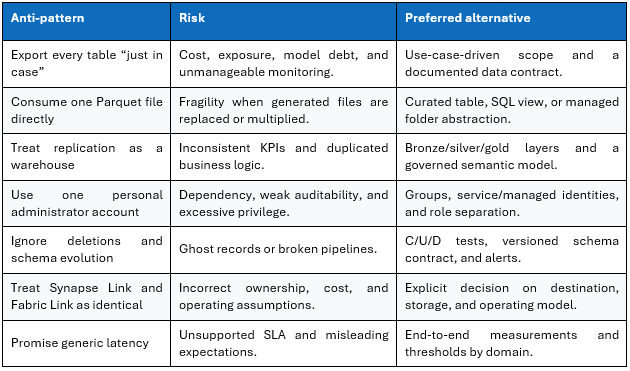
Architecture recommendation
For an Azure/D365 organization with an established data lake and data-engineering capability, Synapse Link to ADLS Gen2 followed by a curated layer and Power BI semantic model remains defensible. Operate it as a data product with an owner, contract, service objective, observability, quality controls, security, and lifecycle management.
For an organization standardizing analytics on Microsoft Fabric, Link to Microsoft Fabric should be evaluated early because it reduces initial data-availability plumbing and integrates with OneLake. That simplification does not remove curation, governance, semantic modeling, security, or capacity management.
Production readiness checklist
| ✓ | Control |
| ☐ | Target architecture and Synapse Link versus Fabric decision approved. |
| ☐ | Environment, tenant, region, and destination verified. |
| ☐ | Table catalog includes grain, keys, legal entity, sensitivity, and volume. |
| ☐ | Eligibility and change tracking confirmed for standard, custom, and ISV objects. |
| ☐ | RBAC, identities, secrets, and emergency access reviewed. |
| ☐ | Networking tested in the final configuration. |
| ☐ | Initial synchronization validated table by table. |
| ☐ | Create, update, delete, and schema-change tests executed. |
| ☐ | Business reconciliation controls approved. |
| ☐ | Curated layer and versioned data contracts deployed. |
| ☐ | RLS/OLS and Power BI access tested with representative personas. |
| ☐ | Freshness and quality alerts operational. |
| ☐ | Incident runbook, ownership, and support model documented. |
| ☐ | Cost measured under realistic load and budget alerts enabled. |
| ☐ | Post-copy and post-refresh environment procedure documented. |
Conclusion
Azure Synapse Link enables analytical workloads to be separated from the Dynamics 365 Finance and Operations transactional system and supports an open data platform around ADLS Gen2 and Azure or third-party analytical engines. The original walkthrough remains a strong teaching sequence: identify the environment, create the link, select tables, confirm generated files, and validate readability in Power BI.
The critical 2026 update is architectural. Azure Synapse Link and Link to Microsoft Fabric are distinct operating patterns. Production success is not demonstrated by “Tables updated successfully” or by opening one Parquet file. It requires governed scope, create/update/delete controls, a stable curated layer, security redesigned for the analytical platform, end-to-end freshness measurement, and a clear support model.


Leave a Reply