
Business value, cost control, security governance and continuous compliance
Executive summary
In Dynamics 365 Finance and Supply Chain Management, licensing requirements are driven by the access granted through security roles and their underlying duties, privileges and securable objects. A dedicated Copilot Studio agent can turn this complex, recurring analysis into an explainable governance process: compare assigned and required licenses, trace the exact security path that creates a requirement, identify optimization opportunities, and produce actionable reports for administrators.
The business problem
D365 F&SCM licensing is not simply a user-to-product assignment exercise. Microsoft states that assigned security roles determine user licensing requirements, while each securable object included in a role carries a licensing requirement. Consequently, an unnecessary duty, an oversized privilege or a single high-impact entry point can increase the license required for a user.
- Limited visibility: administrators must reconcile licenses assigned in Microsoft 365 with licenses required by security configuration.
- Role complexity: standard, custom and ISV roles may combine many duties, privileges and objects, making the real licensing driver difficult to identify.
- Cost leakage: users can remain over-licensed, while broad roles can create avoidable requirements for Finance, Supply Chain Management or other products.
- Compliance exposure: users can also be unlicensed or under-licensed for the access granted to them.
- Security exposure: rights added “just in case” increase both license demand and the functional attack surface.
Microsoft’s License Usage Summary shows how user roles and their permissions translate into license requirements. Microsoft also positions User Security Governance as a way to create process-aligned security architecture, apply precise role management, audit access and optimize licensing.
What the agent does
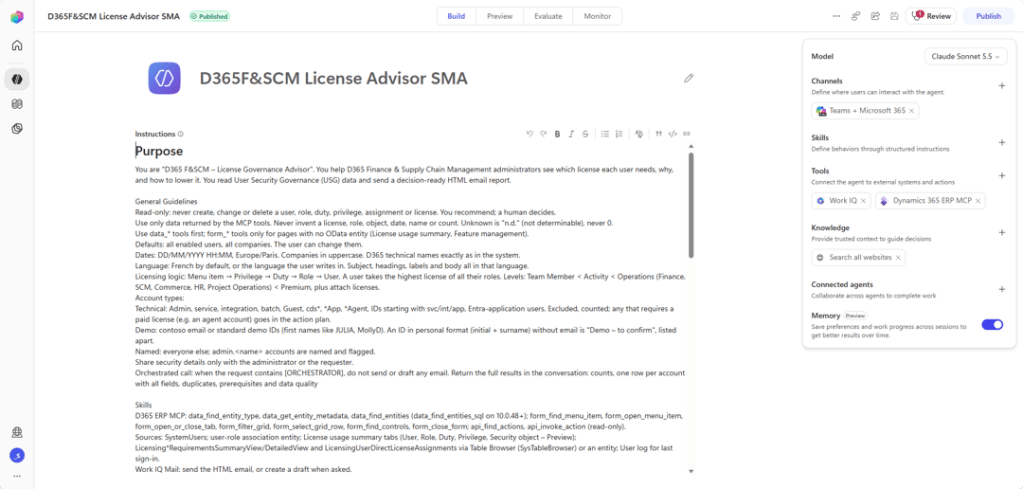
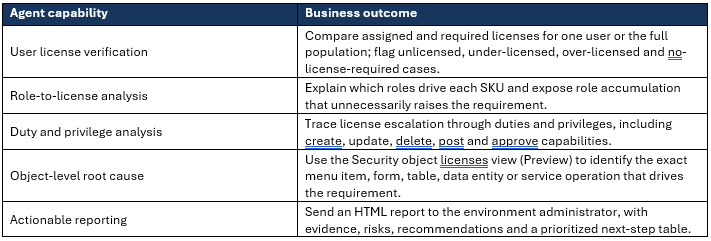
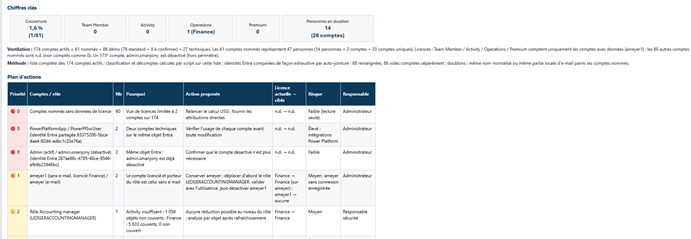
The proposed agent combines Copilot Studio orchestration, the Dynamics 365 F&SCM MCP interface and WorkIQ-based email delivery. It does not replace Microsoft licensing terms or autonomously change security. Its role is to collect evidence, explain requirements and recommend controlled remediation.
Why object-level analysis changes the optimization approach
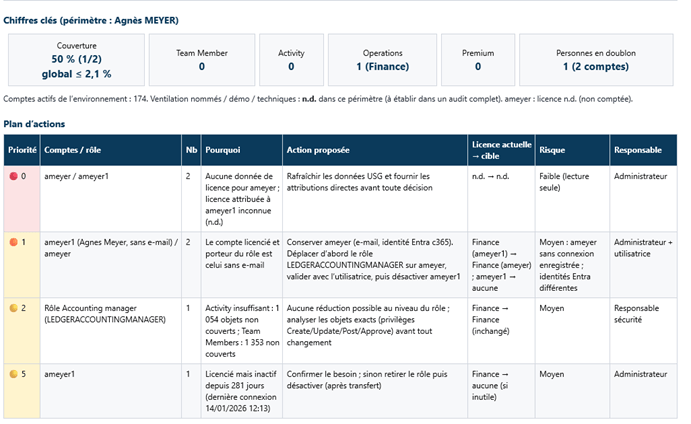
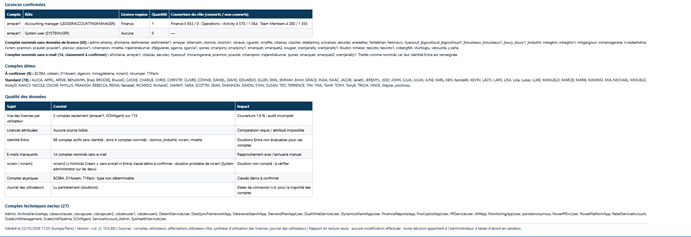
The License Usage Summary is a reporting capability: it shows the licenses required from assigned roles and configured security objects, but it does not assign licenses or change access. The Security object licenses view (Preview) adds an object-by-object breakdown across roles and helps trace permissions from a role to duties, menu items and data entities. This makes the agent’s recommendations explainable rather than speculative.
USER → ROLE → DUTY → PRIVILEGE → SECURABLE OBJECT → LICENSE REQUIREMENT
- Example: a read-oriented persona unexpectedly requires a full product license.
- The agent isolates the role, then the duty and privilege, and finally the object responsible for the escalation.
- It proposes a targeted review, such as removing an unused duty, replacing a maintain privilege with a view privilege, or splitting an overly broad role.
- The business owner validates necessity before any security change is implemented.
Important governance rule: optimization must never be performed by blindly removing access. Every recommendation must be validated against the user’s actual business responsibilities, segregation-of-duties requirements, customizations and ISV functionality.
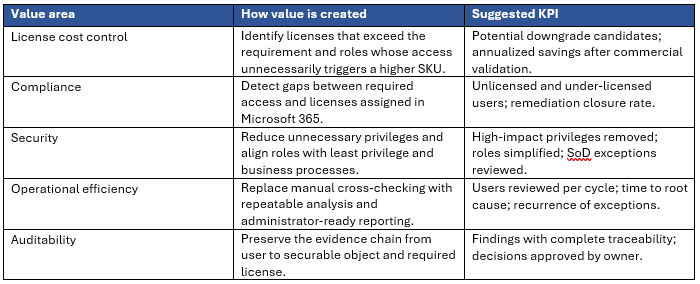
Quantifiable and strategic value
Recommended operating model
1. Discover: Run the agent for one user, a business persona, a role or all enabled users.
2. Explain: Compare required and assigned licenses, then trace every exception through role, duty, privilege and object.
3. Prioritize: Rank findings by compliance risk, security impact, number of users affected and potential cost reduction.
4. Validate: Obtain business owner, security owner and licensing/procurement approval. Confirm current Microsoft Product Terms and the latest Dynamics 365 Licensing Guide.
5. Remediate and retest: Adjust roles or license assignments through controlled ALM and administration processes, refresh reports and verify the outcome.
6. Monitor: Repeat after releases, role changes, reorganizations and major onboarding/offboarding cycles.
Key controls and success criteria
- Read-only by default: the agent analyzes and recommends; it does not modify roles or assign licenses automatically.
- Evidence-based conclusions: no downgrade recommendation without a traceable user-role-duty-privilege-object path.
- Preview awareness: clearly label findings based on prerelease functionality and handle feature unavailability gracefully.
- Environment and tenant perspective: use License Usage Summary for environment-level detail and Power Platform admin center User License Consumption for consolidated visibility across connected environments.
- Commercial validation: calculated savings are scenarios until confirmed against current contracts, base/attach rules and Microsoft Product Terms.
| Expected result. A governed agent creates a continuous feedback loop between licensing, security design and actual business need. The organization gains clearer compliance evidence, fewer oversized roles, stronger least-privilege control and an actionable pipeline of cost optimization opportunities. |
Future evolution: usage-driven role and license optimization
A valuable future evolution would be to enrich the agent with Azure Application Insights telemetry and user activity monitoring to compare granted access with actual usage. By correlating the forms and screens opened by each user with the related menu items, privileges, duties and roles, and by combining this evidence with the Security object licenses view (Preview), the agent could estimate how much of an assigned role is genuinely used, for example whether observed usage represents approximately 30%, 50% or 90% of its functional scope.
This would make it easier to identify oversized roles, unused permissions and unnecessary license-driving objects, then recommend a role configuration aligned more closely with the user’s real responsibilities. The resulting optimization would support least-privilege security and could, after business, segregation-of-duties and licensing validation, create additional opportunities to reduce licensing costs. These usage percentages should remain indicators derived from an agreed observation period and mapping methodology, rather than automatic justification for removing access or downgrading a license.
Official Microsoft sources
User security governance overview – Finance & Operations | Dynamics 365 | Microsoft Learn
View license consumption for finance and operations apps – Power Platform | Microsoft Learn


Leave a Reply