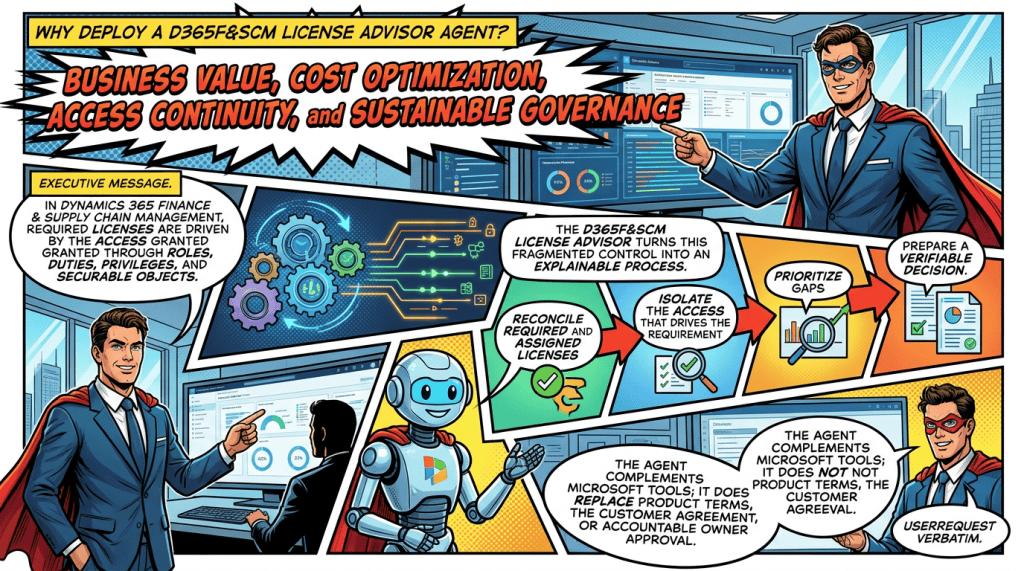
Business value, cost optimization, access continuity, and sustainable governance
Executive summary
In Dynamics 365 Finance & Supply Chain Management, required licenses are driven by the access granted through roles, duties, privileges, and securable objects. The D365F&SCM License Advisor turns this fragmented control into an explainable process: reconcile required and assigned licenses, isolate the access that drives the requirement, prioritize gaps, and prepare a verifiable decision. The agent complements Microsoft tools; it does not replace Product Terms, the customer agreement, or accountable owner approval.
The business problem
Compliance is not a simple “one user = one product” reconciliation. Microsoft states that security roles assigned to enabled users determine their license requirements and that each securable object included in a role carries a licensing requirement [1. A single oversized privilege can therefore move a user to a higher license or an additional product.
- Fragmented visibility: D365 access, calculated requirements, assigned M365 licenses, and contractual availability are reviewed in separate views.
- Role complexity: standard, custom, and ISV roles combine subroles, duties, privileges, and entry points, making the real driver difficult to isolate.
- Value leakage: assigned licenses can exceed actual need, while broad roles can trigger an avoidable higher tier or attach license.
- Access continuity risk: when per-user validation applies, a user without the required license can be blocked from signing in.
- Security and audit risk: rights granted “just in case” increase the access surface, potential conflicts, and review effort.
Why now?
Since January 15, 2026, Microsoft has been progressively rolling out per-user license validation based on contract anniversary or renewal dates, with advance notifications and tenant-level validation [3]. The need is no longer only to optimize: organizations require a recurring, documented, and actionable control before contractual milestones.

Target outcome: a governed pipeline of compliance gaps, validated optimization opportunities, and traceable decisions – without blindly removing access.
What the D365F&SCM License Advisor does
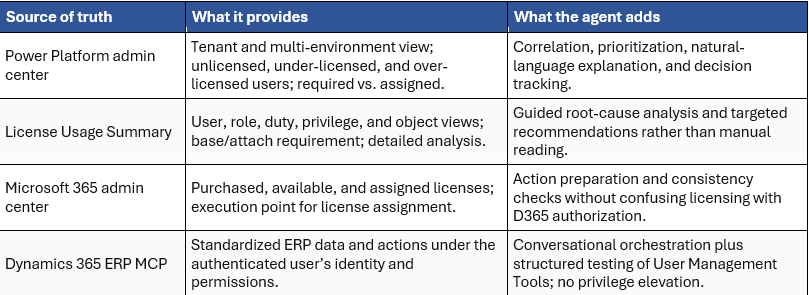
The agent orchestrates existing sources of truth – license consumption reports, security governance, assigned licenses, and data exposed through Dynamics 365 ERP MCP – to answer in natural language and produce a decision package. The exact availability of User Management Tools and write operations must be confirmed in each environment.
MCP evaluation objective. A defined objective of the License Advisor is to test and evaluate the MCP User Management Tools through real licensing scenarios. The agent is used as a controlled evaluation vehicle to assess tool coverage, data quality, permission behavior, orchestration reliability, error handling, and post-action verification before broader production adoption.
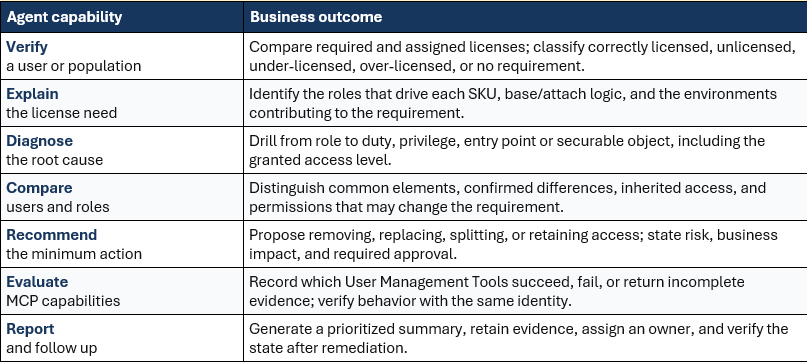
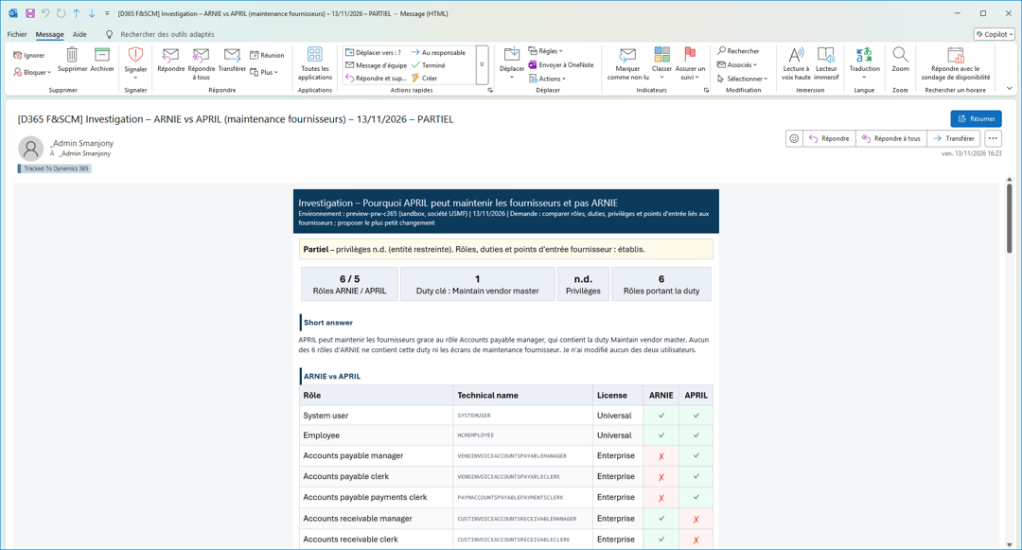
USER > ROLE > DUTY > PRIVILEGE > SECURABLE OBJECT > REQUIRED LICENSE
Value added beyond native capabilities
Concise, strengthened use cases
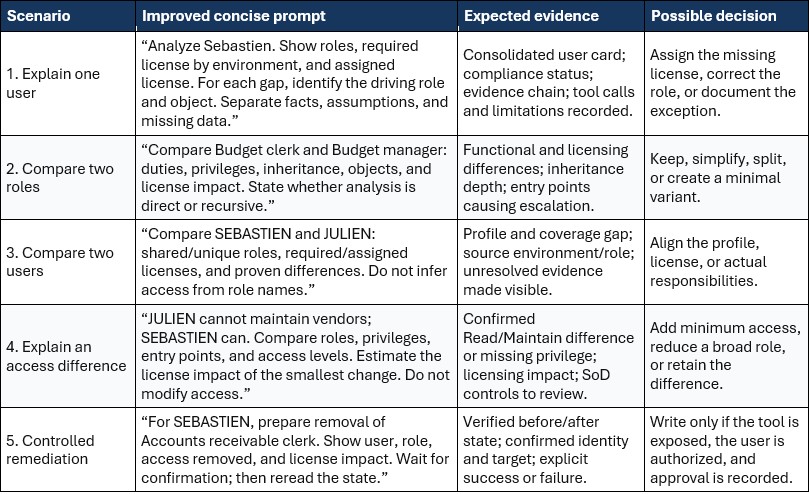
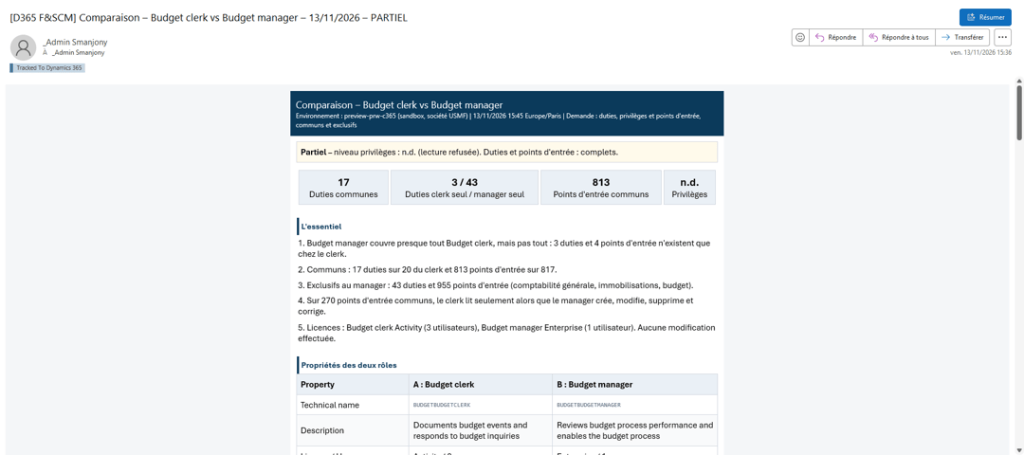
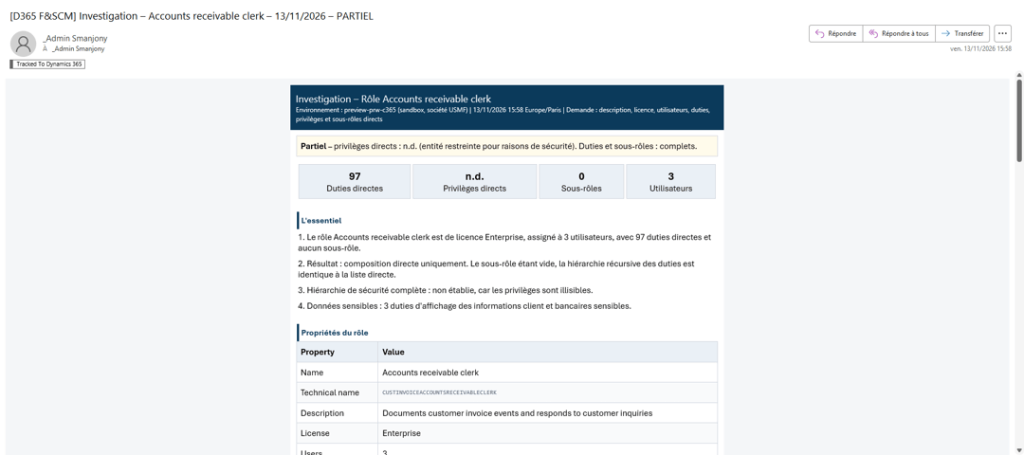
The examples below retain the scenarios from “MCP User Management Tools” and refocus them on licensing decisions and tool evaluation. The identities are demonstration accounts. Each prompt requires retrieved facts, explicit causality, concise output, and a controlled action.
Recommended response contract

MCP capability evaluation record
For every scenario, capture the tool invoked, identity used, evidence returned, completeness, latency, errors, fallback, and verification result. This turns the License Advisor pilot into a reusable assessment of MCP User Management Tools readiness, not only a functional demonstration.
Control point. The agent must distinguish “assigned license” from “granted permission.” A license authorizes product use; it does not grant functional permissions inside D365.
Quantifiable and strategic value
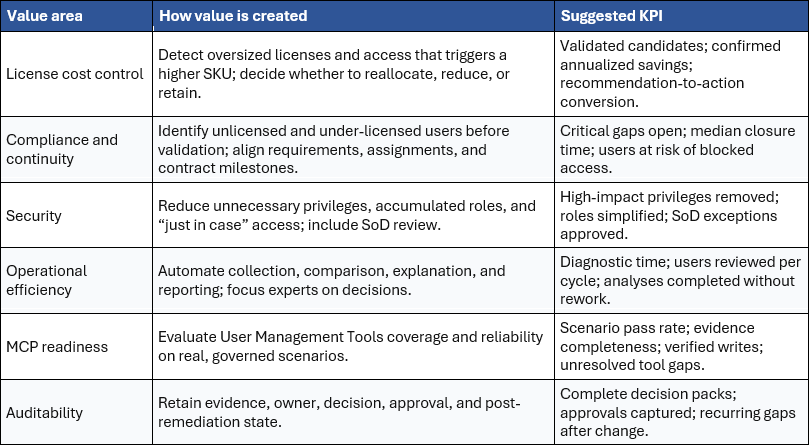
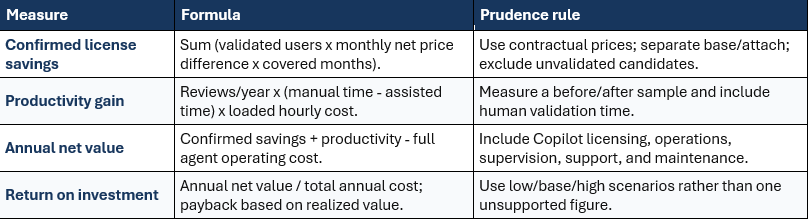
Value should not be reduced to a promise of lower license spend. It combines confirmed savings, access continuity, fewer unnecessary rights, administrator time, audit evidence, and learning about MCP capability readiness. Financial benefits remain scenarios until net prices, base/attach rules, Product Terms, and the customer agreement are validated.
Business case calculation framework
Decision example: an unexpected Finance license
A read-oriented profile shows a Finance requirement. The agent identifies the role, a maintenance privilege, and the securable object driving the higher tier. It does not automatically remove access. It presents three options: (1) retain access and assign the required license, (2) replace Maintain with View if the process allows it, or (3) split the role for users who do not need the function. The business and security owners approve the option, the licensing team confirms commercial impact, and the report is refreshed after the change. The same run also records whether each MCP User Management Tool supplied complete and verifiable evidence.
Measurement rule. The agent creates value when it converts a technical exception into a justified business decision. A count of “licenses detected” or “tools called” is not a benefit; only validated outcomes are.
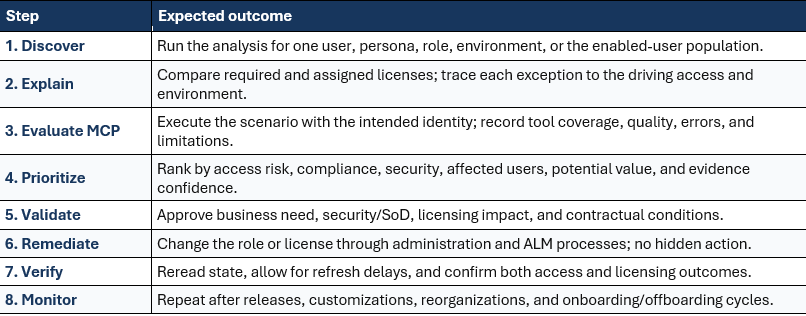
Recommended operating model
Essential controls
- Read-only by default, with clear separation between recommendation, approval, and execution.
- Authenticated identity and least privilege: ERP MCP does not elevate rights; roles, duties, privileges, policies, and business logic remain enforced .
- Allowed MCP clients are controlled, and the agent client’s data movement and retention policies are reviewed .
- No reduction recommendation without a complete evidence chain and validation of business responsibility, customization, ISV behavior, and SoD.
- Post-action verification is mandatory; never claim success without rereading the resulting state.
- MCP evaluation results are evidence-based: distinguish unavailable tool, insufficient permission, rejected business logic, and incomplete data.
- Freshness is managed: PPAC reporting typically refreshes every 4-12 hours, while security changes can take 2-8 hours to appear in governance reporting.
- Use a tenant-level, multi-environment perspective and commercially validate prices, Product Terms, and base/attach rules.
Implementation roadmap
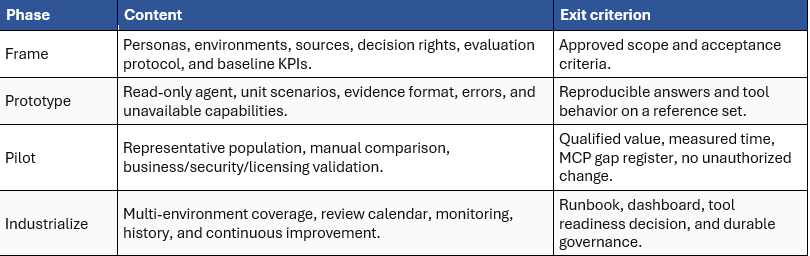
Proceed only if the pilot demonstrates reliable evidence, measurable diagnostic-time reduction, an actionable decision pipeline, documented MCP User Management Tools readiness, and no unauthorized change.
Decision summary
The D365F&SCM License Advisor is relevant when designed as a governance copilot rather than an autonomous cost-cutting engine. Its distinctive value is to connect native reporting, security data, and MCP tools to explain “why this license?”, propose the smallest acceptable action, and produce reusable evidence. It also provides a controlled way to test and evaluate MCP User Management Tools capabilities before wider production adoption. The target is continuous, prioritized, and traceable control that protects budget, user access, least privilege, and implementation confidence.
Success conditions
- Joint sponsorship across IT, Security, Procurement/licensing, and the business, with an explicit decision owner.
- Access to required data: PPAC, License Usage Summary, Microsoft 365 admin center, and available ERP MCP tools.
- A test set covering standard, custom, and ISV roles; inheritance; multiple environments; base/attach scenarios; and controlled write validation.
- A documented MCP evaluation scorecard covering coverage, quality, reliability, permission behavior, error handling, and verification.
- A maintained net-price and contractual-rules reference outside the language model, with an effective date.
- Logging, access control, error management, and periodic review of agent instructions.
Official Microsoft sources
Stay compliant with user licensing requirements
View license consumption for Dynamics 365 finance and operations apps
User security governance license usage summary – role/duty/privilege/object analysis
Security for Dynamics 365 ERP MCP – authentication, authorization, and data
Build an agent with Dynamics 365 ERP MCP – Copilot Studio and MCP tools
Dynamics 365 Licensing Guide – March 2026 – reference guide
Optimizing ERP Security Configuration and Licensing within Microsoft Dynamics 365 – security, compliance, and cost value


Leave a Reply