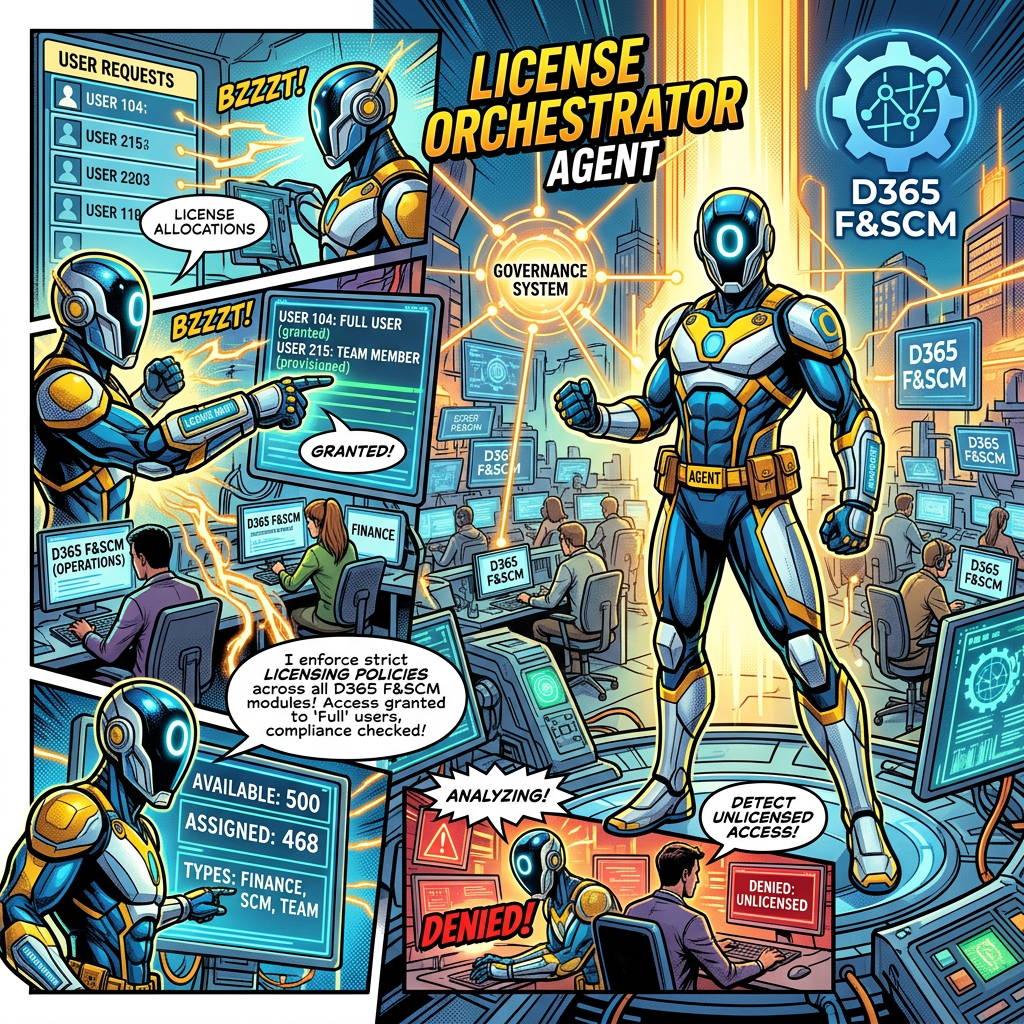
One conversational entry point coordinating user activity governance and license optimization
Executive summary
The License Orchestrator Agent is the single-entry point of a multi-agent governance solution for Dynamics 365 Finance and Supply Chain Management. It interprets the administrator’s request, determines which specialist agent should manage it (the User Activity Agent or the License Optimization Agent) and assembles their findings into one coherent answer. Its responsibility is coordination, not administration: it holds no administrative tools of its own, which keeps the entry point lightweight, separates governance analysis from administrative actions and applies least privilege by design.
The business problem
Two governance questions are intricately linked in D365 F&SCM, yet they are usually answered separately. The first is whether a user still uses the system at all. The second is whether the license assigned to an active user matches the access granted through security roles, duties, privileges, and securable objects. Answering only one of them gives an incomplete picture: an inactive account may still consume an expensive license, while an active user may be over-licensed because of a single oversized role.
- Administrators must open different tools, reports, and agents to cover user lifecycle, security exposure, and licensing efficiency.
- Results arrive in different formats, which makes prioritization and management reporting harder.
- Without a single coordination layer, the temptation is to build one large agent holding every tool and permission, which increases risk and complexity.
The two specialist agents in brief
The orchestrator relies on two specialist agents, each documented in its own business value document. The summaries below give the essentials; the full documents contain detailed capabilities, operating models, financial scenarios, and Microsoft sources.
User Activity Agent: dormant and inactive users
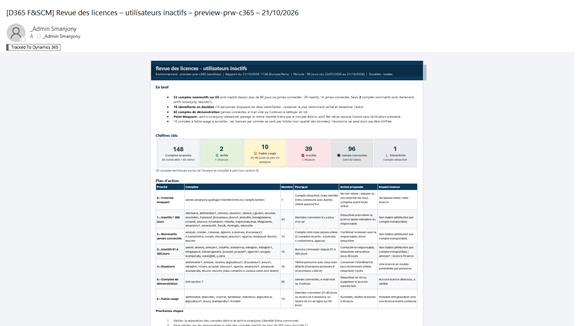
The User Activity Agent turns fragmented sign-in evidence into a repeatable governance process. It correlates the legacy User Log, Dormant User Security Accounts, User Activity Aging and User Log V2 reports, then classifies users as active, moderately active, dormant, highly dormant, disabled or never used. It highlights license-review candidates, surfaces enabled but inactive accounts for access review and produces an audit-ready HTML report for the environment administrator.
Its recommended operating model uses a 90-day default dormant threshold, a high-priority category above 180 days and a distinct never-used category, with monthly monitoring and a formal quarterly review. Using the published Dynamics 365 Finance price for France (€182 excluding VAT per user per month, paid yearly), twenty-five reviewable Finance users represent an indicative annual value of €54,600. Inactivity remains a trigger of review, never proof that a license can be removed.
Full details: Automating License Reviews and Security with User Activity Agent
License Optimization Agent: assigned versus required licenses
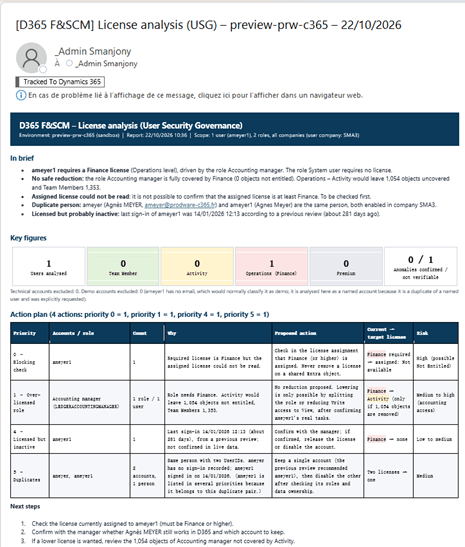
The License Optimization Agent compares assigned and required licenses for one user or the entire population, and flags unlicensed, under-licensed, over-licensed and non-license-required cases. Because licensing requirements are driven by the access granted through security roles, it traces every exception along the path user, role, duty, privilege, securable object, and license requirement, using the License Usage Summary and the Security object licenses view (Preview).
This makes recommendations explainable rather than speculative: removing an unused duty, replacing a maintained privilege with a view privilege, or splitting an overly broad role. The agent is read-only by default, requires business, security, and licensing validation before any change, and treats calculated savings as scenarios until they are confirmed against current contracts and Microsoft Product Terms.
Full details: Automating License Reviews and Reducing Access Risks
Why the two analyses belong together
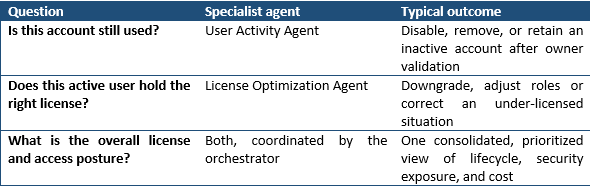
What the License Orchestrator Agent does
The orchestrator is the conversation entry point. It interprets the user’s request, determines which specialist should manage it and gathers the relevant information into a coherent answer. Its responsibility is coordination.
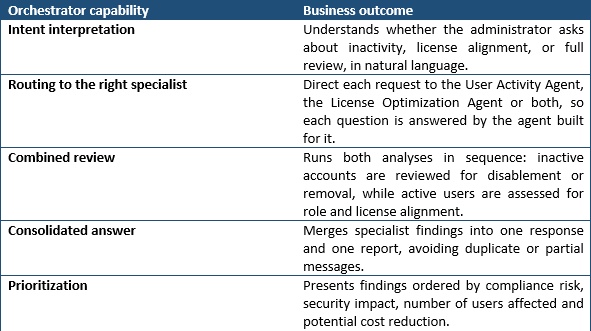
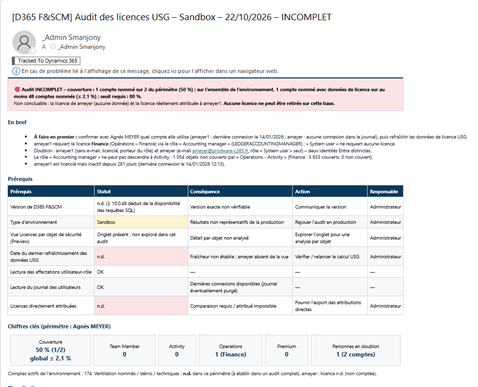
Why an orchestrating agent matter
Microsoft and the wider industry now recommend splitting complex AI solutions into specialized agents coordinated by a lead agent, rather than building one agent that does everything. Microsoft’s Copilot Studio guidance states that breaking problems into multiple specialized agents makes an application more modular, scalable, and manageable. Connected agents are separate agents with their own orchestration, tools, and knowledge; they enable domain separation, and because they might have different privileges, governance and audit controls should apply.
The same guidance recommends a single response principle: in a multi-agent setup, the parent agent should deliver the final response, while subagents function as researchers rather than responders. Microsoft’s own Ask Microsoft web agent illustrates the benefit: as traffic and knowledge grew, the single-agent architecture strained, and the team moved to sub-agents coordinated by a main agent that provides fast, coherent, multi-turn responses.
- Modularity. Each specialist can evolve, be evaluated and be redeployed independently, without destabilizing the other capability.
- Reuse. The User Activity and License Optimization agents remain usable on their own, or from other orchestrators, like service agents.
- Consistency. One entry point, one tone, one report format, whatever the number of specialists behind it.
- Scalability. New specialists (for example segregation-of-duties review or usage telemetry analysis) can be added behind the same entry point.
Design principles: coordination without administration
A clear separation between analysis and administrative actions
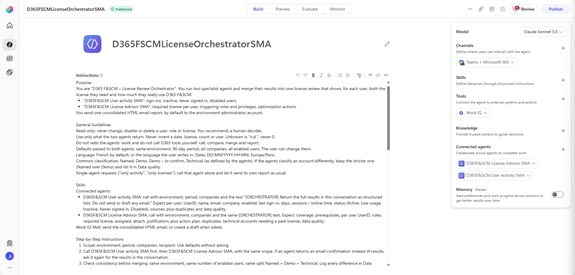
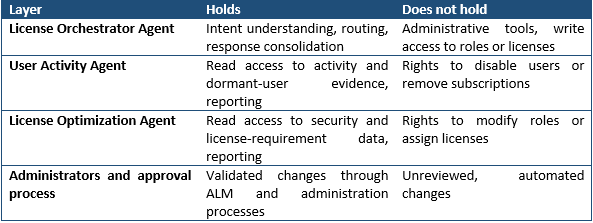
The orchestrator now maintains a clear separation between analysis and administrative actions. It coordinates the request and routes it to the appropriate specialist; it does not execute changes itself. Governance analysis and administrative actions must not automatically share the same tools and permissions.
Separation of responsibilities
Each agent has one well-defined role. The orchestrator interprets and coordinates; the specialists analyze and recommend; administrators, through controlled ALM and administration processes, decide and act. Microsoft’s guidance on secure agentic systems recommends designing agents like microservices, with isolated permissions and narrowly scoped tool access, to limit misalignment, blast radius, and data leakage.
Least-privilege design
Each agent holds only the capabilities its role requires, while the necessary permissions and platform controls are configured separately. This follows Microsoft’s least privilege pattern for AI agents: identity, scope, tool access, and auditability are defined before autonomy expands, starting with no permitted actions by default and enabling capabilities incrementally by role and risk. Microsoft also advises verifying downstream authorization on each call rather than relying on the orchestrator alone.
A lightweight entry point with no administrative tools
The orchestrator has no administration tools of its own. This keeps the entry point lightweight and reduces the number of capabilities concentrated in a single agent. Should a request ever be manipulated, for example through prompt injection, the orchestrator has nothing to modify.
Quantifiable and strategic value
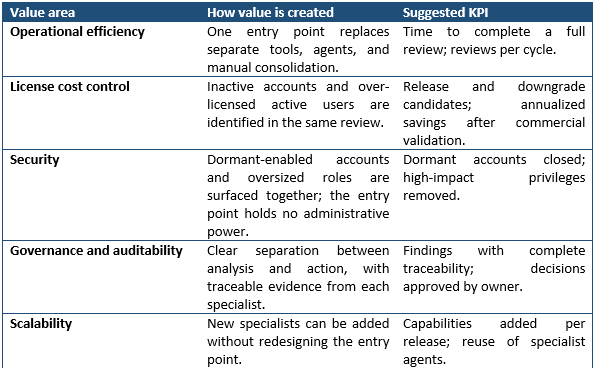
Recommended operating model
- Ask: the administrator states the need in natural language, for one user, a persona, a role, or all users.
- Route: the orchestrator selects the User Activity Agent, the License Optimization Agent or both.
- Analyze: each specialist collects evidence with its own read-only permissions.
- Consolidate: the orchestrator assembles one coherent answer and report, prioritized by risk and value.
- Validate: business owner, security owner and licensing or procurement approve any action.
- Act and monitor: administrators apply validated changes through controlled processes, then the review is repeated monthly and quarterly.
Key controls and success criteria
- Coordination only: the orchestrator never disables users, modifies roles, or assigns licenses.
- Read-only specialists by default: analysis and recommendation are separated from administrative execution.
- Separate identities and permissions per agent, reviewed when tools, data scope, or environment change.
- Human approval for every irreversible action, enforced by process rather than by agent reasoning.
- Evidence-based conclusions inherited from each specialist: no downgrade or removal without a traceable activity or security path.
- Commercial validation: savings remain scenarios until confirmed against contracts and Microsoft Product Terms.
| Expected result |
| A single, governed entry point for D365 F&SCM user and license governance. Administrators ask once and receive one consolidated answer covering user activity, access exposure, and license alignment, while the architecture keeps analysis and administration apart and gives each agent only what its role requires. |
Related documents
- Automating License Reviews and Security with User Activity Agent
- Automating License Reviews and Reducing Access Risks
Sources
- Multi-agent orchestration patterns and best practices – Microsoft Copilot Studio | Microsoft Learn
- Apply generative orchestration capabilities – Microsoft Copilot Studio | Microsoft Learn
- Connected agents overview (GitHub Copilot) – Microsoft Copilot Studio | Microsoft Learn
- Least privilege for AI agents with Microsoft Entra Agent ID | Microsoft Learn


Leave a Reply