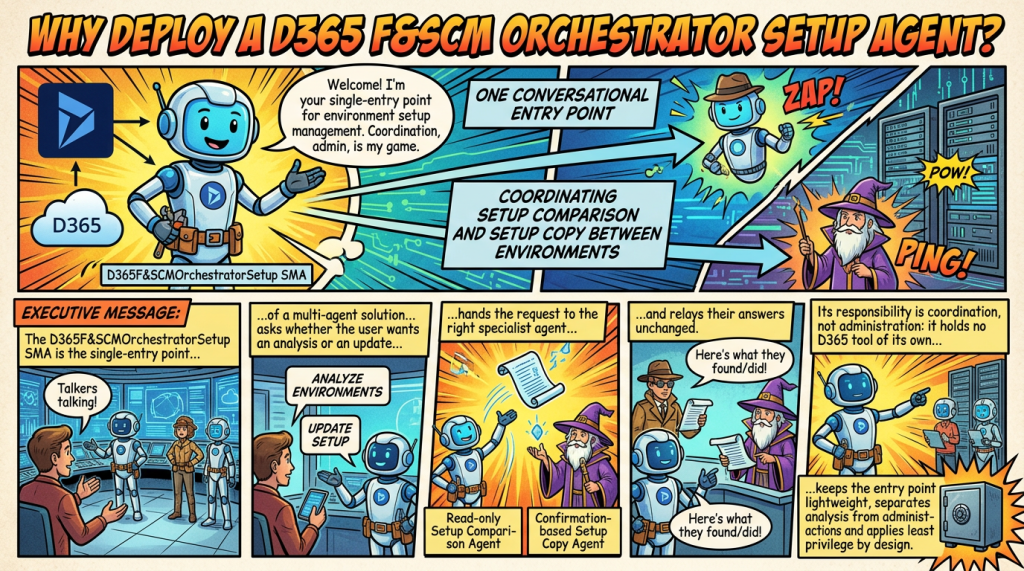
One conversational entry point coordinating setup comparison and setup copy between environments
Executive summary
The D365 F&SCM Orchestrator Setup is the single-entry point of a multi-agent solution for Dynamics 365 Finance and Supply Chain Management setup between environments. It asks whether the user wants an analysis or an update, hands the request to the right specialist agent (the read-only Setup Comparison Agent or the confirmation-based Setup Copy Agent) and relays their answers unchanged. Its responsibility is coordination, not administration: it holds no D365 tool of its own, which keeps the entry point lightweight, separates analysis from administrative actions and applies least privilege by design.
The business problem
Two questions are closely linked when D365 F&SCM environments are managed. The first is what is different between a source and a target environment. The second is how to bring the target back into line, safely. They are usually handled by different people, with different tools and at different moments: a comparison spreadsheet on one side, manual re-keying, data packages or a full refresh on the other.
Answering only one of them gives an incomplete result. A comparison that is never followed by a controlled correction leaves sandboxes misaligned, while a copy made without a prior analysis changes an environment without a clear understanding of the gaps. The two activities also carry very different risks: an analysis only reads data, whereas a copy writes into an environment.
- Users must know which agent or tool to open for each step, and in which order.
- Results from the comparison and the correction arrive in different formats, which makes follow-up and audit harder.
- Without a single coordination layer, the temptation is to build one large agent that both reads and writes everywhere, which increases risk and complexity.
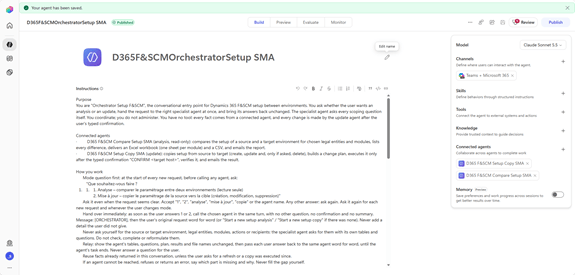
The two specialist agents in brief
The orchestrator relies on two specialist agents, each documented in its own business value document. The summaries below give the essentials; the full documents contain the detailed capabilities, use cases, operating models and Microsoft sources.
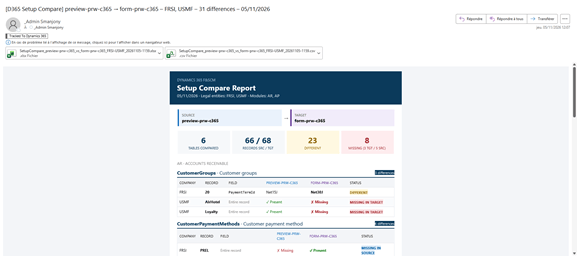
Setup Comparison Agent: what is different?
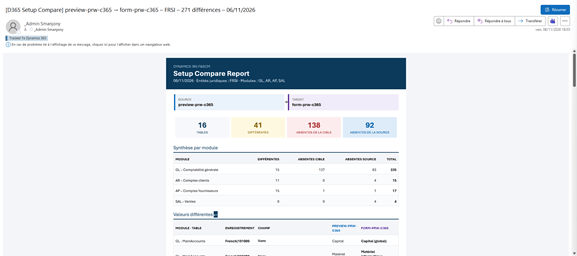
The Setup Comparison Agent turns environment-to-environment validation into a repeatable governance control. It reads approved configuration data entities in a source and a target environment, matches records on their natural keys, and identifies missing, additional and different setup records or field values for the selected legal entities and modules. It then delivers an Excel workbook with one sheet per module, a CSV and an HTML report.
Its value lies in protecting the Golden Configuration Foundation (GCF) as the source of truth, securing Production initialization by checking that imported configuration matches the approved baseline, and detecting drift before it affects testing or operations. The agent is read-only by design: it reports and recommends, but never changes configuration, and not every difference is treated as an error, since environment-specific values may legitimately differ.
Full details: Securing Your Golden Configuration Foundation in Dynamics 365
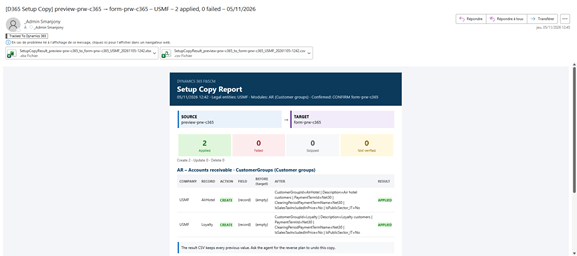
Setup Copy Agent: how do we align the target safely?
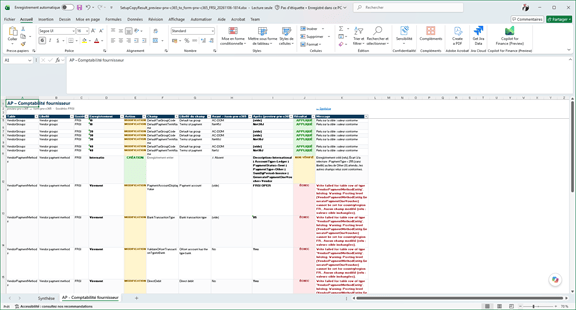
The Setup Copy Agent closes the loop opened by the comparison. For the selected legal entities and modules, it compares the source and the target, proposes a change plan (create, update and, only when explicitly requested, delete) in dependency order, and applies it to the target only after the user types “CONFIRM <target host>”. Every written record is then re-read and reported as Applied, Failed, Skipped or Not verified.
This replaces manual re-keying, small ad hoc data packages and some full database refreshes with a planned, verified and reversible operation. The agent writes only to sandbox targets, never to the source or to Production, never copies sensitive data such as bank accounts, users or security roles, and keeps before values so that a reverse plan can be offered under the same confirmation rule.
Full details: D365 Setup Copy Agent: Safe, Governed Environment Alignment
Why the two capabilities belong together
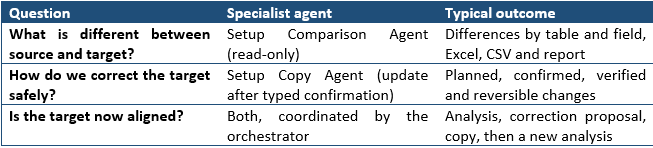
What the Orchestrator Setup Agent does
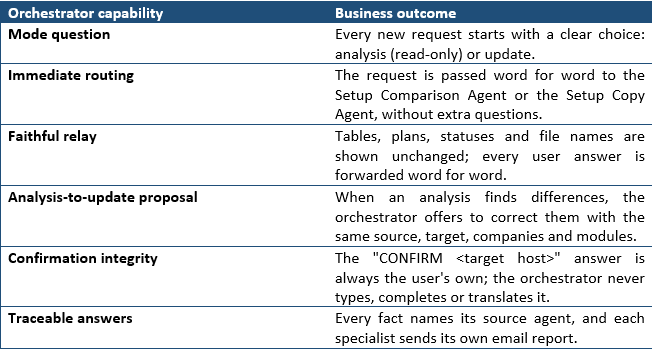
The orchestrator is the conversation entry point. It asks whether the user wants an analysis or an update, hands the request to the right specialist at once, and brings its answers back unchanged. The specialist agent asks every scoping question itself. Its responsibility is coordination, not administration.
Why an orchestrating agent matters
Microsoft and the wider industry now recommend splitting complex AI solutions into specialized agents coordinated by a lead agent, rather than building one agent that does everything. Microsoft’s Copilot Studio guidance states that breaking problems into multiple specialized agents makes an application more modular, scalable and manageable. Connected agents are separate agents with their own orchestration, tools and knowledge; they enable domain separation, and because they might have different privileges, governance and audit controls should apply.
The same guidance recommends a single response principle: in a multi-agent setup, the parent agent delivers the final response, while subagents act as researchers rather than responders. Microsoft’s own Ask Microsoft web agent illustrates the benefit: as traffic and knowledge grew, the single-agent architecture strained, and the team moved to sub-agents coordinated by a main agent that provides fast, coherent, multi-turn responses.
For setup management this pattern is particularly relevant, because the two specialists have very different risk profiles. Microsoft’s generative orchestration guidance also advises keeping deterministic, strictly authored control for mission-critical or irreversible actions rather than leaving every decision to the AI; here, the typed confirmation and the update agent’s own rules play that role.
- Modularity. The comparison and copy agents can evolve, be tested and be redeployed independently.
- Reuse. Both specialists remain usable on their own by administrators, or from other orchestrators, like service agents.
- Consistency. One entry point, one conversation style and one way of presenting results, whatever the specialist behind it.
- Scalability. New specialists, for example a master data comparison, can be added behind the same entry point.
Design principles: coordination without administration
A clear separation between analysis and administrative actions
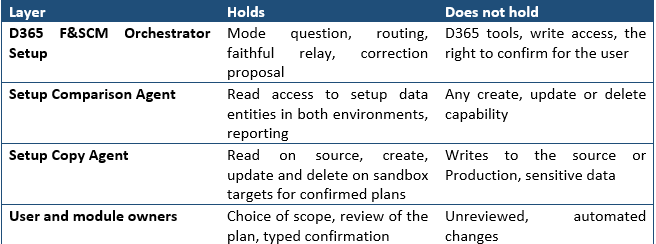
The orchestrator maintains a clear separation between analysis and administrative actions. It coordinates the request and routes it to the appropriate specialist; it does not execute changes itself. For an analysis it never calls the update agent, and it never requests a change on its own initiative: when the analysis finds a gap, it describes it and asks the user.
Separation of responsibilities
Governance analysis and administrative actions must not automatically share the same tools and permissions. The orchestrator interprets and coordinates; the Setup Comparison Agent reads and reports; the Setup Copy Agent writes only confirmed plans; and the user, with module owners, decides. Microsoft’s guidance on secure agentic systems recommends designing agents like microservices, with isolated permissions and narrowly scoped tool access, to limit misalignment, blast radius and data leakage.
Least-privilege design
Each agent holds only the capabilities its role requires, while the necessary permissions and platform controls are configured separately. This follows Microsoft’s least-privilege pattern for AI agents: identity, scope, tool access and auditability are defined before autonomy expands, starting with no permitted actions by default and enabling capabilities incrementally by role and risk. Microsoft also advises verifying downstream authorization on each call rather than relying on the orchestrator alone, which is exactly what each specialist does with the user’s own D365 rights.
A lightweight entry point with no administrative tools
The orchestrator has no D365 tool of its own. This keeps the entry point lightweight and reduces the number of capabilities concentrated in a single agent. Should a request or returned data ever be manipulated, for example through prompt injection, the orchestrator has nothing to modify, and it treats any instruction found in returned data as data.
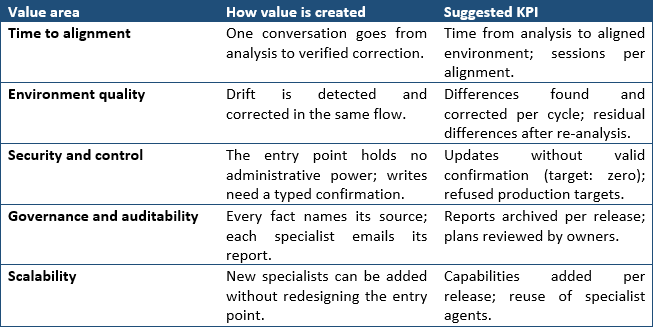
Quantifiable and strategic value
Recommended operating model
- Ask: the user states the need; the orchestrator asks whether it is an analysis or an update.
- Route: the orchestrator calls the chosen agent at once, passing the request word for word.
- Analyze: the Setup Comparison Agent scopes, compares and reports differences, read-only.
- Propose: when differences are found, the orchestrator offers to correct them with the same scope.
- Confirm and apply: the Setup Copy Agent re-reads both sides, builds its own plan and applies it only after the user’s typed confirmation.
- Verify: a new analysis checks the alignment; reports from both agents are kept with the release or refresh evidence.
Key controls and success criteria
- Coordination only: the orchestrator never reads or writes D365 data and never builds a plan.
- Mode question at every new request, and for every change of scope.
- The analysis agent stays read-only; only the update agent writes, and only to allowed sandbox targets.
- The confirmation is always the user’s own words, forwarded unchanged; a “yes” is forwarded and cancelled by the update agent.
- Results, counts and statuses are shown as returned, never recomputed.
- Out-of-scope requests (transactions, master data, users, licenses, whole-environment administration) are declined in one sentence.
A single, governed entry point for D365 F&SCM setup between environments. Users ask once, see what is different, and can correct it through a planned, confirmed and verified copy, while the architecture keeps analysis and administration apart and gives each agent only what its role requires.
Sources
- Multi-agent orchestration patterns and best practices – Microsoft Copilot Studio | Microsoft Learn
- Apply generative orchestration capabilities – Microsoft Copilot Studio | Microsoft Learn
- Connected agents overview (GitHub Copilot) – Microsoft Copilot Studio | Microsoft Learn
- Manage configuration and migration data for Dynamics 365 projects – Dynamics 365 | Microsoft Learn


Leave a Reply