- Introduction
- Elastic Compute at a Glance
- Why It’s Simpler
- Cost Is Proportional to Workload
- Deployment in the Middle
- Scaling Triggers
- Scale-Up and Scale-Down Flow
- Power Platform Requests & Compute Capacity
- How PPRs Accumulate
- PPR Formula
- Minimum and Maximum AOS
- AOS Capacity per Number of User Licenses
- Scaling Capacity: Add-on Pack Example
- Request Limits vs. Elastic Compute Capacity — Don’t Mix Them Up
- The Two Purposes of PPRs
- Unified Developer Environments
- LCS vs. Unified Environments
- Multiple Environments Still Matter
- What Gets Cheaper, What Gets Harder
- A Few Important Limits to Keep in Mind
- Key Takeaways
Introduction
Microsoft is transforming how infrastructure works inside D365 Finance applications. In unified environments, Elastic Compute replaces fixed-tier environments with a shared capacity model that automatically scales to actual usage. Instead of picking a T2, T3, or T4 up front, test and production environments now draw from a common capacity model shared with the Power Platform.
Finance & Operations apps in unified environments use elastic compute capacity to deliver flexible, scalable processing power. Rather than selecting a fixed-size environment tier at purchase, all your test and production environments tap into a shared capacity pool and adapt automatically to real workload demand.
What this means:
- Test and production share the same performance model. Performance testing done in a sandbox reflects what you can expect in production — no more guessing across tiers.
- You don’t pick a tier. Your compute is determined by your Power Platform Request (PPR) entitlement and scales automatically.
- Increasing capacity is simple. Buy more PPR to raise your compute ceiling, or add storage to create more environments. No contract amendments, no support tickets.
In practice, customers no longer plan infrastructure the same way. The AOS tier remains the primary compute layer, but the number of AOS instances can grow with demand. Microsoft describes this as scalability driven by actual workload, not by a predefined tier.
Microsoft’s published reference points matter. Each AOS instance corresponds to 650,000 Power Platform Requests (PPRs). Test and production environments have a minimum of two AOS instances, and an environment can scale up to 80 instances — split between 40 interactive and 40 batch. Unified developer environments are the exception and remain fixed at a single AOS instance.
Elastic Compute at a Glance
Finance & Operations apps automatically adjust compute power based on actual usage — no fixed tiers, no support tickets, no guesswork.
Why Elastic Compute?
Three core advantages over the traditional LCS model:
- Identical performance model — Test and production share the same Elastic Compute model. Performance tests in sandbox reflect production behavior.
- No tier selection — Compute capacity is driven by your PPR entitlement and scales automatically. No tier lock-in.
- Simple capacity add-ons — Buy PPR add-on packs from the Microsoft 365 admin center to instantly raise your compute ceiling — no contracts, no price negotiations.
Key Numbers
| Metric | Value |
| Max AOS instances per environment | 80 |
| Interactive / Batch split | 40 + 40 |
| PPR per AOS instance | 650,000 |
| Base tenant PPR | 500,000 |
How Elastic Compute Works
In unified environments, the Application Object Server (AOS) layer is the primary compute component for Finance & Operations. Each AOS instance hosts X++ business logic and handles user requests, OData and custom service calls, integration traffic, and batch jobs.
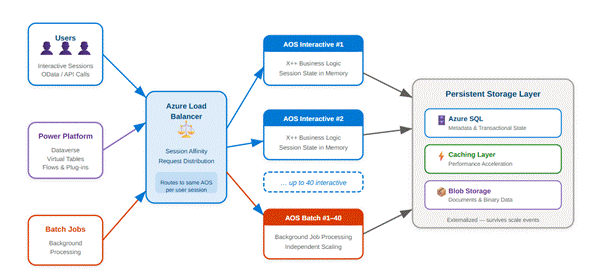
AOS instances are stateful — they hold user session state in memory. Internal Azure load balancers distribute requests across AOS instances, and session affinity ensures a user’s requests are handled by the same AOS instance for the duration of the session. Persistent data (metadata, transactional state) is stored externally in Azure SQL, caching layers, and Blob storage.
Because AOS instances hold session state in memory, scaling up and scaling down behave differently:
- Scaling up (adding AOS instances) is transparent and doesn’t disrupt active users.
- Scaling down (removing AOS instances) requires closing active sessions, so it’s reserved for planned maintenance windows or customization deployments — times when a service interruption is already expected.
This approach guarantees users never lose sessions unexpectedly during a scale-down.
An environment supports a maximum of 80 total AOS instances: up to 40 interactive AOS handling user requests, and up to 40 batch AOS running background jobs.
| Key takeaway: AOS instances are stateful — they store user session state in memory. That’s why scale-up is seamless, while scale-down is reserved for maintenance windows to avoid session loss. |
Why It’s Simpler
The biggest change: capacity is no longer purchased as a specific infrastructure tier. It now comes from a global tenant-wide PPR entitlement. Microsoft defines this as:
- 500,000 base PPRs, plus
- 5,000 PPRs per assigned user license, plus
- Optional 50,000 PPR add-on packs when you need more.
This simplifies the customer conversation. The old question was: “Which environment tier do we need?” The new one is closer to: “What workload are we expecting, and how much shared capacity do we want available?” The model is easier to implement, but it also means customers need to think more carefully about usage patterns across their environments.
Cost Is Proportional to Workload
Microsoft doesn’t publish a per-request price list for PPRs, but it does offer 50,000 PPR add-on packs — giving customers a practical reference point for understanding the cost of additional headroom. The exact commercial price can vary by region and agreement.
The real shift is conceptual. Under the old model, customers often paid for fixed capacity whether they used it or not. With elastic compute, idle baseline capacity becomes less of a planning issue, while activity spikes become much more visible. High concurrency, API bursts, Dataverse traffic, and heavy batch workloads are now what matter most.
There is also no rollover. Power Platform request limits are measured over a rolling 24-hour window, so unused requests can’t be banked for a later spike. This confirms the model is real-time consumption, not a monthly quota.
5,000 vs. 40,000 — Two Different Numbers. Microsoft uses one model for elastic compute capacity and another for per-license user request limits:
- 5,000 PPR per assigned user license → adds to the tenant-wide 500,000 base. This drives Elastic Compute scaling.
- 40,000 requests per user per 24 hours (for Dynamics 365 Enterprise paid users) → this is the documented per-user request throttling limit. It governs request behavior and throttling, not AOS compute calculation.
Two distinct mechanisms for two different problems:
- 5,000 answers: “How much elastic compute capacity does this license add to the tenant?”
- 40,000 answers: “How many Power Platform requests can this licensed user make in 24 hours before throttling kicks in?”
They’re related, but not interchangeable.
Deployment in the Middle
Environments start with a medium-sized baseline — not minimum, not maximum — so they’re immediately ready for typical workloads.
When Microsoft provisions a Finance & Operations environment, it deploys a medium-sized base topology. This baseline:
- Is not the minimum compute available.
- Is not the maximum compute available.
- Is chosen to handle steady-state interactive usage, normal batch processing, and typical Dataverse/Power Platform integration patterns.
By starting in the middle, the platform minimizes the need for cold scale-ups. Most customer workloads hover around this baseline, so the environment is ready for typical use immediately after provisioning.
Scaling Triggers
- High concurrent sessions — Many simultaneous interactive users push up the count of interactive AOS instances.
- Bursty API traffic — Spikes in OData or custom service calls trigger additional AOS to absorb the load.
- Heavy batch processing — Large batch job queues drive independent scaling of batch AOS instances.
- Power Platform calls — Increased Dataverse virtual-table traffic from flows, plug-ins, or apps triggers elastic scaling.
Scale-Up and Scale-Down Flow
- Demand detected — The platform monitors sessions, API traffic, and batch queue depth.
- Scale-up — New AOS instances are added horizontally, with no service interruption. Batch capacity can scale independently.
- Load redistribution — Load balancer redistributes traffic across all instances.
- Maintenance window — Sessions end, extra AOS are removed, environment returns to baseline.
Because AOS instances hold session state in memory, scale-down can’t happen on demand without disrupting active users. The platform reserves scale-down for planned maintenance windows or customization deployments, where a service interruption is already expected. During those windows, excess AOS instances are removed and the environment returns to its baseline topology.
The environment scales down to baseline — never below. This ensures the environment is always ready for normal workloads as soon as it comes back online.
Power Platform Requests & Compute Capacity
Power Platform Requests (PPRs) drive compute capacity for Finance & Operations apps in unified environments. PPRs are the unit of measure that determines how much compute is allocated. Each AOS instance requires 650,000 PPRs.
How PPRs Accumulate
| Source | Amount |
| Tenant base | 500,000 PPRs — included automatically with any Dynamics 365 purchase |
| Per user license | 5,000 PPRs per assigned license — added to the tenant PPR pool |
| Add-on packs | 50,000 PPRs per pack — purchased from the Microsoft 365 admin center |
PPR Formula
| 500,000 (Tenant base) + (Licenses × 5,000) + (Add-on packs × 50,000) = Total PPRs ÷ 650,000 = Number of AOS instances |
- Minimum: 2 AOS
- Maximum: 80 AOS (40 interactive + 40 batch)
Minimum and Maximum AOS
Every test and production environment is provisioned with a minimum of two AOS instances (one interactive, one batch), regardless of available PPRs. This ensures the environment runs correctly and provides basic redundancy. The maximum is 80 AOS (40 interactive + 40 batch).
AOS Capacity per Number of User Licenses
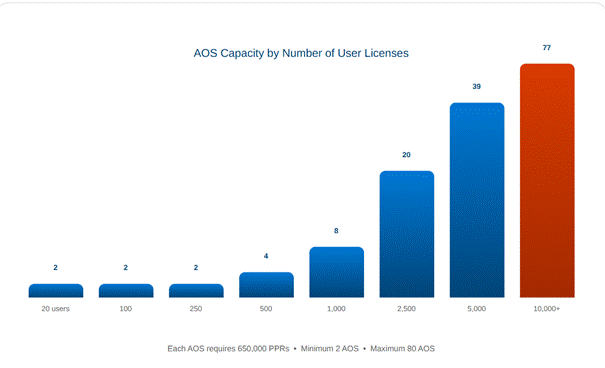
| User licenses | PPRs calculation | Total PPRs | AOS capacity |
| 20 (minimum) | 500,000 + (20 × 5,000) | 600,000 | 2 AOS (floor) |
| 100 | 500,000 + (100 × 5,000) | 1,000,000 | 2 AOS |
| 250 | 500,000 + (250 × 5,000) | 1,750,000 | 2 AOS |
| 500 | 500,000 + (500 × 5,000) | 3,000,000 | 4 AOS |
| 1,000 | 500,000 + (1,000 × 5,000) | 5,500,000 | 8 AOS |
| 2,500 | 500,000 + (2,500 × 5,000) | 13,000,000 | 20 AOS |
| 5,000 | 500,000 + (5,000 × 5,000) | 25,500,000 | 39 AOS |
| 10,000+ | 500,000 + (10,000 × 5,000) | 50,500,000 | 77 AOS |
Scaling Capacity: Add-on Pack Example
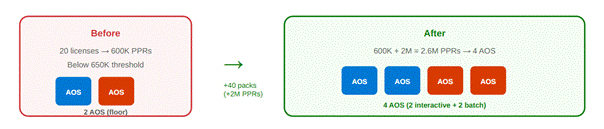
If your license-driven PPRs don’t give you enough AOS capacity, you can buy additional 50,000 PPR packs from the Microsoft 365 admin center.
Example: A customer with 20 user licenses has 600,000 PPRs (from licenses) + 500,000 (base) = 1,100,000 PPRs. They could buy 40 add-on packs (2,000,000 PPRs) to reach 2,600,000 PPRs — enough for two additional AOS instances.
Combined with the two-AOS minimum, that brings the total to four AOS instances. That maximum allowed AOS count applies to every environment created, now and in the future. The number of environments is bounded by available storage.
These totals determine the compute capacity available for elastic scaling across all Finance & Operations environments in the tenant.
Request Limits vs. Elastic Compute Capacity — Don’t Mix Them Up
Customers need to be careful to distinguish the capacity model from the per-user request limit.
Example: 100 Supply Chain Management users. For elastic compute capacity, Microsoft’s formula gives:
- 500,000 base + (100 × 5,000) = 1,000,000 PPRs → 2 AOS
If someone instead started from the per-user 24-hour limit of 40,000:
- 100 × 40,000 = 4,000,000 PPRs — this would be wrong for scaling.
That calculation confuses the user request-limit model with the environment capacity model. For Elastic Compute, the relevant figure is the 1,000,000 PPR tenant entitlement, not the 40,000-per-user request limit.
It’s also important that attach licenses don’t grant additional platform rights. Microsoft’s licensing guide specifies that attach licenses use the rights of the associated base license. Customers shouldn’t assume base + attach doubles their Elastic Compute quota.
The Two Purposes of PPRs
PPRs serve two purposes:
- Capacity entitlement — PPRs determine how many AOS instances your environments can support. More PPRs = higher maximum Elastic Compute ceiling.
- Request throttling limit — PPRs also govern throttling for Power Platform operations (Dataverse calls, plug-ins, flows). These limits are independent of AOS capacity.
Unified Developer Environments
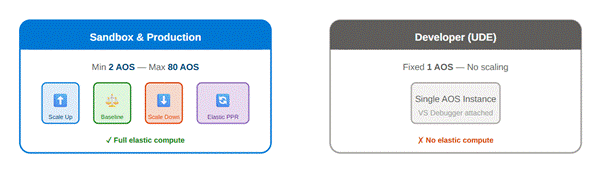
Developer environments are the exception to elastic scaling. They remain fixed at a single AOS instance.
Why? The Visual Studio debugger must attach to a specific AOS process, and a single AOS guarantees stable debugging. For multi-AOS workloads, use a sandbox environment instead.
LCS vs. Unified Environments
Elastic Compute removes the friction of fixed tiers, manual scaling, and sandbox-vs-production mismatches.
| Lifecycle Services (Legacy) | Unified Environments (Elastic) |
| Fixed tiers (Tier 2–5) selected at purchase | Elastic compute auto-adjusts based on PPRs |
| Sandbox ≠ Production performance | Sandbox = Production — same capacity model |
| Contract amendments required (EA/CSP) to change capacity | PPR add-ons purchased from Microsoft 365 admin center |
| Support tickets required to scale up | Automatic scale-up with no service interruption |
| Separate LCS project for each production environment | Direct provisioning from tenant capacity pool |
| 3–12 AOS max per environment (depending on tier) | Up to 80 AOS per environment (40 + 40) |
| Cloud-hosted developer VMs | Unified developer environments with a single AOS |
Multiple Environments Still Matter
Even though test and production now share the same Elastic Compute model, customers should continue to reason at the tenant level. Test, UAT, Golden, and other environments are no longer designed as fixed, isolated tiers. They plug into the same global capacity model, and operational demand across them can compound significantly when testing, refreshes, migrations, integrations, and batch processing happen in parallel.
This matters most during implementation. Customers often have multiple active environments before the final production licensing model is fully established. If those environments need to scale during migrations, test cycles, or parallel workload periods, temporary 50,000 PPR add-on packs may be needed until final licensing is in place.
What Gets Cheaper, What Gets Harder
What should get cheaper: unused infrastructure. Customers no longer need to oversize tiers “just in case.” Idle baseline capacity and unused overhead generate less waste, and planning between sandbox and production is simplified since both follow the same capacity model.
What can raise costs: sustained activity. Complex integrations, API traffic, Dataverse calls, and large batch workloads now translate more directly into visible capacity demand. The model is more efficient, but it also makes cost more sensitive to actual usage.
Budgeting also gets harder. With fixed tiers, infrastructure costs were easier to predict, even when inefficient. With Elastic Compute, customers may need to adjust PPR capacity over time — especially for projects with variable demand or multiple active environments. The model is technically simpler but financially less stable.
| Rule of thumb: If you don’t have more PPR capacity and want to add a second sandbox, plan to buy 40 PPR add-on packs at roughly €50 each ≈ €2,000/month. If you also need additional database capacity, remember the Dataverse Database Capacity add-on at €35/GB/month. |
A Few Important Limits to Keep in Mind
This model doesn’t yet cover all compute resources. Components like Commerce Scale Unit and e-commerce-related workloads aren’t clearly described in public documentation as part of the Elastic Compute model. Customers should be cautious and not assume full alignment at this stage — this area is still evolving.
Also worth noting: unified environments are managed through the Power Platform Admin Center (PPAC), not Lifecycle Services. Microsoft’s current documentation clearly states that unified Finance & Operations environments are managed via PPAC and don’t use LCS infrastructure.
Key Takeaways
Elastic Compute is a significant shift for D365 Finance. It replaces fixed tiers with a shared, flexible, PPR-driven capacity model, gives sandbox and production the same compute framework, and lets customers add capacity without going through the old infrastructure process. It scales automatically.
The main lesson for customers: stop thinking in tiers and start thinking in workload. If workload is low, the model is simpler and often more efficient. If workload is heavy or unpredictable, the model remains flexible — but requires closer attention to capacity, integrations, and budgeting.
- Zero downtime during scale-up — no support tickets required
- Same model for sandbox and production
- 80 AOS max per environment


Leave a comment