One Always-On Roadmap: What Microsoft’s AI at Work Model Changes for Business and IT
From September 2026, Microsoft is bringing Dynamics 365, Power Platform, and Dataverse roadmap content into a unified, continuously updated view – changing how organizations discover, assess, communicate, and govern product change.
| The change in one sentence Microsoft is replacing a roadmap experience organized around twice-yearly release-plan publications with an always-on disclosure model, while preserving the distinct roles of the public roadmap, tenant-specific Message Center notifications, and Microsoft Learn documentation. |
A roadmap shift with operational consequences
For years, Dynamics 365 and Power Platform customers organized release planning around Microsoft’s twice-yearly release waves. That rhythm created recognizable checkpoints for reviewing features, briefing stakeholders, and preparing testing or adoption activities. From September 2026, Microsoft is changing the communication model: roadmap information for Dynamics 365, Power Platform, and Dataverse is being consolidated into the Microsoft AI at Work Roadmap and published continuously as plans are committed.
This is more than a change of website. It replaces a periodic planning habit with an ongoing product-intelligence process. Business leaders gain a broader view of innovation across Microsoft’s work and business application portfolio. IT, architecture, security, and application teams gain a continuously updated source that can be filtered, exported, subscribed to, and consumed programmatically.
The practical implication is straightforward: organizations should stop treating roadmap review as a task performed only around a release-wave announcement. Instead, roadmap monitoring becomes a recurring governance activity connected to portfolio management, change assessment, testing, communications, and adoption.
What matters most
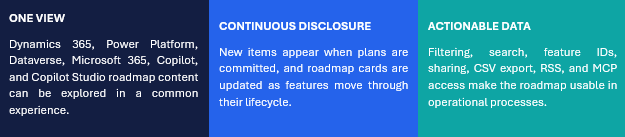
What the unified AI at Work Roadmap provides
The AI at Work Roadmap, formerly the Microsoft 365 Roadmap, is positioned as a central location for understanding what is coming across Microsoft’s productivity, business application, low-code, data, and Copilot portfolio. Consolidation matters because transformation programs rarely depend on only one product. A Dynamics 365 process may also involve Dataverse, Power Automate, Power Apps, Copilot Studio, Teams, or other Microsoft 365 services.
A shared roadmap view does not eliminate product-specific analysis. It makes cross-product dependencies easier to see and gives organizations a common starting point for prioritization and discussion.
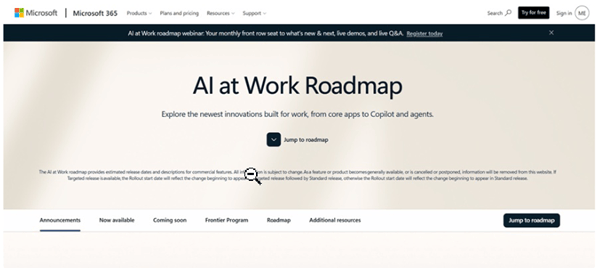
Use the Microsoft AI at Work Roadmap.
Capabilities that turn browsing into planning
- Search and feature IDs. Users can locate items by roadmap ID, keyword, description, or tag. A unique ID provides a stable reference for decision logs, backlog items, and stakeholder communications.
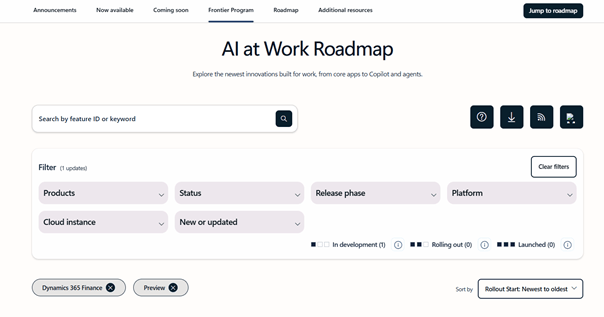
- Product and environment filters. Roadmap views can be narrowed by product and, where applicable, platform, release phase, status, and cloud instance.
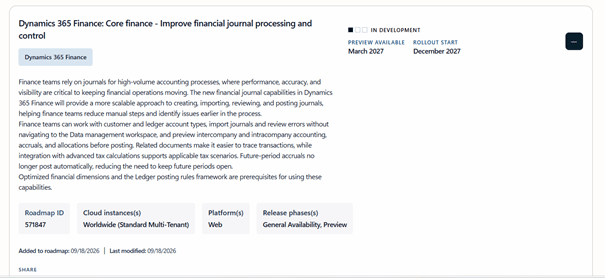
- Lifecycle status. Cards indicate whether a capability is in development, rolling out, or launched. Preview and rollout dates provide additional planning signals, but dates and scope should still be monitored for change.
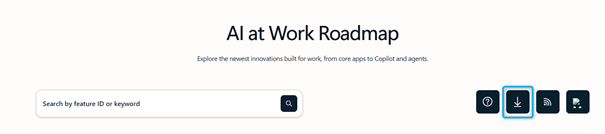
- Export and subscription. Complete or filtered views can be exported to CSV, while RSS subscriptions support recurring monitoring without requiring teams to revisit the site manually.
- Sharing. Filtered roadmap views and individual feature links can be shared with stakeholders, making it easier to discuss the same roadmap record across governance forums.

Three sources, three different jobs
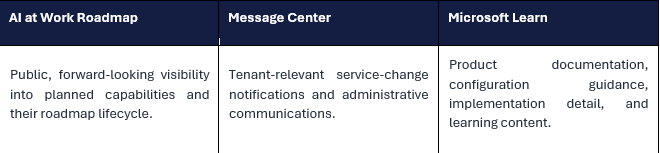
These sources are complementary, not interchangeable. A roadmap item signals direction and timing; Message Center explains changes relevant to a specific tenant; Microsoft Learn remains the implementation reference. Mature release governance should connect all three.
Impacts for Dynamics 365, Power Platform, and Dataverse customers
Release planning becomes continuous
The familiar release-wave checkpoint is no longer sufficient as the primary planning mechanism. Teams need a lightweight way to review newly added or modified roadmap items throughout the year, identify relevance, and assign ownership for assessment.
This does not mean every roadmap change requires a project. It means every relevant change should have a clear disposition: monitor, assess, test, adopt, defer, or record as not applicable.
Business and IT need a shared intake process
Roadmap items can create business opportunities, technical dependencies, security questions, licensing considerations, or user-adoption needs. A shared intake process helps avoid two common failures: promising a feature before IT has assessed it, or treating innovation as a purely technical update without business sponsorship.
Change management starts earlier
Earlier visibility gives communication and training teams more time to identify affected roles, processes, and guidance. However, roadmap dates and descriptions may evolve. Communications should therefore distinguish between an item being planned, available in preview, rolling out, and fully launched.
Architecture watch becomes cross-platform
For Dynamics 365 customers, product change increasingly spans Dataverse, Power Platform, Copilot, Microsoft 365, and integration or analytics services. Architects should review roadmap items for dependencies across identity, data, ALM, environments, security, integrations, and user experience – not only within the originating application.
Governance evidence becomes easier to retain
Feature IDs, direct links, filtered exports, and status information can be attached to architecture decisions, change records, adoption backlogs, and steering materials. This creates a clearer trail from Microsoft’s public plan to the organization’s own decision.
The MCP opportunity: bring roadmap data into AI-assisted workflows
Microsoft also provides the Release Communications MCP Server, a remote Model Context Protocol endpoint that exposes trusted public information from the AI at Work Roadmap and Azure Updates to compatible AI clients. Instead of requiring users to understand a data schema or query API, an MCP-compatible client can call defined tools to search recent roadmap or Azure update items and retrieve a specific item by its identifier.
| Verified service facts from Microsoft documentation The documented endpoint is https://www.microsoft.com/releasecommunications/mcp and uses streamable HTTP transport.The service is publicly available, requires no authentication, and does not require a license; use remains subject to the Microsoft API Terms of Use.The documented tool set covers lists and item-by-ID retrieval for both Microsoft AI at Work roadmap entries and Azure Updates.The underlying public release information is refreshed daily; list operations return truncated descriptions and support filtering, search, and pagination. |
The practical value is not autonomous release management. It is assisted discovery and summarization. For example, an organization could use an approved MCP-compatible client to identify recently updated roadmap items for selected products, prepare a draft review list, or retrieve the current details for a known feature ID. Human review remains essential because relevance, risk, timing, and adoption decisions depend on the organization’s environment and business context.
A sensible control boundary
- Treat MCP output as an input to governance, not as an approval or deployment instruction.
- Retain the roadmap ID and direct Microsoft source in any generated summary.
- Validate tenant relevance in Message Center and implementation detail in Microsoft Learn.
- Apply the organization’s normal AI, data, security, and review policies to the chosen MCP client.
Use cases
With MRC MCP, you can do the following actions:
- Enhance AI clients such as Visual Studio Code (VS Code), Visual Studio, GitHub Copilot CLI, Claude Code, and other MCP-compatible clients.
- Enable IT admins, engineers, and technical users to query release and roadmap information directly from their AI client without relying on the websites.
Requirements
Although the MRC MCP Server is publicly available and free to use, users are subject to the Microsoft API Terms of Use. Read and understand the API Terms of Use before using the MRC MCP Server and before including the output in any production environment.
There’s no authentication required to access the MRC MCP Server. Users can use their preferred MCP client or agentic development environment, such as VS Code, Visual Studio, and more.
There’s no licensing required to use the MRC MCP server.
MCP Endpoint
To connect with MRC MCP Server, use a compatible AI client with the endpoint pointing to the following URL:
https://www.microsoft.com/releasecommunications/mcp
This endpoint provides programmatic access for MCP clients over Streamable HTTP. It doesn’t support direct access from a web browser and might return a 405 Method Not Allowed error if accessed manually.
Installation guide
Although VS Code is a common client for MCP Server, MCP is an open protocol that’s also supported by many clients including agents in Copilot Studio, in Foundry, and many other agentic IDEs. For some other MCP-compatible clients, the configuration steps are similar and involve adding the MCP server endpoint to a client-specific configuration file or settings.
The high-level process includes the following steps:
- Configure your AI client.
- Use the MCP server.
Standard configuration
The following standard configuration works in most clients:
JSON
{
“servers”: {
“MRC-MCP-Server”: {
“type”: “http”,
“url”: “https://www.microsoft.com/releasecommunications/mcp”
}
}
}
Available Tools
The MCP server exposes four tools:
| Tool | Description |
| get_recent_azure_updates | Retrieves Azure update posts from Microsoft Release Communications with optional filtering and search capabilities. Returns up to 50 updates per request with truncated descriptions. Supports OData filtering by products, product categories, tags (Features, Retirements, Security, etc.), status, availability dates, and publication dates. Includes text search on titles and pagination |
| get_azure_update_by_id | Retrieves a specific Azure update post by its unique identifier. Returns full details of products, tags, and availability dates. Use the unique Azure Updates ID to get more information about a specific post. |
| get_recent_roadmaps | Retrieves Microsoft AI at Work roadmap posts from Microsoft Release Communications with optional filtering and search capabilities. Returns up to 50 roadmap items per request with truncated descriptions. Supports OData filtering by products, platforms, release rings, cloud instances, status, availability dates, and publication dates. Includes text search on titles and pagination. |
| get_roadmap_by_id | Retrieves a specific Microsoft AI at Work roadmap post by its unique identifier. Returns full details of products and availability dates. Use the unique Microsoft AI at Work roadmap ID to get more information about a specific post. |
The list tools (get_recent_azure_updates, get_recent_roadmaps) return truncated descriptions to fit within AI context windows.
Use the MCP Server
To use the MRC MCP Server after installation, do the following steps:
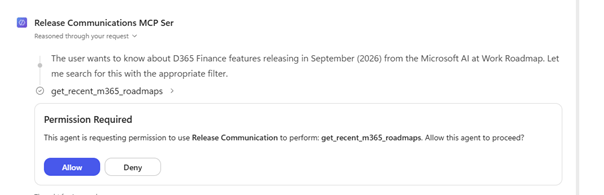
- Open your agent in M365 Copilot, or a chat window in VS Code with GitHub Copilot or your AI client.
- Ask a question related to Microsoft AI at Work Roadmap or Azure Updates.
- Allow the client to use MCP server tools when prompted.
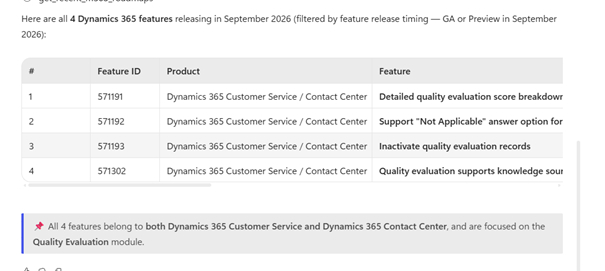
- Review the response.
Example queries
Here are sample natural-language queries that demonstrate how users can retrieve product release information across Microsoft AI at Work Roadmap and Azure Updates:
Microsoft AI at Work Roadmap
- As per Microsoft AI at Work Roadmap, which Microsoft Teams product features are releasing in June?
- Which Outlook product features on the Microsoft AI at Work Roadmap were updated last week?
- What’s the status of Feature ID 526798?
- List all Excel features launching on Mac that are releasing in March.
- Create an email for my Compliance team to review the Microsoft Purview features that are currently rolling out on Microsoft AI at Work Roadmap.
- What’s planned for mobile-only apps in OneNote?
Azure Updates
- Which Azure features became Generally Available this quarter?
- Show all Azure retirements scheduled for this year.
- What are the latest Azure AI services updates?
- Which Azure Databricks features were released in February?
- List all Azure features that are retiring in next three months.
Limitations
The MRC MCP server contains publicly available documentation, which is available on Microsoft AI at Work Roadmap and Azure Updates. The underlying product release information refreshes daily.
What is not changing?
While Microsoft’s roadmap communication approach is evolving, the way products are developed, released, and deployed remains unchanged
- Products with established release schedules will continue to follow those schedules.
- Message Center remains the source for tenant-relevant change notifications.
- Microsoft Learn remains the home for product documentation and implementation guidance.
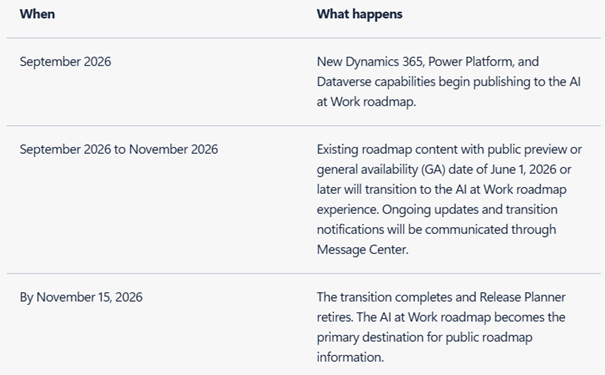
Transition milestones at a glance
Recommended transition plan for customers
The following actions are practical recommendations, not Microsoft-mandated requirements.
- Define ownership. Assign responsibility for roadmap monitoring and establish who represents business, application, architecture, security, change, and support perspectives.
- Create focused roadmap views. Configure filters for the products, platforms, statuses, and cloud instances relevant to the organization. Avoid one unfiltered list for every audience.
- Set a review rhythm. Use a monthly operational review for new or changed items and a quarterly portfolio discussion for priorities, dependencies, funding, and adoption decisions.
- Create a disposition workflow. For every relevant item, record the roadmap ID, owner, impacted processes, environments, dependencies, decision, target review date, and current status.
- Connect the three information layers. Use the roadmap for forward visibility, Message Center for tenant-specific change, and Microsoft Learn for implementation and configuration guidance.
- Update existing governance artefacts. Replace references to twice-yearly release-plan reviews in runbooks, RACI matrices, steering packs, architecture watch processes, and support procedures.
- Use automation selectively. Start with CSV or RSS where sufficient. Consider the Release Communications MCP Server when natural-language discovery or AI-assisted summarization adds measurable value and fits governance controls.
- Preserve human decisions. Do not convert a roadmap announcement directly into a commitment. Confirm availability, scope, tenant relevance, prerequisites, security impact, licensing, and testing needs before adoption.
Transition FAQ: what the source material supports
Will Microsoft publish a September 2026 Release Wave 2 plan?
Microsoft’s transition announcement states that, from September 2026, new Dynamics 365 and Power Platform features are published continuously in the AI at Work Roadmap rather than through a new twice-yearly release-plan announcement.
Will every historical roadmap item move?
No. Microsoft’s transition material states that items with Public Preview or General Availability dates from 1 June 2026 onward move to the AI at Work Roadmap, while earlier items remain in existing Microsoft Learn release plans for historical reference.
Does the new roadmap change how products are developed or deployed?
Microsoft states that the communication approach is changing, while established product release schedules continue. The roadmap should therefore not be interpreted as a new deployment mechanism.
Does the roadmap replace Message Center or Microsoft Learn?
No. Microsoft identifies Message Center as the source for tenant-relevant notifications and Microsoft Learn as the home for documentation and implementation guidance.
The roadmap is becoming always-on: Customer governance should become always-ready
Microsoft’s unified AI at Work Roadmap offers a clearer cross-product view and more flexible ways to search, filter, share, export, subscribe to, and query release information. The benefit will not come from visibility alone. It will come from connecting that visibility to disciplined decisions across business ownership, architecture, change management, testing, communications, and adoption.
For Dynamics 365, Power Platform, and Dataverse customers, the next step is not to recreate the old release-wave process at a higher frequency. It is to build a proportionate, continuous practice: focused monitoring, shared assessment, documented decisions, and timely action.
References
- Microsoft Dynamics 365 Blog – One always-on roadmap: Dynamics 365, Power Platform, and Dataverse join the AI at Work roadmap
- Microsoft AI at Work Roadmap
- Microsoft Learn – Microsoft AI at Work Roadmap guidance
- Microsoft Learn – Microsoft Release Communications MCP Server
- Microsoft Release Communications MCP endpoint
- Microsoft Learn – Microsoft API Terms of Use
- Microsoft Learn – Configure release options for Microsoft 365 services
- Microsoft Learn – Overview of update channels for Microsoft 365 Apps


Leave a Reply