From LCS-era thinking to PPAC-based architecture, lifecycle operations, and ALM governance
A practical field guide and architecture deep dive
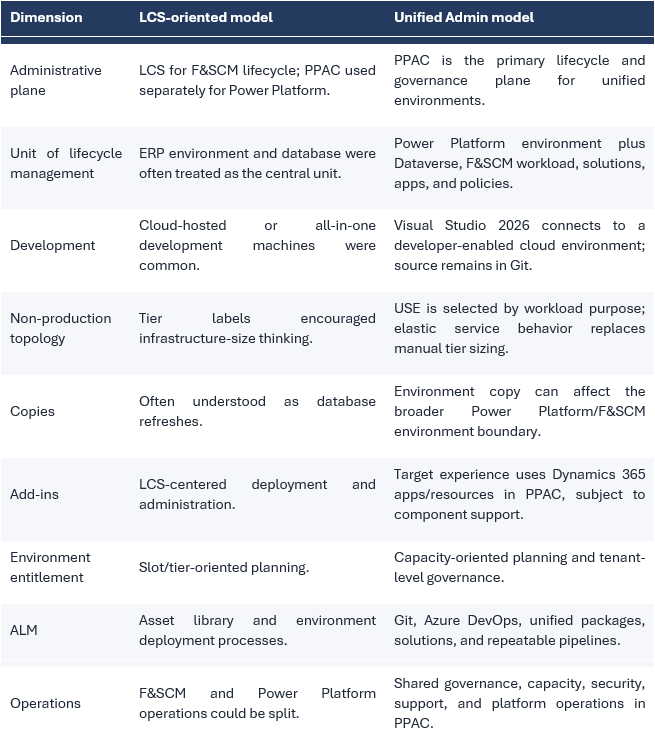
Unified Admin is not simply a portal change. It changes the unit of administration: Finance and Operations becomes part of a Power Platform environment that also carries Dataverse, solutions, apps, capacity, security, and lifecycle operations. That shift affects development, testing, copies, release engineering, regional placement, capacity planning, and operational accountability.
Executive summary
The Unified Admin model brings Finance and Operations lifecycle administration into the Power Platform Admin Center (PPAC). In the target model, an F&SCM workload is provisioned into a Power Platform environment with Dataverse, and the environment is managed as a coherent platform boundary rather than as an isolated ERP tier. This is the central idea behind every operational change described in this guide.
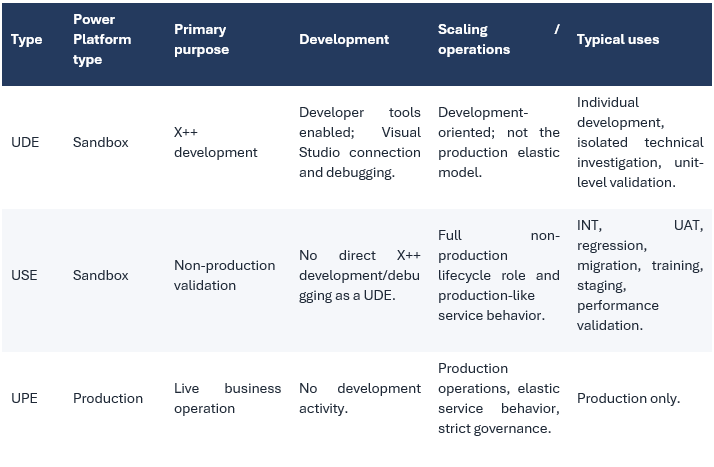
- Use a Unified Developer Environment (UDE) for X++ development and debugging, not as the origin of production-like configuration or performance evidence.
- Use a Unified Sandbox Environment (USE) for integration, migration, regression, UAT, training, staging, and production-like validation.
- Use a Unified Production Environment (UPE) only for live workloads, with stricter change, security, and operational controls.
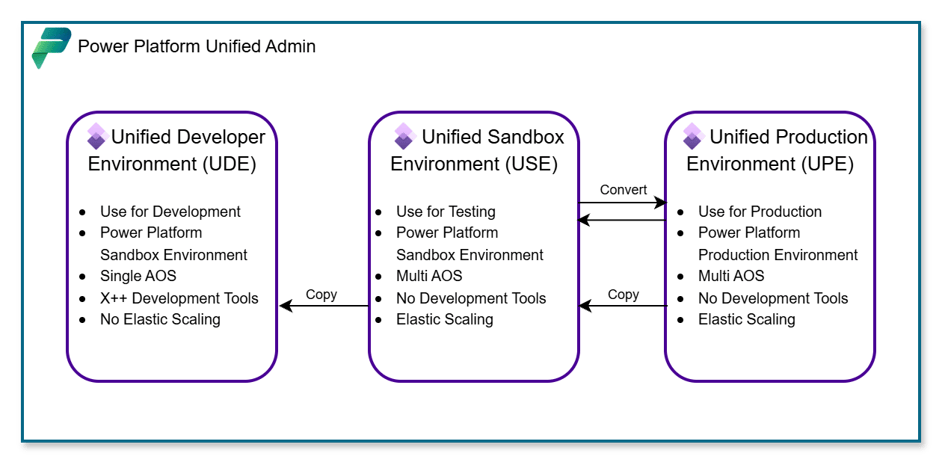
- Treat environment copy as a broad platform operation. Do not assume it behaves like the historical “database refresh only” mental model.
- Design ALM so code and Power Platform artifacts can be redeployed deterministically after lifecycle operations.
- Manage capacity as a shared, governed resource. Capacity-based flexibility does not mean environments are free or unlimited.
- Validate region, support status, and preview/GA state from the tenant and current Microsoft documentation before automating a production process.
- Keep unsupported or weakly documented source-to-target copy combinations out of the runbook until Microsoft explicitly documents them.
- Choose the environment type from its intended workload and lifecycle role. Do not choose UDE, USE, or UPE merely by translating an old LCS tier number.
The mental model: F&SCM becomes part of a Power Platform environment
In the historical operating model, many teams treated the Finance and Operations environment as the primary object and linked Power Platform capabilities around it. Unified Admin reverses that perspective. The Power Platform environment is the administrative boundary; Finance and Operations is provisioned as an application workload inside that boundary, alongside Dataverse and other installed Dynamics 365 or Power Platform components.
This has four immediate consequences:
- Lifecycle operations must be assessed across the complete environment, not only the F&SCM database.
- Environment security and administration must account for Power Platform roles, security groups, Dataverse, F&SCM roles, service principals, and partner access.
- ALM must coordinate X++ metadata, unified packages, Dataverse solutions, Power Apps, Power Automate flows, configuration, and integration endpoints.
- Capacity, location, naming, governance, and retention decisions become shared platform decisions rather than isolated ERP decisions.
Before and after Unified Admin
Environment types: UDE, USE, and UPE
The three labels are not cosmetic. They encode development capability, lifecycle intent, and production status. A robust landscape starts by matching each environment to a workload and then documenting the permitted operations for that role.
Unified Developer Environment (UDE)
A UDE is a developer-enabled sandbox designed for the modern Finance and Operations developer experience. Developers work from Visual Studio 2026 on a local workstation or managed development machine, connect to the online environment, download the required F&SCM assets and metadata, and keep custom source in Git.
Use UDE for
- X++ development and model compilation.
- Interactive debugging and technical investigation.
- Developer-level deployment and validation within the supported developer experience.
- Isolated work where performance similarity with production is not the test objective.
Do not use UDE as
- The authoritative golden-configuration environment when that configuration must be promoted through environment copies.
- The basis for performance conclusions.
- A substitute for integration, migration, UAT, or production-readiness testing.
- A shared long-lived environment without an explicit ownership and source-control model.
The most expensive UDE mistake is not technical; it is procedural. Teams place shared configuration or migration work in a developer environment, then discover that their intended promotion path is not supported or repeatable. Keep reusable configuration and test baselines in a USE-oriented flow
Unified Sandbox Environment (USE)
A USE is the standard non-production environment for workloads that must behave like the managed service rather than like a developer endpoint. It should host integration tests, data migration rehearsals, UAT, regression suites, training, release-candidate validation, and performance testing where Microsoft’s production-like service model is required.
The term “sandbox” should not be read as “disposable and uncontrolled.” A USE may contain sensitive copied data, production-like integrations, service accounts, Dataverse solutions, Power Automate flows, and high-value test evidence. Apply explicit access controls, masking/anonymization policies, endpoint isolation, and retention rules.
Unified Production Environment (UPE)
A UPE is the production form of the unified environment. It must remain isolated from development activity and governed by approved release, support, identity, monitoring, backup, and incident processes. Changes should reach UPE only through validated artifacts and a release procedure proven in a representative USE.
Do not convert or repurpose an environment for production merely because the platform permits lifecycle action. Production designation is an architecture and governance decision requiring security, data, integration, support, monitoring, recovery, and business-readiness approval.
Choosing the right environment for each workload
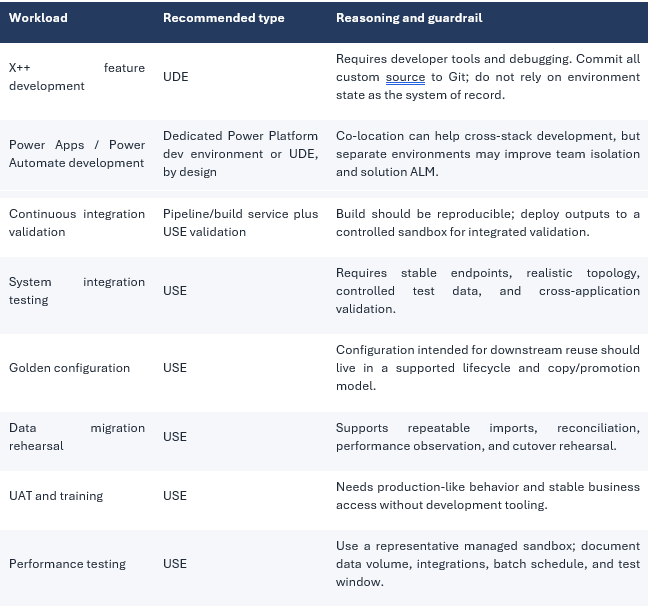
Environment copies: a lifecycle operation, not a database-only refresh
The biggest conceptual change: an environment copy in Power Platform is broader than the old database-refresh mental model. The operation can affect Dataverse, the F&SCM workload, installed solutions and apps, configuration, code/package state, connections, users, integrations, and destination-specific settings. The exact scope and supported combinations must be checked in the current Microsoft copy documentation before execution.
Before every copy, create a source/destination impact sheet. List data, code, solutions, apps, integrations, identities, secrets, endpoints, flows, batch jobs, email settings, legal-entity data, and post-copy remediation. A successful platform operation is not the same as a business-ready destination.
Conservative copy compatibility matrix
The matrix below intentionally uses “validate” where the retrieved authoritative corpus did not establish a universal rule. This is safer than converting field observations into unsupported platform guarantees.
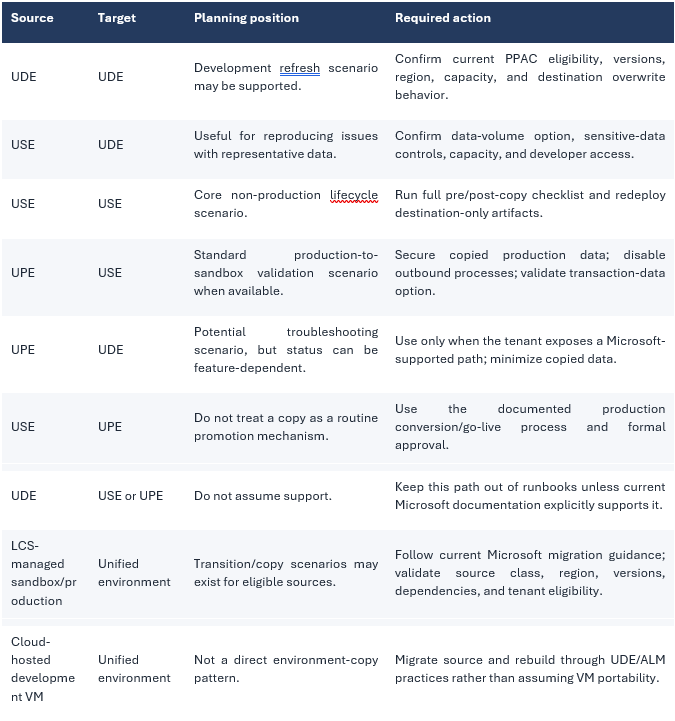
What to expect after a copy
- The destination may inherit source artifacts that are not appropriate for its role.
- Destination-only solutions, packages, settings, or apps can be overwritten or removed and may require redeployment.
- Connections and integration endpoints must be reviewed before any batch, flow, business event, email, or outbound process is re-enabled.
- Users and security must be validated across both Dataverse/Power Platform and F&SCM.
- Environment-specific secrets must never be copied as an unmanaged operational dependency; rebind them through a controlled secret-management process.
- Capacity must be available for the requested copy, including the selected transaction-data scope.
- Post-copy reconciliation must cover application version, custom package/solution versions, legal entities, data volume, integrations, batch jobs, and test readiness.
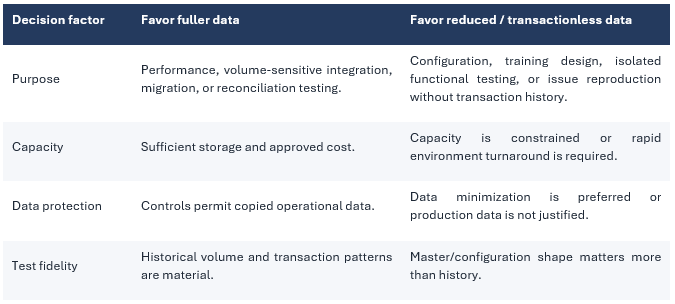
Full data versus reduced/transactionless data
Treat the exact options and semantics as tenant- and release-sensitive. The design decision is nevertheless stable: copy only the data required for the purpose. A migration or performance rehearsal may require representative transactions; a configuration sandbox or technical investigation may not.
Elastic compute and performance testing
USE and UPE are designed around Microsoft-managed service behavior rather than customer-selected LCS tiers. The practical benefit is that non-production validation can use the same service model as production. The practical risk is overclaiming equivalence: identical platform class does not make every test automatically representative.
A credible performance test still requires comparable data volumes, customizations, integrations, batch workload, concurrency, feature flags, service version, external dependencies, security configuration, and test duration. Elastic behavior also means the environment may respond to workload over time, so short synthetic bursts can be misleading.
Performance evidence checklist
- Confirm the USE and UPE are on the intended application/platform versions.
- Document test data volume and distribution, not only record counts.
- Include interactive, batch, integration, reporting, and Power Platform workloads that compete for resources.
- Warm up caches and run long enough to observe steady-state behavior.
- Capture telemetry from supported monitoring surfaces and correlate it with test timestamps.
- Repeat the test after material changes to code, data, integrations, or platform version.
- Avoid deriving production sizing or capacity conclusions from UDE results.
Regional placement and deployment automation
Region is both a technical and compliance decision. The PPAC user interface may present a geography or location abstraction, while supported automation interfaces can expose explicit location parameters. Because available locations and command syntax evolve, query the current toolset and tenant rather than copying a hard-coded region value from an article.
Recommended placement procedure
- Document the required data residency, latency, disaster-recovery, integration, and support constraints.
- List the locations currently available to the tenant using supported Power Platform administration tooling.
- Choose the Power Platform environment location and verify the F&SCM provisioning behavior for that location.
- If precise placement is material, use the supported automation method and parameters documented for the current release.
- After provisioning, record the actual environment location and validate dependent services, connectors, and endpoints.
- Keep the command output, approval, and environment identifiers in the deployment record.
| DO NOT HARD-CODE THE EXAMPLE A statement such as “Europe can map to West Europe or East Europe” can become stale or be incorrect for a particular tenant. Use it only as an illustration of geography-versus-region ambiguity, never as a guaranteed mapping. |
Dynamics 365 apps and the future of LCS add-ins
In Unified Admin, the target operational model is to manage supported application components through the Power Platform environment and its Dynamics 365 apps/resources rather than through an LCS-only add-in workflow. However, “add-in” covers multiple products and deployment models. Each component must be assessed individually.
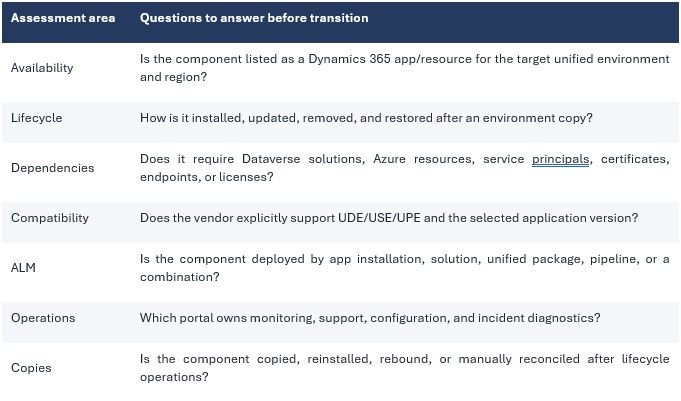
Do not infer that every historical LCS add-in has a one-click Unified Admin equivalent. If current Microsoft or vendor documentation does not establish support, record the gap and plan a validation environment before migration.
MCP and Copilot Studio: treat availability as status-sensitive
D365 F&SCM Model Context Protocol (MCP) server is available for Unified Admin environments and can be connected to Copilot Studio agent tooling. This is a rapidly evolving capability area. The safe publication position is: Microsoft provides F&SCM agent and MCP-related capabilities, but availability, enablement, licensing, connector/tool experience, geography, and preview/GA status must be confirmed in current Microsoft documentation and in the target tenant before an architecture commits to it.
MCP readiness checklist
- Confirm the current product status: preview, general availability, or limited availability.
- Confirm that the target environment type and region are supported.
- Identify required licenses, environment roles, application permissions, and tenant settings.
- Define which business actions and data the agent may access; enforce least privilege.
- Validate auditing, data-loss-prevention policy, connector governance, and responsible AI controls.
- Test in a non-production environment with representative security personas.
- Document the support boundary between F&SCM, Copilot Studio, custom tools, and external services.
Capacity-based provisioning changes the environment strategy
Unified Admin shifts environment planning away from a simple slot/tier inventory toward capacity governance. This enables more flexible landscapes, but every environment consumes shared tenant resources and introduces security, operations, data, and ALM overhead. Short-lived environments are valuable only when creation, configuration, deployment, access, data handling, and deletion are automated and governed.
Capacity governance model
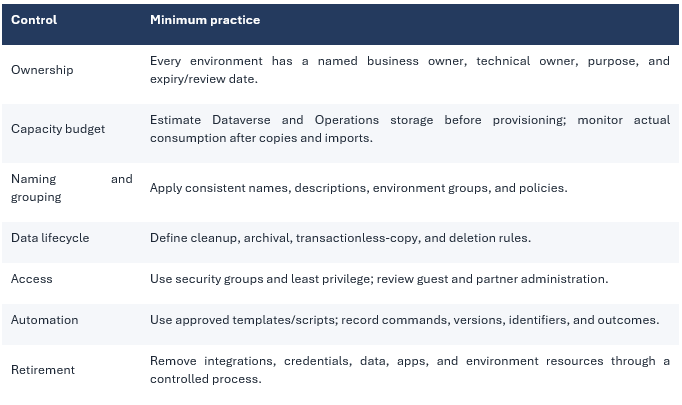
| “No environment slots” does not mean “no limit.” Capacity, licenses, service protection, governance effort, and operational risk remain real constraints. |
An ALM blueprint for mixed F&SCM and Power Platform delivery
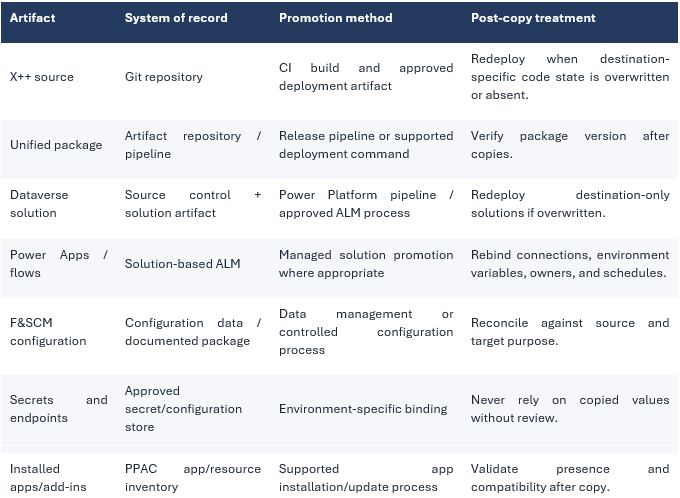
A unified environment can contain X++ extensions, Dataverse solutions, Power Apps, Power Automate flows, configuration, integrations, and installed Dynamics 365 apps. The ALM design must therefore coordinate multiple artifact types without making the environment itself the source of truth.
Recommended flow
- Develop X++ in developer-owned UDEs, with source committed to Git and reviewed through pull requests.
- Develop Power Platform components in an approved development environment strategy; export solutions through controlled pipelines.
- Build versioned, immutable deployment artifacts and retain traceability to source commits.
- Deploy to an integration USE and execute automated smoke, integration, and security tests.
- Promote the same artifact versions to UAT/release-candidate USE environments.
- Perform migration rehearsal, regression, operational readiness, and performance validation in representative USE environments.
- Approve and deploy to UPE through segregation of duties and a documented rollback/recovery plan.
- Validate versions, integrations, batch processing, telemetry, and user access after deployment.
Artifact ownership table
Migration from LCS to PPAC: how to plan without guessing the roadmap
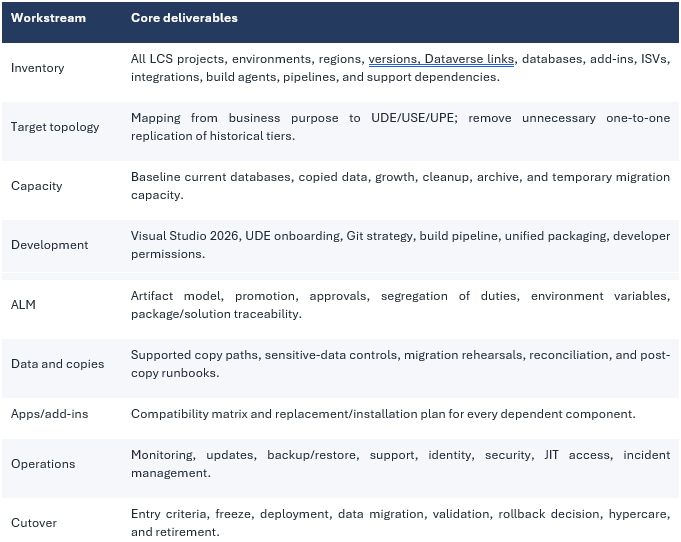
The direction is clear: new investment and unified lifecycle experiences are centered on PPAC. The exact migration availability for an existing customer, however, depends on Microsoft’s current program status, tenant eligibility, environment class, region, dependencies, and tooling.
Migration workstreams
Migration readiness gates
- Microsoft currently exposes the supported migration/provisioning path for the tenant and environment.
- Target region and capacity are confirmed.
- All ISV solutions and Dynamics 365 apps are certified or validated for unified environments.
- Build and release pipelines generate and deploy the required modern artifacts.
- Copy, backup/restore, and support procedures are rehearsed in non-production.
- Integration identities, endpoints, certificates, secrets, and network controls are mapped.
- Business regression, security, migration, and performance evidence meet approved exit criteria.
- Legacy environments and LCS-dependent processes have an explicit retirement plan.
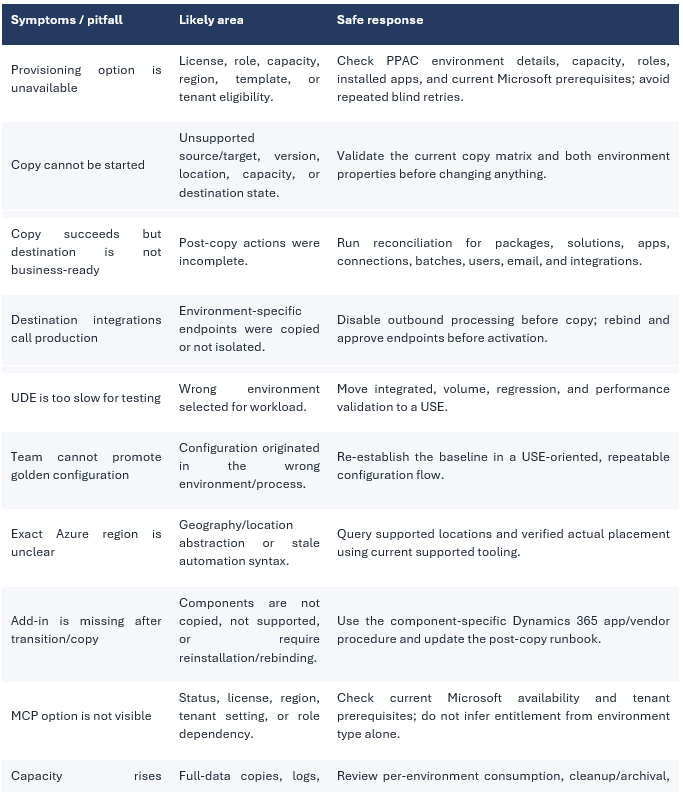
Common pitfalls and troubleshooting
Governance and security guardrails
Unified administration concentrates power. Environment administrators can influence multiple workloads, and a copy can move sensitive operational data into a less controlled context. Governance must therefore be designed across identity, environment, data, ALM, and operations.
- Apply least privilege separately for tenant, PPAC, Dataverse, F&SCM, Azure DevOps, and external services.
- Separate development, release approval, production deployment, and privileged support duties.
- Use named service identities and managed secret storage; avoid personal accounts in pipelines.
- Review administrator and guest access periodically, including partner/GDAP arrangements.
- Classify data before production-to-nonproduction copies and apply masking/minimization where required.
- Use environment groups, DLP policies, security groups, and managed governance capabilities where licensed and appropriate.
- Retain audit evidence for provisioning, copies, restores, deployments, role changes, and production actions.
- Define emergency access and recovery procedures without bypassing platform-supported controls.
Operational checklists
Before provisioning
- Purpose and environment type approved.
- Region/location and residency requirements documented.
- Capacity and license prerequisites confirmed.
- Naming, security group, ownership, and expiry defined.
- Required Dynamics 365 apps and dependencies identified.
- Automation method and tool versions recorded.
Before an environment copy
- Supported source/target combination confirmed in current Microsoft documentation.
- Source and destination versions, region, state, and capacity validated.
- Business and data-owner approvals recorded.
- Outbound integrations, flows, email, batch jobs, and business events controlled.
- Destination-only artifacts inventoried for redeployment.
- Backup/recovery position understood.
- Post-copy technical and business reconciliation prepared.
Before production release
- Same artifact versions passed integration, regression, security, and UAT gates.
- Migration and cutover rehearsed in a representative USE.
- Performance evidence is current and workload-representative.
- Monitoring, support, rollback, and decision authorities are confirmed.
- Production identities and environment-specific configuration are approved.
- Release record links source commits, builds, packages, solutions, approvals, and validation evidence.
Monthly operations review
- Environment inventory and ownership.
- Capacity by environment and growth trend.
- Unused/expired environments.
- Administrator and guest access.
- Pending service updates and platform notices.
- Copy/restore/deployment failures and recurring manual steps.
- App/add-in compatibility and version drift.
- ALM traceability and production change compliance.
Final recommendations
- Adopt PPAC as an operating-model change, not a portal migration.
- Build the target landscape from workload purpose: UDE for development, USE for validation, UPE for production.
- Keep Git and artifact repositories as systems of record; never depend on environment state alone.
- Treat copies as cross-platform lifecycle events with formal pre- and post-copy controls.
- Use a representative USE for release-candidate, migration, and performance evidence.
- Control capacity through ownership, retention, data minimization, cleanup, archival, and environment retirement.
- Validate every add-in/app and MCP capability against current Microsoft and vendor status.
- Automate only after the interactive process and support boundary are understood and rehearsed.
- Publish verification dates for status-sensitive claims and remove speculative roadmap dates from architecture baselines.
- Review the landscape regularly; flexibility is valuable only when governance keeps pace.
| Unified Admin creates a more coherent platform for F&SCM, Dataverse, low-code, and modern ALM. Its value is realized when architecture, lifecycle operations, capacity, security, and release engineering are redesigned together. |
References
- Microsoft Learn – Overview of unified admin experience for finance and operations apps
- Microsoft Learn – Unified environment types and templates
- Microsoft Learn – Deploy a new environment with an ERP template
- Microsoft Learn – Finance and operations unified developer experience overview
- Microsoft Learn – Finance and operations developer FAQ
- Microsoft Learn – Manage service updates in unified environments
- Microsoft Learn – Power Platform CLI dynamics command reference
- Microsoft Learn – Power Platform administrator PowerShell
- Microsoft Learn – Environment planning for Finance and Operations


Leave a Reply